RTT outputs staggerd prints and misses a lot of prints

Hi,

1.)

I am programming a custom board based on NRF52833 using NRF52833-DK using SWIO/SWCLK interfaces using Segger Embedded Studio with NCS v1.6.1.
I am trying to print some logs from my programmed custom board on the RTT terminal but it looks like RTT prints the output very very slowly and misses a lot of prints.

Below is a snippet of the code I am using in main.c:

#include <errno.h>
#include <zephyr.h>

LOG_MODULE_REGISTER(main);

void main(void)
{

while(1){
LOG_INF("Hello World!\r\n");
printk("Printk messages\r\n");
k_sleep(K_MSEC(100));
}
}

Below is the proj.conf file I am using:

CONFIG_LOG=y
CONFIG_USE_SEGGER_RTT=y
CONFIG_RTT_CONSOLE=y
CONFIG_LOG_BACKEND_RTT=y
CONFIG_MAIN_STACK_SIZE=4096

Below is a snapshot of what the RTT terminal looks like (I am also getting some weird errors at the beggining):
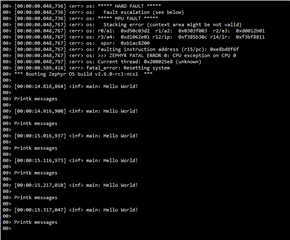
Is there anything that I am doing wrong? What should be done to speed up the RTT output?

2.)

I am not able to use NRF_LOG_INIT and NRF_LOG_INFO macros. It throws an error saying the functions are undefined.
The following headers are also not getting included in the project:

#include "nrf_log.h"
#include "nrf_log_ctrl.h"
#include "nrf_log_default_backends.h"

Is there a reason why am I unable to use these logging functions ? As stated I am using SES with ncs v1.6.1

Any help on these 2 questions will be greatly appreciated.

  • Hi,

    Below is a snapshot of what the RTT terminal looks like (I am also getting some weird errors at the beggining):

    Regarding the Hard- and MPU-fault at the beginning. They are usually caused by some errors called by function calling down in the script. The addresses in the error message should say something about what functions causes the errors. Could you open a command line window such as cmd  and run the following:

    1) "where arm-none-eabi-addr2line": This should return something like C:\Program Files (x86)\GNU Tools ARM Embedded\4.9 2015q3\bin\arm-none-eabi-addr2line.exe

    2) If you get the proper returned location from 1), write "arm-none-eabi-addr2line -e <path to _build\zephyr\zephyr.elf> <0xaddr>", where you replace <path to _build> with the path to your build and "<0xaddr> with the address in line with r15/pc and r14/lr, i.e 0xe8bd8f6f and 0xf3bf8811 in two separate commands.  This should return something regarding those addresses, most likely a .c or .h file and a code-line where the fault has occurred.

    I am not able to use NRF_LOG_INIT and NRF_LOG_INFO macros. It throws an error saying the functions are undefined.

    These functions are only valid if you use nRF5 and are not defined in any version of ncs (including 1.6.1). The same goes for the headers you have listed.

    Instead use the logging api documented here by Zephyr which works in ncs where you can use the info-logging function LOG_INF instead. To enable the logging functions, you have to include the logging header "#include <logging/log.h> "

    I am trying to print some logs from my programmed custom board on the RTT terminal but it looks like RTT prints the output very very slowly and misses a lot of prints.

    Based  on the output in the snippet you added to the code, it seems like the RTT terminal prints correctly. The time stamps in the prints corresponds to 1 print every 100milliseconds. The same applied when I ran a "hello_world" sample with your config on my device, where the output appeared stuttered, but I got 10 prints every second. If you want it to print faster you could reduce the sleep time you've set in "k_sleep(K_MSEC(100));".

    Below is the sample I ran with the same prj.conf settings you mentioned above.

    #include <errno.h>
    #include <zephyr.h>
    #include <logging/log.h>
    
    LOG_MODULE_REGISTER(main);
    
    void main(void)
    {
    	while(1){
    
    		LOG_INF("Hello World! \r\n");
    		printk("Printk messages\r\n");
    		k_sleep(K_MSEC(100));
    
    		}
    }


    Let me know if this clarifies things for you and if the address-inspections gives anything fruitful regarding solving the MPU-fault!

    Kind regards,
    Andreas

Related