

I am trying to scan for BLE devices in my area, but when I connect to the USB840XZ with the windows development tool the "Start Scan" button is not active. There are some error messages on the log window.
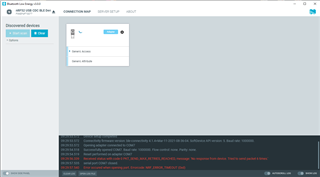
2022-03-24T22:14:21.519Z INFO Device closed.
2022-03-24T22:14:27.820Z INFO Selected device with s/n F99EF4F75577
2022-03-24T22:14:27.824Z INFO Device setup completed
2022-03-24T22:14:27.824Z INFO Connectivity firmware version: ble-connectivity 4.1.4+Mar-11-2021-08-36-04. SoftDevice API version: 5. Baud rate: 1000000.
2022-03-24T22:14:27.825Z INFO Opening adapter connected to COM7
2022-03-24T22:14:28.768Z INFO Successfully opened COM7. Baud rate: 1000000. Flow control: none. Parity: none.
2022-03-24T22:14:28.769Z DEBUG State change: STATE_START -> STATE_RESET
2022-03-24T22:14:28.769Z DEBUG 1 -> [N/A] type: RESERVED_5 reliable: no seq#:0 ack#:0 payload_length:0 data_integrity:0 err_code:0x0
2022-03-24T22:14:28.770Z INFO Reset performed on adapter COM7
2022-03-24T22:14:29.069Z DEBUG State change: STATE_RESET -> STATE_UNINITIALIZED
2022-03-24T22:14:29.070Z DEBUG 2 -> [01 7e ] type: LINK_CONTROL_PACKET reliable: no seq#:0 ack#:0 payload_length:2 data_integrity:0 err_code:0x0 [SYNC]
2022-03-24T22:14:29.324Z DEBUG 3 -> [01 7e ] type: LINK_CONTROL_PACKET reliable: no seq#:0 ack#:0 payload_length:2 data_integrity:0 err_code:0x0 [SYNC]
2022-03-24T22:14:29.579Z DEBUG 4 -> [01 7e ] type: LINK_CONTROL_PACKET reliable: no seq#:0 ack#:0 payload_length:2 data_integrity:0 err_code:0x0 [SYNC]
2022-03-24T22:14:29.832Z DEBUG 5 -> [01 7e ] type: LINK_CONTROL_PACKET reliable: no seq#:0 ack#:0 payload_length:2 data_integrity:0 err_code:0x0 [SYNC]
2022-03-24T22:14:30.087Z DEBUG 6 -> [01 7e ] type: LINK_CONTROL_PACKET reliable: no seq#:0 ack#:0 payload_length:2 data_integrity:0 err_code:0x0 [SYNC]
2022-03-24T22:14:30.340Z DEBUG 7 -> [01 7e ] type: LINK_CONTROL_PACKET reliable: no seq#:0 ack#:0 payload_length:2 data_integrity:0 err_code:0x0 [SYNC]
2022-03-24T22:14:30.593Z DEBUG State change: STATE_UNINITIALIZED -> STATE_NO_RESPONSE
2022-03-24T22:14:30.593Z ERROR Received status with code 0 PKT_SEND_MAX_RETRIES_REACHED, message: 'No response from device. Tried to send packet 6 times.'
2022-03-24T22:14:31.778Z DEBUG serial port read on port COM7 aborted.
2022-03-24T22:14:31.784Z ERROR Error occured when opening port. Errorcode: NRF_ERROR_TIMEOUT (0xd)
I can connect to the USB840X with the android app and send data through the comport. So it appears the USB840X is not completely dead. Do I need a different firmware installed?

