This discussion has been locked.
You can no longer post new replies to this discussion. If you have a question you can start a new discussion

NCS1.9.1 add DFU encountered a bug

Hello,

NCS1.9.1 nRF52840DK, Windows10 X64  VSCode,

peripheral_lbs add dfu OTA 

Add DFU support to your application - Software - nRF Connect SDK guides - Nordic DevZone (nordicsemi.com)

or download the project from here

sdk-nrf/samples/bluetooth/peripheral_lbs at ble_dfu_peripheral_lbs · simon-iversen/sdk-nrf · GitHub
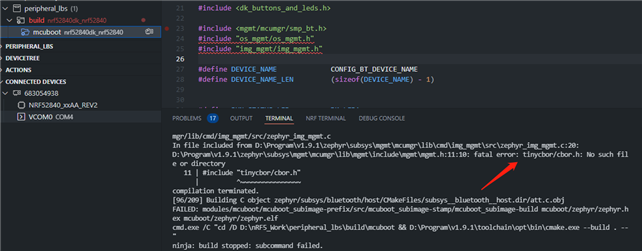
build error fatal error: tinycbor/cbor.h: No such file or directory.
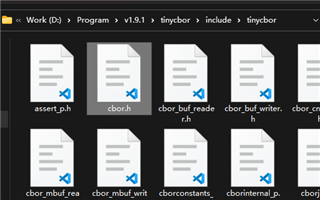
The file of cbor.h is exists.


Best Regards

  • Hi,

    The path to the cbor.h looks correct. It might be that something had gone wrong while downloading nRF Connect SDK.. Could try reinstalling the SDK from the toolchain manager and try once more.?

    Regards,

    Swathy

  • Hi,

    i change to nRF21540DK and rebuild it ok.

    i add two line to CMakeLists.txt,  and put a private_key.pem file.

    set(mcuboot_key_file ${CMAKE_CURRENT_SOURCE_DIR}/private_key.pem) 
    set(mcuboot_CONFIG_BOOT_SIGNATURE_KEY_FILE "\"${mcuboot_key_file}\"")

    rebuild (Whether two lines key are added or not)

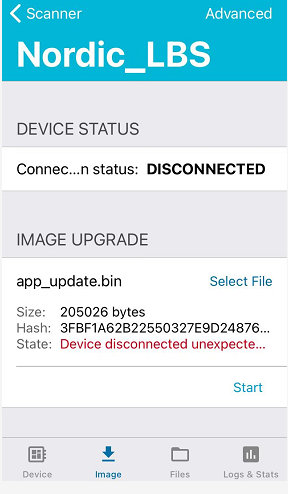
    nRF Toolbox whilt  \build\zephyr\dfu_application.zip, app crashed.

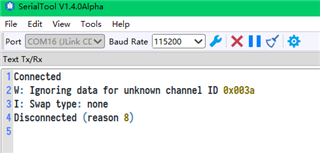
    nRF Connect Device Manager with  \build\zephyr\app_update.bin, got logs:


    Best Regards

  • Hi.. 

    I was away on vacation.. Sorry that I have not been able to get back to you sooner... What is the current status of this issue..? Is it still showing that the directory does not exist.?

    Regards,

    Swathy

  • Hi,

    thanks for reply,

    The problem has been solved.


    Best regards

Related