nRF SDK 1.9.1

I am looking for the examples for the SDK. I installed SDK 1.9.1 through the Toolchain Manager and see the directory "users/my_user_name/ncs/v1.9.1" Supposedly this is where the SDK was installed but where are the examples??? Am I looking in the wrong place?

I cannot follow Youtube tutorials because I cannot find the SDK examples.

Thank you for your help!

Parents
  • Hi, 

    One way to see all the samples created is to follow the same link as has been supplied in the thread.


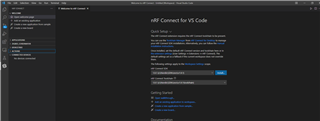
    My guess is that you're following this youtube tutorial to set up your SDK and that you want to see the samples directly in VSCode? If thats the case, and you've installed all the extensions up to the quick-setup part of the video, your setup should look something like this:

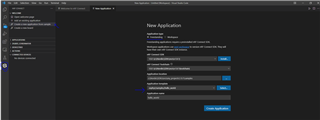
    Following this, you should be able to set up an existing sample by opening the nRF Connect extention in VSCode, click on "Create a new sample from application", select "freestanding application" and make sure that the SDK and Toolchain you want to use are selected from the drop down menu. The samples/templates can be found under "Application template".

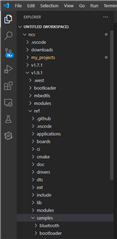
    If you're working in the Explorer-mode in VSCode, you may open the folder where you've installed the SDK (in my case "ncs") and follow the path: "ncs\v1.9.1\nrf\samples" for the nrf-samples or "ncs\v1.9.1\zephyr\samples" for the zephyr samples. In your case this should be something like "users/my_user_name/ncs/v1.9.1/nrf/samples".

    Please note that this setup requires that you've followed the guide, made sure all extensions are correct and opened VSCode from the toolchain manager. 

    Let me know if this helps at all or if you have any other questions regarding setting up the environment for following the tutorial! 

    Kind regards,
    Andreas

Reply
  • Hi, 

    One way to see all the samples created is to follow the same link as has been supplied in the thread.


    My guess is that you're following this youtube tutorial to set up your SDK and that you want to see the samples directly in VSCode? If thats the case, and you've installed all the extensions up to the quick-setup part of the video, your setup should look something like this:

    Following this, you should be able to set up an existing sample by opening the nRF Connect extention in VSCode, click on "Create a new sample from application", select "freestanding application" and make sure that the SDK and Toolchain you want to use are selected from the drop down menu. The samples/templates can be found under "Application template".

    If you're working in the Explorer-mode in VSCode, you may open the folder where you've installed the SDK (in my case "ncs") and follow the path: "ncs\v1.9.1\nrf\samples" for the nrf-samples or "ncs\v1.9.1\zephyr\samples" for the zephyr samples. In your case this should be something like "users/my_user_name/ncs/v1.9.1/nrf/samples".

    Please note that this setup requires that you've followed the guide, made sure all extensions are correct and opened VSCode from the toolchain manager. 

    Let me know if this helps at all or if you have any other questions regarding setting up the environment for following the tutorial! 

    Kind regards,
    Andreas

Children
No Data
Related