case about nRF52820 uart dfu

Hi,

1.Please help me complete example pca10100e_uart

2.I am testing the nRF52820 UART DFU example

3.The example is named pca10100e_uart based on example pca10040_uart

4.The following problems occurred in the test:
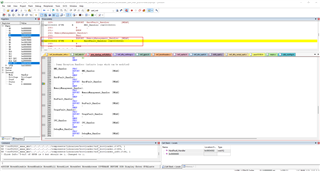
5.I suspect my memory address is set incorrectly:

6.Please give me the correct nRF52820 memory address, As shown in the figure below

https://infocenter.nordicsemi.com/topic/sdk_nrf5_v17.1.0/lib_bootloader.html
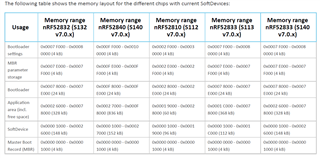
sdk nRF5_SDK_17.1.0_ddde560

code:4682.nRF52820 uart dfu bootloader.zip

Thank you for all your assistance.
Kind regards,
Peter.Min

Parents
  • Hello,

    It seems I never tried to build a bootloader for the nRF52820 (at least with Keil), because I was not able to compile your project. Do you happen to know where to get the file that it claims to be missing (It is evening, and I am sitting at home. I can reach out to some colleagues tomorrow if I don't find it). I assume that you have what you need to compile, other than the 

    However, I see that the array that you refer to is missing the nRF52820. However, the nRF52820 has different flash and RAM sizes from the other devices. As you can see here, it has 256 kB flash and 32kB RAM. This means that the flash is on the address:

    0x0000 0000 -> 0x0004 0000

    And the RAM is on the address:

    0x2000 0000 -> 0x2000 8000

    So an appropriate set of the bootloader's memory segments should be somthing like:

    Bootloader settings: 0x0003 F000 -> 0x0004 0000

    MBT parameter storage: 0x0003 E000 -> 0x0003 F000

    Bootloader: 0x0003 8000 -> 0x0003 E000

    Application area (depending on the softdevice that you use, but if you are using only MBR) : 0x0001 0000 -> however large you need, but less than 0x0003 F000. You don't need to specify the top.

    Master Boot Record (MBR) 0x0000 0000 -> 0x0000 1000

    SoftDevice -

    If you intend to have a softdevice, your softdevice will replace the MBR, and the application will start after the softdevice. E.g. if you use the S112 from SDK17.1.0:

    Softdevice: (which includes MBR) 0x0000 0000 -> 0x0002 8000

    This leaves this flash for the application: 0x0002 8000 -> 0x0003 8000 (NB: Only 64kB).

    I hope this clears things up a bit. Let me know if anything was unclear.

    BR,

    Edvin

  • Hi  Edvin,

    1. I make sure I set up the correct addresses

    2. During the debug process, it is found that the program does not run to the main entrance of the bootloader

    3. I used nRF52820 module for testing

    4. Is there anything else that needs to be changed?

    5. Other s112 + MBR = 100 KB

    6.Calculate the application available space

    settings = 4kb

    mbr data = 4kb

    bootloader =24kb

    application = ?

    softdevice = 96kb

    mbr = 4kb

    Application free space: 256-4-4-24-96-4= 124KB

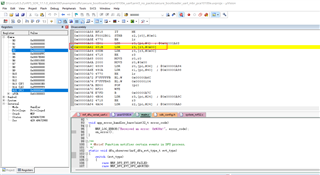
    7.The address before the error was reported is as follows:

    Thank you for all your assistance.
    Kind regards,
    Peter.Min

  • Hi Edvin,

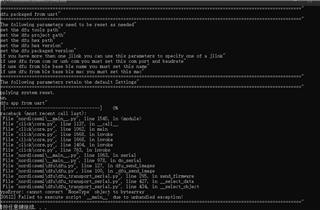
    The following data appears

    Thank you for all your assistance.
    Kind regards,
    Peter.Min
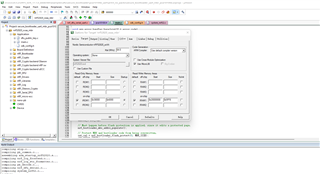
  • I can't see what arguments you are using in your nrfutil call. Can you try it without your script that you sent in the last reply?
    e.g.
    "nrfutil dfu usb-serial ..."

    This error looks to come from nrfutil, and not the bootloader. I guess that one of the nrfutil arguments are not populated properly, so I suggest you get it working with a raw command before you add your long script that abstracts everything away.

    BR,

    Edvin

  • Hi Edvin,

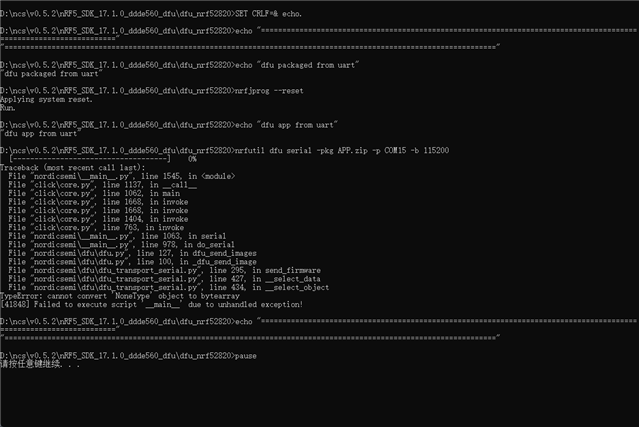
    The NRFUTIL code is shown below:

    Kind regards,
    Peter.Min

  • Hello Peter,

    Can you also please show what command you used to generate the image?

    It should start with "nrfutil pkg generate ..."

    And what version of nrfutil have you installed?

    "nrfutil version"

    BR,

    Edvin

  • Hi Edvin,

    nrfutil pkg generate --key-file private.pem --hw-version 52 --sd-req 0x0103 --application APP.zip --application-version 0xFF APP.zip


    nrfutil version 6.1.0

    Kind regards,
    Peter.Min

Reply Children
  • peter.min said:
    -application APP.zip

    APP.zip should not be the --application argument. You should be able to generate the image without the image being present, meaning. Try to delete APP.zip, and you would see that this wouldn't work.

    Try using the application .hex file in the --application argument instead.

    Best regards,

    Edvin

  • Hi Edvin,

    Sorry, transcription error

    Here are the instructions

    nrfutil pkg generate --key-file private.pem --hw-version 52 --sd-req 0x0103 --application APP.hex --application-version 0xFF APP.zip

    Kind regards,
    Peter.Min

  • Does this happen with all applications that you have tried? 

    Does it work on a standard example using another chip, e.g. the nRF52840dk or nRF52832/nRF52833?

    Can you please upload the image you are using, together with the bootloader project and the application project so that I can try to replicate the issue?

    Also, can you please try to use at least two "-v" flags to get more verbose output:

    e.g.: nrfutil -v -v dfu serial -pkg files\dfu_img.zip -p COM20 -b 115200 (but with your image and COM port)

    Best regards,

    Edvin

  • Hi Edvin

    I test nRF52840 nRF52832 nRF52833 nRF52810 ble dfu uart dfu OK

    example:https://pan.olib.cn/%EF%BC%887%EF%BC%89%EF%BC%9A%E6%B5%8B%E8%AF%95%E4%BE%8B%E7%A8%8B%EF%BC%88%E5%8A%9F%E8%80%97%20%E5%A4%96%E8%AE%BE%20DFU%20FDS%20AT%EF%BC%89/nRF52/nRF5_SDK_17.1.0_ddde560_dfu.zip

    bootloader:

    #define RX_PIN_NUMBER 28 
    #define TX_PIN_NUMBER 6 

    change nRF5_SDK_17.1.0_ddde560_dfu\dfu_nrf52820\0_env.cmd

    SET KEIL_UVISION5_PATH="C:\Program Files (x86)\Keil_v5\UV4\UV4.exe"
    SET NRFUTIL_PATH="..\external\micro-ecc\nrfutil.exe"
    SET MERGEHEX_PATH="C:\Program Files (x86)\Nordic Semiconductor\nrf-command-line-tools\bin\mergehex.exe"
    SET NRFJPROG_PATH="C:\Program Files (x86)\Nordic Semiconductor\nrf-command-line-tools\bin\nrfjprog.exe"

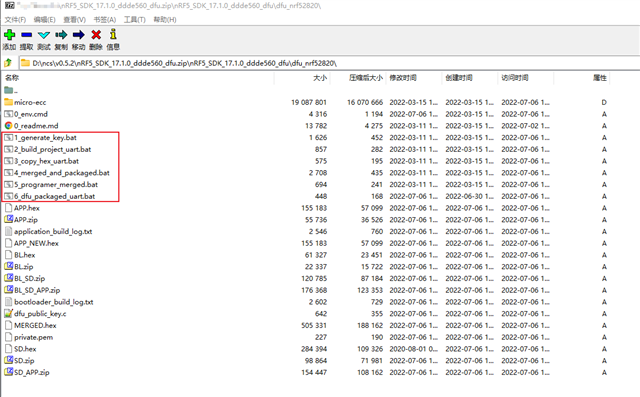
    You can use scripts 1-6 

    Kind regards,
    Peter.Min

  • I don't have an nRF52820 to test on (I am on home office during the summer), and it is 3 months since this case went silent, so I didn't bring any nRF52820 devices. I tried to just plug an nRF52840 DK programmed with a standard bootloader, and it gave the response that it was an invalid object, which it is. Does the "'nonetype' to object" error come regardless whether it is connected to the nRF52820 device or not? Should I be able to replicate that error without a device connected?

    The scripts that are used are a bit too complicated. If you provide something that I can use to replicate this with an 820 device when I return to the office in August, I can test it. Ideally just one script with hardcoded paths and names.

    If this is more urgent, and can't wait until August, please create a new ticket, and it will be assigned to someone who is working this summer. The subject of this ticket has deviated enought from the original title/question, so it might be time to start a new case either way.

    Best regards,

    Edvin

Related