How to make nRF52832 to first advertise for 30secs then scan for 30secs and repeat this cycle

Hello Everyone,

For my project, I have to make my BLE device to advertise itself for a period of time and transit to "scan" mode to scan for other device for a period of time.

This will be in a repeated cycle until the battery dies.

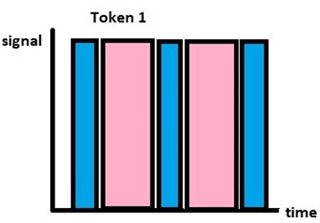
I've attached in image for references

  • -Blue bar: Advertise
  • -Pink bar: Scan
  • please ignore the gap in between the bars as the device will not enter any sleep mode.
Is there any example i can refer to?

Parents
  • Hello,

    Are you using the nRF5 SDK or NCS? Based on your case history, I am going to guess nRF5 SDK. 

    If you look at one of the examples that supports both advertising and scanning, such as the SDK\examples\ble_central_and_peripheral\experimental\ble_app_hrs_rscs_relay, you can see that by default, the advertising_init() function sets the advertising timeout to APP_ADV_DURATION, which is set to 180 seconds by default. You can change this to 30. 

    When the advertising times out after APP_ADV_DURATION, it will trigger an event in on_adv_evt with the case BLE_ADV_EVT_IDLE. You can use this event to trigger the start of the scanning. Then, if you look in the scan_init() function you can see that it uses the scan parameter m_scan_param, which is defined further up in the main.c file. Here, the timeout is set to NRF_BLE_SCAN_SCAN_DURATION, which is the time that the scanning will go on. This particular parameter is set in sdk_config.h (but you can use a parameter defined in main.c as well, if you prefer that. By default, this is set to 0, which means that it will scan "forever". But you can set it to any value. This parameter is given in units of 10ms. 

    When (if) the scanner times out, it will trigger an event in the scan_evt_handler() callback function with the scan_evt_id  NRF_BLE_SCAN_EVT_SCAN_TIMEOUT. You can use this to start advertising when you are done scanning.

    Then you have the function adv_scan_start() that currently starts both advertising and scanning. Use it to start only one of them, and then use the timeout events to start the other.

    Best regards,

    Edvin

  • Hi Edvin,

    Yes, I'm using nRF5 DK.

    Thank you so much for the clear explanation! It really helps me a lot!

    *edit: I have another question:

    I've establish a connection between a device and the development kit during its advertising period for x amount of time, and I've realised that once I've disconnected my device from the development kit, the development kit will "reset" the advertising duration. Is it possible for the development kit to continue the advertising duration right after disconnection?

    E.g.:
    Development kit programmed to advertise for 30 sec and scan for 15 sec.
    Connect device to development kit  at the 5th second of its advertising duration.
    Disconnect device from development kit after 15 seconds. (total duration taken 20sec).
    Development kit continues to advertise from where it stops/pause (20th sec onwards) for another 10sec (total 30sec) then switch to scan again.

    Regards,

    Zachary

  • Hello Zachary,

    There is no API to do exactly this, no. If you want this, you need to keep track of time yourself from the application. What you can do is e.g. to use the app_timer. I think, since you just want to toggle the switch between advertising and scanning every 30ms, regardless of connections, then you can just start a repeated app_timer that gives a timeout callback every 30 seconds, and start/stop advertising scanning manually from there. 

    For an example that uses the app_timer, you can look at the SDK\examples\ble_peripheral\ble_app_hrs, which uses an app_timer to update the simulated "remaining battery service" every 2 seconds or so. 

    Relevant APIs for scanning and advertising:

    sd_ble_gap_adv_stop() for stopping advertisements (you can see how it is used in ble_advertising_restart_without_whitelist() in ble_advertising.c.)

    sd_ble_gap_scan_stop() (or nrf_ble_scan_stop() in nrf_ble_scan.c, which just calls the softdevice call directly)

    Relevant APIs for app_timer:

    APP_TIMER_DEF()

    app_timer_create()

    app_timer_start()

    Then you just start the advertisements and scanning with a higher timeout than 30 seconds, to make sure that they don't time out before the 30 second mark, so that you have one (two) less timeout callbacks to worry about.

    Best regards,

    Edvin

Reply
  • Hello Zachary,

    There is no API to do exactly this, no. If you want this, you need to keep track of time yourself from the application. What you can do is e.g. to use the app_timer. I think, since you just want to toggle the switch between advertising and scanning every 30ms, regardless of connections, then you can just start a repeated app_timer that gives a timeout callback every 30 seconds, and start/stop advertising scanning manually from there. 

    For an example that uses the app_timer, you can look at the SDK\examples\ble_peripheral\ble_app_hrs, which uses an app_timer to update the simulated "remaining battery service" every 2 seconds or so. 

    Relevant APIs for scanning and advertising:

    sd_ble_gap_adv_stop() for stopping advertisements (you can see how it is used in ble_advertising_restart_without_whitelist() in ble_advertising.c.)

    sd_ble_gap_scan_stop() (or nrf_ble_scan_stop() in nrf_ble_scan.c, which just calls the softdevice call directly)

    Relevant APIs for app_timer:

    APP_TIMER_DEF()

    app_timer_create()

    app_timer_start()

    Then you just start the advertisements and scanning with a higher timeout than 30 seconds, to make sure that they don't time out before the 30 second mark, so that you have one (two) less timeout callbacks to worry about.

    Best regards,

    Edvin

Children
  • Hi Edvin,

    Thank you for your prompt and kind reply. Apologies for the late reply, I was caught up with other projects. 

    I've tried your recommendation, however, it seems like the app_timer would eventually overwrites the initial timers that were defined for advertising and scanning. (#define APP_ADV_DURATION & #define NRF_BLE_SCAN_SCAN_DURATION) and will continue to toggle between scan and advertising mode (it will turn on scan led but advertising itself on the nRF connect app).

    What I've done:

    • created APP_TIMER_DEF for both scan and advertise respectively
    • implemented app_timer_create in the timer_init() and callback to the event handler respectively
    • created application_timer_start for both scan and adv using APP_TIMER_TICKS to set the time respectively

    What I didn't do:

    • creating a separate/new timeout handler for the app_timer_create, I called back the old 'scan_evt_handler' and 'on_adv_evt'.

    Was I supposed to create a new sets of timeout handler for the timer_init? If so, how do I go about with creating a new set of timeout handler? Will it eventually overwrites the initial handlers (scan_evt_handler & on_adv_evt) or this app_timer will run simultaneously with the initial timer and callback handler?

    I have also received 3 warnings, 1 stating that the 'NRF_BLE_SCAN_SCAN_DURATION has been redefined' and the remaining warning states 'passing argument 3 of 'app_timer_create' from incompatible pointer type [-Wincompatible-pointer-types]'. 

    Regards,

    Zachary

  • So in your app_timer timeout handler, you will stop the advertisement, but it is still visible in nRF Connect, is that what you are saying?

    As long as you tell it to stop advertising, it will do so, but if nRF Connect has already started scanning and picked up the advertisements then it will not automatically disappear. You should see that if you clear the scan buffer (start scanning again), it will not reappear. Let me know what version (Desktop/mobile) you are using if you can't see how to clear the buffer.

    Zachary16 said:
    I have also received 3 warnings, 1 stating that the 'NRF_BLE_SCAN_SCAN_DURATION has been redefined' and the remaining warning states 'passing argument 3 of 'app_timer_create' from incompatible pointer type [-Wincompatible-pointer-types]'. 

    Where did you define NRF_BLE_SCAN_SCAN_DURATION? I guess you have one instance in sdk_config.h and one in main.c, is that correct? There should only be one instance, so you should remove one of them. I think the default placement is sdk_config.h for this one, but it is up to you where you define it.

    What is the 3rd parameter you use in app_timer_create?

    Best regards,

    Edvin

Related