Anomalous high current transients every 8 sec in BLE sleep mode -nRF52832

We have a simple coin battery powered BLE device with a Laird BL652 module which has an nRF52832 chipset.
We have three buttons and set it up as low power as possible and only waking momentarily and sending a beacon on a button press.
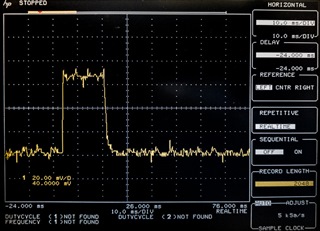
In sleep mode we are measuring between 4-18uA current drain with no buttons pressed  (can we do better than this?). There is a problem though, every 8 seconds in undisturbed sleep mode we get a high current transient (700uA) that lasts 15 msec.  There are no other consumers of current in this circuit.
What can this be and can we stop it?  If so how?
Current is measured with a Fluke 87 DVM in uA range (100 ohm resistance).  The transient can be seen on this meter, but is more accurately characterized by measuring across a 100 ohm sense resistor with an oscilloscope.
Parents
  • JKe is our SW developer.  We do not have an external oscillator, though it seems like maybe in our next rev we should add one.  There is also not one on board of the Laird BL652 module we are using.  From 5.2.1 of the Laird data sheet:

    "To keep the on-chip 32.768 kHz RC oscillator within ±250 ppm (which is needed to run the BLE stack) accuracy,
    RC oscillator needs to be calibrated (which takes 16-17 mS) regularly. The default calibration interval is eight
    seconds which is enough to keep within ±250 ppm. The calibration interval ranges from 0.25 seconds to 31.75
    seconds (in multiples of 0.25 seconds) and configurable via smartBASIC command at+cfg210."

    This sounds exactly like what we are seeing.

    Since we sleep and do nothing except after a button press to send a beacon it seems we could set the interval long and just do an extra RC osc cal whenever a button press occurs, if there is a way to manually invoke it.

    Thanks for that link to the power optimization article.  I think that will help.

  • Okay, I was just confused as the defines were stated to be 0, but yes, it seems to be the RC oscillator. And by setting the calibrations to 0, you should be able to only calibrate manually. But this is not recommended for most applications.

    Best regards,

    Simon

Reply Children
No Data
Related