This discussion has been locked.
You can no longer post new replies to this discussion. If you have a question you can start a new discussion

nRF Connect SDK 1.5.0 won't build any "application" on VS Code following any of the official guides or using any of the Nordic DevZone discussions/solutions

I'm attempting to create firmware using nRF Connect SDK. Thoroughly studied these guides:

https://devzone.nordicsemi.com/guides/nrf-connect-sdk-guides/b/getting-started/posts/nrf-connect-sdk-tutorial

https://devzone.nordicsemi.com/guides/nrf-connect-sdk-guides/b/getting-started/posts/nrf-connect-sdk-tutorial---part-1-ncs-v1-4-0

https://devzone.nordicsemi.com/guides/nrf-connect-sdk-guides/b/getting-started/posts/nrf-connect-sdk-tutorial---part-2-ncs-v1-4-0

https://devzone.nordicsemi.com/guides/nrf-connect-sdk-guides/b/getting-started/posts/nrf-connect-sdk-tutorial---part-3-ncs-v1-4-0

https://developer.nordicsemi.com/nRF_Connect_SDK/doc/latest/nrf/getting_started.html#

https://developer.nordicsemi.com/nRF_Connect_SDK/doc/latest/nrf/gs_programming.html#gs-programming

Thoroughly studies this video series (nRF Connect for VS Code tutorials):

https://www.youtube.com/playlist?list=PLx_tBuQ_KSqEt7NK-H7Lu78lT2OijwIMl

Attempted to troubleshoot using these DevZone discussions:

https://devzone.nordicsemi.com/f/nordic-q-a/80768/sample-project-creation-issue/336517

(plus tons of other DevZone discussions..).

At this point, I don't know what's working and what isn't.

Here's a summary of how I installed nRF Connect SDK:

1 - Installed nRF Command Line Tools

2 - Installed nRF Connect for Desktop

3 - Installed "Toolchain Manager"

4 - Installed nRF Connect SDK 1.5.0 (made sure the install directory is super close to C:\) (Also made sure there's no spaces in the directory label)

5 - Installed VS Code

6 - Upon clicking "Open VS Code" allowed the Toolchain Manager to install the extensions for VS Code

7 - Quick Setup section has v1.5.0 as nRF Connect SDK and nRF Connect Toolchain paths.

8 - Copied sample "hello world" from SDK directory and pasted it somewhere safe.

9 - Selected "add an existing application to workspace". Set path to directory containing the copy of "hello world" from the SDK (from step 8)

10 - selected "add build configuration" on the application that was just created (corresponding to the "hello world" from step 8)

11 - selected board, configuration (prj.conf), build directory, enabled generating config, enabled debug options -> hit "build configuration"

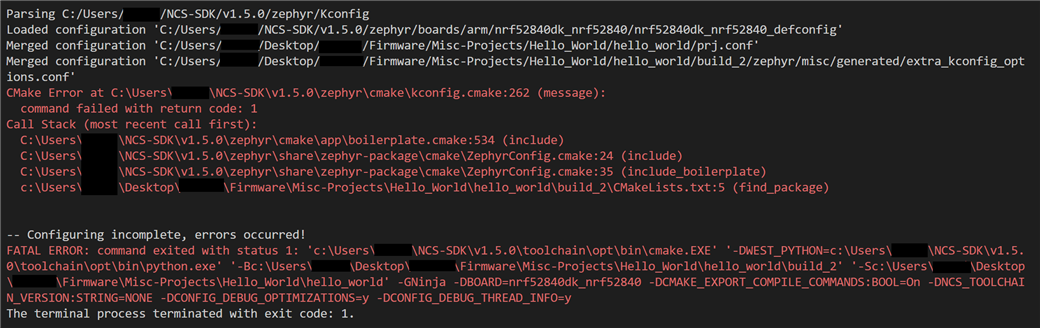
No matter what I do, I can't get past this error:
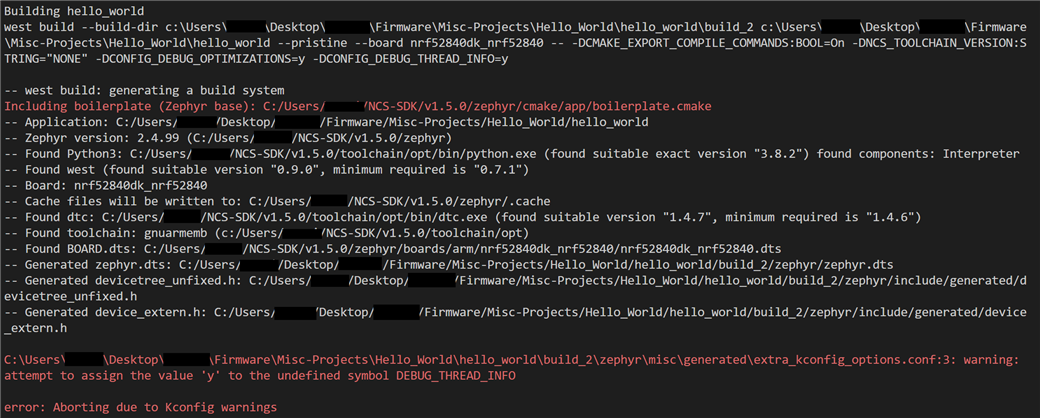
If I leave "enable debug options" as FALSE then I can get past this point...

Here's my support info...

IMPORTANT: The data below could contain sensitive or confidential information about your environment.
If you do not wish this to be seen by others, please make sure to remove it before sharing.

For help and support, visit the Nordic DevZone at devzone.nordicsemi.com/.

{
  "platform": {
    "os": "win32",
    "osVersion": "Windows 10 Home",
    "osKernel": "----------",
    "vscode": "------",
    "electron": "------",
    "node": "--------"
  },
  "system": {
    "date": "2022-04-07T18:20:59.486Z",
    "vscodeRoot": "c:\\Users\\----\\AppData\\Local\\Programs\\Microsoft VS Code\\resources\\app",
    "nrfConnectForDesktopInstalled": true,
    "vscodeUptime": "00:13:40",
    "osUptime": "00:51:37",
    "cpu": {
      "model": "11th Gen Intel(R) Core(TM) i7-11370H @ 3.30GHz",
      "speed": "3302 MHz",
      "count": 4
    },
    "memory": {
      "total": "15.79 GB",
      "free": "7.00 GB"
    }
  },
  "workspace": {
    "name": "Untitled (Workspace)",
    "workspaceFile": "1649353389969",
    "folders": [
      "c:\\Users\\-----\\Desktop\\------\\Firmware\\Misc-Projects\\Hello_World\\hello_world"
    ]
  },
  "extensions": {
    "internal": {
      "nordic-semiconductor.nrf-connect": {
        "version": "2022.3.104",
        "path": "c:\\Users\\-----\\.vscode\\extensions\\nordic-semiconductor.nrf-connect-2022.3.104",
        "isActive": true
      },
      "nordic-semiconductor.nrf-terminal": {
        "version": "2022.3.31",
        "path": "c:\\Users\\-----\\.vscode\\extensions\\nordic-semiconductor.nrf-terminal-2022.3.31",
        "isActive": true
      },
      "nordic-semiconductor.devicetree": null,
      "nordic-semiconductor.kconfig": null
    },
    "external": {
      "marus25.cortex-debug": "1.4.4",
      "ms-vscode.cpptools": "1.9.7",
      "ms-vscode-remote.remote-wsl-recommender": "0.0.15",
      "ms-vscode.js-debug": "1.66.1",
      "ms-vscode.js-debug-companion": "1.0.17",
      "ms-vscode.references-view": "0.0.89",
      "ms-vscode.vscode-js-profile-table": "1.0.0",
      "trond-snekvik.gnu-mapfiles": "1.1.0",
      "twxs.cmake": "0.0.17"
    }
  },
  "tools": {
    "C:\\Program Files\\SEGGER\\JLink\\JLink.exe": "7.60d",
    "C:\\Program Files\\Nordic Semiconductor\\nrf-command-line-tools\\bin\\nrfjprog.exe": "10.15.4",
    "nrfutil": "Not found",
    "c:\\Users\\-----\\NCS-SDK\\v1.5.0\\toolchain\\opt\\bin\\cmake.exe": "3.17.3",
    "c:\\Users\\-----\\NCS-SDK\\v1.5.0\\toolchain\\opt\\bin\\Scripts\\west.exe": "0.9.0",
    "c:\\Users\\-----\\NCS-SDK\\v1.5.0\\toolchain\\opt\\bin\\python.exe": "3.8.2",
    "c:\\Users\\-----\\NCS-SDK\\v1.5.0\\toolchain\\opt\\bin\\ninja.exe": "1.9.0",
    "c:\\Users\\-----\\NCS-SDK\\v1.5.0\\toolchain\\opt\\bin\\gperf.exe": "3.1",
    "c:\\Users\\-----\\NCS-SDK\\v1.5.0\\toolchain\\opt\\bin\\dtc.exe": "1.4.7",
    "c:\\Users\\-----\\NCS-SDK\\v1.5.0\\toolchain\\opt\\bin\\arm-none-eabi-gcc.exe": "9-2019-q4-major",
    "c:\\Users\\-----\\NCS-SDK\\v1.5.0\\toolchain\\opt\\bin\\gn.exe": "1891",
    "c:\\Users\\-----\\NCS-SDK\\v1.5.0\\toolchain\\mingw64\\bin\\git.exe": "2.26.2.windows.1"
  },
  "sdks": [
    {
      "version": "1.5.0",
      "path": "c:\\Users\\-----\\NCS-SDK\\v1.5.0"
    }
  ],
  "toolchains": [
    {
      "version": "1.5.0",
      "path": "c:\\Users\\-----\\NCS-SDK\\v1.5.0\\toolchain"
    }
  ],
  "connectedDevices": [
    {
      "serialNumber": "801032578"
    }
  ],
  "deviceProviders": [
    "nrfjprog"
  ],
  "config": {
    "nordic-semiconductor.nrf-connect": {
      "topdir": "${nrf-connect.sdk:1.5.0}",
      "toolchain": {
        "path": "${nrf-connect.toolchain:1.5.0}"
      },
      "ozonePath": "",
      "applications": [
        "${workspaceFolder}"
      ],
      "kconfig": {
        "interface": "kconfig"
      },
      "welcome": {
        "showOnStartup": true
      },
      "west": {
        "env": {
          "$base": "terminal"
        }
      },
      "boardRoots": [],
      "enableTelemetry": false
    },
    "nordic-semiconductor.nrf-terminal": {
      "terminalMode": "character"
    },
    "nordic-semiconductor.devicetree": {
      "modules": [
        "${zephyrBase}",
        "${zephyrBase}/../nrf",
        "."
      ],
      "zephyr": "c:\\Users\\-----\\NCS-SDK\\v1.5.0",
      "ctxFile": "",
      "defaultBoard": ""
    },
    "nordic-semiconductor.kconfig": {
      "root": "",
      "env": {},
      "cfiles": true,
      "disable": false,
      "zephyr": {
        "base": ""
      },
      "python": "",
      "liveValue": true
    },
    "marus25.cortex-debug": {
      "armToolchainPath": null,
      "armToolchainPrefix": "arm-none-eabi",
      "gdbPath": null,
      "objdumpPath": null,
      "JLinkGDBServerPath": null,
      "openocdPath": null,
      "pyocdPath": null,
      "PEGDBServerPath": null,
      "stutilPath": null,
      "stlinkPath": null,
      "stm32cubeprogrammer": null,
      "enableTelemetry": true,
      "flattenAnonymous": false,
      "registerUseNaturalFormat": true,
      "variableUseNaturalFormat": true,
      "dbgServerLogfile": null,
      "showRTOS": false,
      "showDevDebugOutput": "none"
    }
  },
  "environment": {
    "westExe": "c:\\Users\\-----\\NCS-SDK\\v1.5.0\\toolchain\\opt\\bin\\Scripts\\west.exe",
    "westEnv": {
      "ELECTRON_RUN_AS_NODE": "1",
      "HOME": "C:\\Users\\-----",
      "HOMEDRIVE": "C:",
      "HOMEPATH": "\\Users\\-----",
      "Path": "c:\\Users\\-----\\NCS-SDK\\v1.5.0\\toolchain\\mingw64\\bin;c:\\Users\\-----\\NCS-SDK\\v1.5.0\\toolchain\\mingw64\\libexec\\git-core;c:\\Users\\-----\\NCS-SDK\\v1.5.0\\toolchain\\opt\\bin;c:\\Users\\-----\\NCS-SDK\\v1.5.0\\toolchain\\opt\\bin\\Scripts;C:\\Program Files (x86)\\Common Files\\Oracle\\Java\\javapath;C:\\Windows\\system32;C:\\Windows;C:\\Windows\\System32\\Wbem;C:\\Windows\\System32\\WindowsPowerShell\\v1.0\\;C:\\Windows\\System32\\OpenSSH\\;C:\\Program Files (x86)\\Gow\\bin;C:\\Program Files\\Nordic Semiconductor\\nrf-command-line-tools\\bin\\;C:\\Program Files (x86)\\GNU Arm Embedded Toolchain\\9 2020-q2-update\\bin;C:\\msys64\\usr\\bin;C:\\Program Files (x86)\\GNU Tools ARM Embedded\\6 2017-q2-update\\bin;C:\\Users\\-----\\AppData\\Local\\Microsoft\\WindowsApps;C:\\Users\\-----\\AppData\\Local\\Programs\\Microsoft VS Code\\bin",
      "ZEPHYR_BASE": "c:\\Users\\-----\\NCS-SDK\\v1.5.0\\zephyr",
      "GNUARMEMB_TOOLCHAIN_PATH": "c:\\Users\\-----\\NCS-SDK\\v1.5.0\\toolchain\\opt",
      "ZEPHYR_TOOLCHAIN_VARIANT": "gnuarmemb",
      "PYTHONPATH": "c:\\Users\\-----\\NCS-SDK\\v1.5.0\\toolchain\\opt\\bin;c:\\Users\\-----\\NCS-SDK\\v1.5.0\\toolchain\\opt\\bin\\Lib;c:\\Users\\-----\\NCS-SDK\\v1.5.0\\toolchain\\opt\\bin\\Lib\\site-packages",
      "Python3_ROOT": "c:\\Users\\-----\\NCS-SDK\\v1.5.0\\toolchain\\opt\\bin"
    },
    "toolchainPath": "c:\\Users\\-----\\NCS-SDK\\v1.5.0\\toolchain",
    "toolchainBinPath": "c:\\Users\\-----\\NCS-SDK\\v1.5.0\\toolchain\\opt\\bin",
    "toolchainVersion": "1.5.0"
  },
  "terminal": {
    "shell": null,
    "defaultProfile": null
  }
}
Can anyone spot anything that looks wrong?
Parents
  • Hi,

    Selecting "Enable debug options" will select the Kconfig symbol DEBUG_THREAD_INFO. However, this symbol does not exist in nRF Connect SDK v1.5.0, resulting in the error you are getting. If you want to use v1.5 you cannot select this option in the build configuration. This option is not necessary for simple applications, and only if you want to use thread aware debugging, so it is not certain that you need it. A similar option available in v1.5.0 would be CONFIG_OPENOCD_SUPPORT, so if you still want thread aware debugging you can set this option in your prj.conf file.

    I recommend using the latest official release of the SDK, v1.9.1, if possible

    Best regards,

    Marte

Reply
  • Hi,

    Selecting "Enable debug options" will select the Kconfig symbol DEBUG_THREAD_INFO. However, this symbol does not exist in nRF Connect SDK v1.5.0, resulting in the error you are getting. If you want to use v1.5 you cannot select this option in the build configuration. This option is not necessary for simple applications, and only if you want to use thread aware debugging, so it is not certain that you need it. A similar option available in v1.5.0 would be CONFIG_OPENOCD_SUPPORT, so if you still want thread aware debugging you can set this option in your prj.conf file.

    I recommend using the latest official release of the SDK, v1.9.1, if possible

    Best regards,

    Marte

Children
No Data
Related