I tried to create/ open a project using nRF Connect in SES. The error appears as shown in image. While the file exists as shown in the second image. Why, such error and what possible solution ?
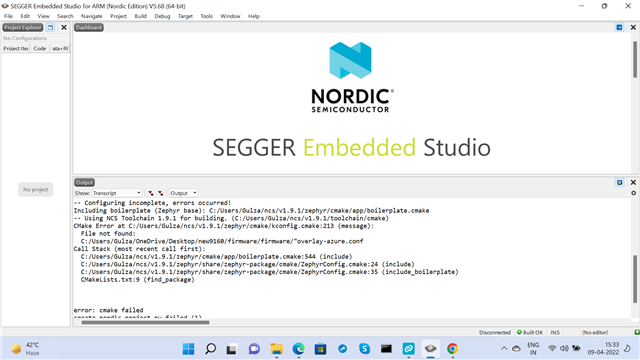
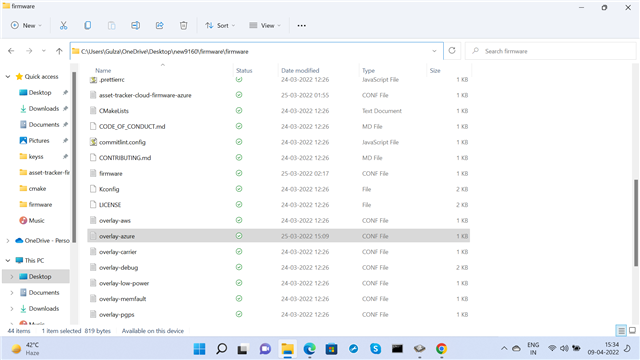
I tried to create/ open a project using nRF Connect in SES. The error appears as shown in image. While the file exists as shown in the second image. Why, such error and what possible solution ?


Hi,
You are getting this error because it is looking for a file called "ovarlay-azure.conf, with " at the beginning of the file name. I have seen this happen when trying to add multiple CMake options in the 'extra CMake build options' field in SES. Unfortunately it is not possible to specify more than one CMake options because of the issue NCSDK-9992.
Best regards,
Marte
Hi,
You are getting this error because it is looking for a file called "ovarlay-azure.conf, with " at the beginning of the file name. I have seen this happen when trying to add multiple CMake options in the 'extra CMake build options' field in SES. Unfortunately it is not possible to specify more than one CMake options because of the issue NCSDK-9992.
Best regards,
Marte
Hi .. thanks for yoyr suggestion. I have seen the link given by you. In that the soultion of multiple Overlay options is explained as workarround title, as shown in image. Pleae, may you tell by example, how to write all the -D...Overlay options in a CMake file and then include in Extra CMake Build Options of nRF Connect SDK in SES. I have written as shown in top of the attached image. Is it right ? I tried to create by defining -COVERLAY_CONFIG = overlay.cmake; in Extra Build Options in SDK Connect in SES. But, the error is shown as in the bottom of same image.
Hi,
The simplest way would be to set it directly in CMakeLists.txt and not add anything to the 'extra CMake build options' field at all. If you for example have a conf overlay file called foo.conf and a devicetree overlay file called bar.overlay you can set this by adding the following to CMakeLists.txt:
set(OVERLAY_CONFIG "foo.conf")
set(DTC_OVERLAY_FILE "bar.overlay")
You can read more what you can do in your CMakeLists.txt and how to set different options in Application CMakeLists.txt.
Best regards,
Marte