Wpantund program initialization failed when hardware flow control was enabled in coprocessor code

Hi

I plan to enable hardware flow control in the coprocessor code. After successful compilation and burning, I will use Ubuntu to start wpantund and an error will be reported
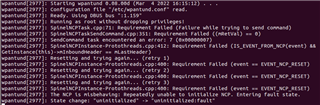
When I comment out hw-flow-control in my overlay file,wpantund starts normally

Is there any way I can successfully start and initialize wpantund using hardware flow control

Parents Reply Children
  • Hi

    In that case, try to disable mass storage. It might interfere with the Hardware control:

    JLinkExe -device NRF52840_XXAA -if SWD -speed 4000 -autoconnect 1 -SelectEmuBySN SEGGER_ID
    J-Link>MSDDisable
    Probe configured successfully.
    J-Link>exit

    Does this fix the issue?

    Regards,
    Sigurd Hellesvik

  • Hi

    I entered the msddisable command on the j-link commander tool,The test results have not changed and wpantund still cannot be initialized.

    Regards,

    Ethan

  • Hi

    I tried to set up wpantund following the tutorial found in Thread tools, wpantund, with our sample nrf/samples/openthread/coprocessor build with the command:

    west build -b nrf52833dk_nrf52833 -- -DCONFIG_OPENTHREAD_THREAD_VERSION_1_2=y
    

    No changes to the overlays, so hw-flow-control should be enables.
    Here are the versions I used:

    nRF Connect SDK: v1.9.1
    wpantund: master (25dd5d02dedc5e13f28b6fa72674f3486fa0e404)
    Ubuntu LTS 20.04

    I were able to run wpantund successfully:

    $ sudo wpantund -I leader_if -s /dev/ttyACM0 -b 1000000
    wpantund[30072]: Starting wpantund 0.08.00d (Apr 12 2022 08:40:55) . . .
    wpantund[30072]: 	SOURCE_VERSION = 0.07.01-365-g25dd5d0-dirty
    wpantund[30072]: 	BUILD_VERSION = 0.07.01-365-g25dd5d0-dirty
    wpantund[30072]: Configuration file "/usr/local/etc/wpantund.conf" read.
    wpantund[30072]: Ready. Using DBUS bus ":1.189"
    wpantund[30072]: Running as root without dropping privileges!
    wpantund[30072]: State change: "uninitialized" -> "offline"
    wpantund[30072]: NCP is running "OPENTHREAD/thread-reference-20200818-ncs1-rc3-560-g02e61a2ed; Zephyr; Apr 12 2022 08:44:25"
    wpantund[30072]: Driver is running "0.08.00d (0.07.01-365-g25dd5d0-dirty; Apr 12 2022 08:40:55)"
    wpantund[30072]: Network is not joinable
    wpantund[30072]: [-NCP-]: SLAAC enabled
    wpantund[30072]: Resetting interface(s). . .
    wpantund[30072]: Finished initializing NCP
    

    Are you able to make it work following the steps I explained above?

    Regards,
    Sigurd Hellesvik

  • Hi

    Thank you for your answer

    The environment we use is different.

    Here are the versions I used:

    nRF Connect SDK: v1.8.0

    Ubuntu 18.04 LTS

    wpantund The version is not up to date,

    Could you please do the test on THE NCS of V1.8.0? We do not want to update the VERSION of NCS at present.

    Regards,

    Ethan

Related
