

I am trying to upgrade SoftDevice and Application firmware from v6.1.1 to v7.2.0 on Nordic USB840M dongle and I am facing a strange issue after such upgrade.
Please find below the steps I am doing:
- Generate the upgrade zip package:
- nrfutil pkg generate --hw-version 52 --sd-req 0xB6 --sd-id 0x100 --softdevice ".\s140_nrf52_7.2.0_softdevice.hex" --application-version 1 --application ".\connectivity_4.1.1_usb_for_s140_7.2.0.hex" --key-file ".\private.pem" ".\sd_app_6.1.1_to_7.2.0.zip"
Zip created at .\sd_app_6.1.1_to_7.2.0.zip - Program the dongle:
- NrfUtil.exe dfu usb-serial -pkg ".\sd_app_6.1.1_to_7.2.0.zip" -p COM7
[####################################] 100%Device programmed.
After such upgrade the device appears in the device manager as USB Serial Device (COM8) with VID_1915&PID_521B and with the pretty old driver installed:

Then I've performed the downgrade of SoftDevice from 7.2.0 to 6.1.1. Please find below the steps I am doing:
- Generate the downgrade zip package:
- nrfutil pkg generate --hw-version 52 --sd-req 0x100 --sd-id 0xB6 --softdevice ".\s140_nrf52_6.1.1_softdevice.hex" --application-version 1 --application ".\connectivity_4.1.1_usb_for_s140_6.1.1.hex" --key-file ".\private.pem" ".\sd_app_7.2.0_to_6.1.1.zip"
Zip created at .\sd_app_7.2.0_to_6.1.1.zip - Program the dongle:
- NrfUtil.exe dfu usb-serial -pkg ".\sd_app_7.2.0_to_6.1.1.zip" -p COM7
[####################################] 100%Device programmed.
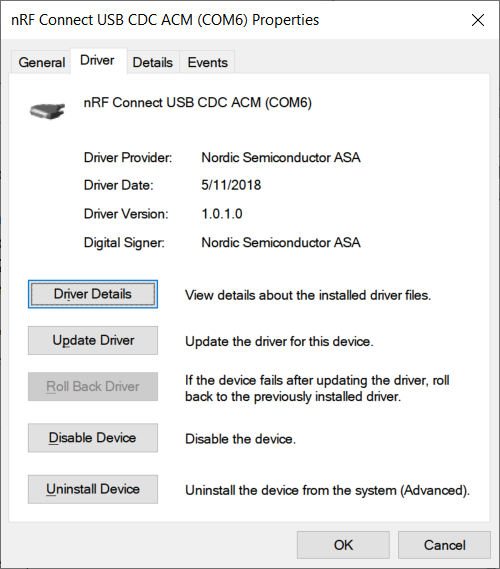
After such downgrade the device appears in the device manager as nRF Connect USB CDC ACM (COM6) with VID_1915&PID_C00A and with the new driver installed:
I have attached the SoftDevice and Application firmware hex files:

I have installed nRF Connect for Desktop 3.10.0
Any help or insights are much appreciated.

