SoftDevice and Application firmware upgrade from 6.1.1 to 7.2.0 issue

I am trying to upgrade SoftDevice and Application firmware from v6.1.1 to v7.2.0 on Nordic USB840M dongle and I am facing a strange issue after such upgrade.
Please find below the steps I am doing:
  1. Generate the upgrade zip package: 
  2. nrfutil pkg generate --hw-version 52 --sd-req 0xB6 --sd-id 0x100 --softdevice ".\s140_nrf52_7.2.0_softdevice.hex" --application-version 1 --application ".\connectivity_4.1.1_usb_for_s140_7.2.0.hex" --key-file ".\private.pem" ".\sd_app_6.1.1_to_7.2.0.zip"
    Zip created at .\sd_app_6.1.1_to_7.2.0.zip
  3. Program the dongle: 
  4. NrfUtil.exe dfu usb-serial -pkg ".\sd_app_6.1.1_to_7.2.0.zip" -p COM7
      [####################################]  100%
    Device programmed.
After such upgrade the device appears in the device manager as USB Serial Device (COM8) with VID_1915&PID_521B and with the pretty old driver installed:
Then I've performed the downgrade of SoftDevice from 7.2.0 to 6.1.1. Please find below the steps I am doing:
  1. Generate the downgrade zip package: 
  2. nrfutil pkg generate --hw-version 52 --sd-req 0x100 --sd-id 0xB6 --softdevice ".\s140_nrf52_6.1.1_softdevice.hex" --application-version 1 --application ".\connectivity_4.1.1_usb_for_s140_6.1.1.hex" --key-file ".\private.pem" ".\sd_app_7.2.0_to_6.1.1.zip"
    Zip created at .\sd_app_7.2.0_to_6.1.1.zip
  3. Program the dongle:
  4. NrfUtil.exe dfu usb-serial -pkg ".\sd_app_7.2.0_to_6.1.1.zip" -p COM7
      [####################################]  100%
    Device programmed.
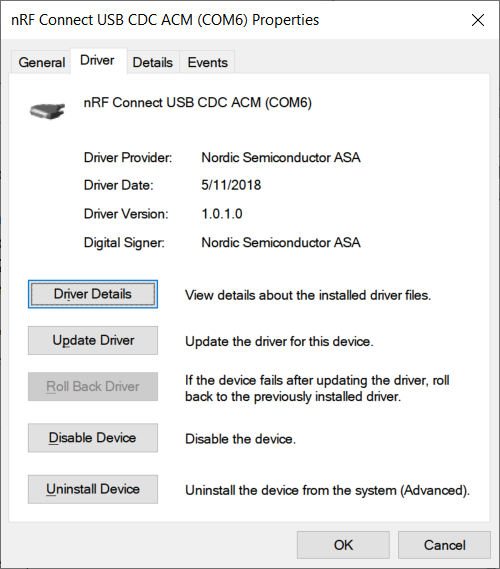
After such downgrade the device appears in the device manager as nRF Connect USB CDC ACM (COM6) with VID_1915&PID_C00A and with the new driver installed:
I have attached the SoftDevice and Application firmware hex files:
I have installed nRF Connect for Desktop 3.10.0
Any help or insights are much appreciated.
Parents
  • Hi,

    This seems related to USB only, so the SoftDevice itself should not be relevant, but the SDK could be. Are you also changing SDK version, or only SoftDevice? Which (two) SDK versions are you using? Also, are there any issues or does this still work and you just wonder why Windows picks one driver in one case and another diver in the other case?

  • Hi Einar,

    Thank you for your response!

    I am changing the SDK version. Previously the connectivity application firmware was built using nRF5_SDK_15.3.0 and SoftDevice of v6.1.1 is part of that SDK. Now I am building the connectivity application firmware using nRF5_SDK_17.1.0 where SoftDevice of v7.2.0 is part of.

    It seems the problem is not with just drivers, the device itself is not functioning - sd_rpc_open API which initializes the SoftDevice module fails with error 0x000d NRF_ERROR_TIMEOUT after an upgrade.

Reply
  • Hi Einar,

    Thank you for your response!

    I am changing the SDK version. Previously the connectivity application firmware was built using nRF5_SDK_15.3.0 and SoftDevice of v6.1.1 is part of that SDK. Now I am building the connectivity application firmware using nRF5_SDK_17.1.0 where SoftDevice of v7.2.0 is part of.

    It seems the problem is not with just drivers, the device itself is not functioning - sd_rpc_open API which initializes the SoftDevice module fails with error 0x000d NRF_ERROR_TIMEOUT after an upgrade.

Children
  • Hi,

    Ah, I see. Did you build both connectivity firmwares yourself? If you are interfacing with the pc-ble-driver, you need to build it as specified under Compiling connectivity HEX files and include a bunch of patches as described. That is only provided for SDK 15.3. We do not support newer SDK versions for the pc-ble-driver, and do not indent to do so either. Among other things, the patch will adjust the USB PID (0xC00A), so without it the device will not be recognized. 

  • Yes, I have built the connectivity firmware using existing pc-ble-driver. I have noticed that it does not  have sd_api_v7 folder and does not use nRF5_SDK_17.1.0. That's why I have modified CMakeLists.txt and util.cmake files to consume the new nRF5_SDK_17.1.0 and new SoftDevice id 0x0100. After that the folder sd_api_v7 is getting created and connectivity firmware hex files are placed there.

    I have applied the patch nRF5_SDK_15.3.0_connectivity.patch to nRF5_SDK_15.3.0, but I did not apply it to nRF5_SDK_17.1.0. Is there any similar patch for nRF5_SDK_17.1.0? Or can I apply nRF5_SDK_15.3.0_connectivity.patch to nRF5_SDK_17.1.0?

  • Yuriy Sharamaha said:
    I have applied the patch nRF5_SDK_15.3.0_connectivity.patch to nRF5_SDK_15.3.0, but I did not apply it to nRF5_SDK_17.1.0. Is there any similar patch for nRF5_SDK_17.1.0? Or can I apply nRF5_SDK_15.3.0_connectivity.patch to nRF5_SDK_17.1.0?

    No, there is no similar patch for 17.1.0 and you cannot apply the 15.3.0 patch to 17.1.0. SDK 15.3.0 is the latest that is (and will be) supported.

  • Understood, thank you!

    Is there any way to use SoftDevice v7.2.0 with the connectivity application of v6.1.1? For example, generate the upgrade zip package with SD v7.2.0 and the connectivity app of v6.1.1 and then program the dongle by nrfutil. I need SD v7.2.0 because it supports the BLE_GATTC_OPT_UUID_DISC option.

  • There is always a way, provided you are willing to do the effort. There are API changes between major versions of the SoftDevice, so some porting will have to be involved. I suspect the easiest is to stick with SDK 15.3 and the patch form the from pc-ble-driver repo, and use that as a starting point. Then port that to SoftDevice 7.2.0 first and get that working. Then add BLE_GATTC_OPT_UUID_DISC to the serialization code on the nRF and the pc-ble-driver. I cannot say exactly how much effort this will take, though.

    An alternative could perhaps be to consider if you can achieve your end goal differently, without using BLE_GATTC_OPT_UUID_DISC.

Related