nrf9160dk modem shell settings

Toolchain: 1.9.1

modem fw: mfw_1.3.1

PC OS: windows 10

Terminal software: Tera Term

SIM card: AT&T (North America)

in the modem shell example code, in "prj.conf file", there is a configuration,

CONFIG_LTE_AUTO_INIT_AND_CONNECT=n

  1. should it be turned on, if I wanna the nrf9160dk start auto searching the cellular network and registration?
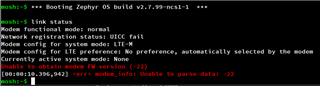
  2. I did try to turn it on, but after that, when the program start, and I try to pull "link status", it will throw out some errors. see screenshot below. (I know I didn't plug in the SIM when I try to make this screenshot, but even if I did insert the SIM the error is the same.)
  3. for general purpose, should user need to change any of those options in the prj.config file?
Also, in "modem_shell" command line, I see the option to toggle "link nmodeauto"

link nmodeauto -e //Enable autoconnect (default)
link nmodeauto --enalble_no_rel14 //Enable autoconnect without setting Release 14 features

  1. is there a way to keep those changes in the NVM, so we don't lose it after power cycle?
Parents
  • Hi,


    should it be turned on, if I wanna the nrf9160dk start auto searching the cellular network and registration?

    The default, in ncs v1.9.1, is that it starts searching on boot.

    You can read the static settings with the command:

    link settings -r


    If you type link settings, you will get a help menu printed:

    mosh:~$ link settings
    Usage: link settings --read | --reset | --mreset_all | --mreset_user
    Options:
      -r, --read,        Read and print current persistent settings
          --reset,       Reset all persistent settings to defaults
          --mreset_all,  Reset all modem settings to defaults
          --mreset_user, Reset modem user configurable settings to defaults


    I did try to turn it on, but after that, when the program start, and I try to pull "link status", it will throw out some errors. see screenshot below. (I know I didn't plug in the SIM when I try to make this screenshot, but even if I did insert the SIM the error is the same.)

    The screenshot shows that there are problems communicating with the SIM card. Are you certain it was properly connected at the time of testing?

    for general purpose, should user need to change any of those options in the prj.config file?

    the modem_shell sample is setup in such a way that it (usually) requires commands to do a certain task. If everything works as you intend it to, then no need to add or adjust any configurations. There are overlay configuration files available in the sample for certain use-cases, like pgps/cloud/ppp etc.


    Kind regards,

    Håkon

Reply
  • Hi,


    should it be turned on, if I wanna the nrf9160dk start auto searching the cellular network and registration?

    The default, in ncs v1.9.1, is that it starts searching on boot.

    You can read the static settings with the command:

    link settings -r


    If you type link settings, you will get a help menu printed:

    mosh:~$ link settings
    Usage: link settings --read | --reset | --mreset_all | --mreset_user
    Options:
      -r, --read,        Read and print current persistent settings
          --reset,       Reset all persistent settings to defaults
          --mreset_all,  Reset all modem settings to defaults
          --mreset_user, Reset modem user configurable settings to defaults


    I did try to turn it on, but after that, when the program start, and I try to pull "link status", it will throw out some errors. see screenshot below. (I know I didn't plug in the SIM when I try to make this screenshot, but even if I did insert the SIM the error is the same.)

    The screenshot shows that there are problems communicating with the SIM card. Are you certain it was properly connected at the time of testing?

    for general purpose, should user need to change any of those options in the prj.config file?

    the modem_shell sample is setup in such a way that it (usually) requires commands to do a certain task. If everything works as you intend it to, then no need to add or adjust any configurations. There are overlay configuration files available in the sample for certain use-cases, like pgps/cloud/ppp etc.


    Kind regards,

    Håkon

Children
No Data
Related