MQTT connect error -45

Hello,

I am using MQTT+TLS on nRF9160DK. In the development stage, I followed this link https://devzone.nordicsemi.com/guides/cellular-iot-guides/b/software-and-protocols/posts/enabling-and-testing-tls-in-mqtt_5f00_simple to use MQTT+TLS. Everything worked properly without any errors.

Now we are in the pre production. We have created 50 custom boards with nRF9160 on it. I created the tls certificates and programmed in the similar manner. All the custom boards could connect to the mqtt server and there was the communication between nRF9160 and the mqtt server.

After 3-4 months of testing, on few cards there is mqtt connect -45 error. Before few days these cards were completely functional.

I am using sec_tag 16842753. Can I use this sec_tag? What might be the cause of this error?

I re-programmed few non-functional cards by putting the application file + certificates in this way:

cred.py --CA_cert root.crt --client_cert BT36-chain.crt --client_private_key BT36.key --sec_tag 16842753 --program_app nRF9160.hex

These cards are working again.

So the question is why the cards doesn't connect to the mqtt server after few days even after the application hex file and the certificates are same?

Parents Reply Children
  • Hello,

    Modem firmware version used is 1.2.0

    ncs version v1.0.0

    I checked with AT command %CMNG. All the certificates are deleted from the sec tag.

    I have not updated anything related to my devices. SIM cards and mqtt server, everything is same.

    If I put the same certificates which were used previously on the custom board, it starts working.

    So the question is why these certificates are deleted. I checked my application program, I never delete these certificates.

    This behaviour is seen on various boards.

    At every power on of nRF9160, I configure the modem, read imei number with cgsn command and check the presence of the SIM with xsim command, then turn off the modem. These are the operations which are carried out each time.

    All the boards are used for around 2-3 months by our testers and they were powered on for around 200-300 times.

    The boards which are not used by the testers but were programmed at the same time, have their certificates and are working normally.

    So I really don't understand what is the cause of this problem.

  • Is there a reason for working with an old modem FW and NCS version? Several improvements have been introduced, specifically for NCS i.e. currently at v1.9.1

    -Øyvind

  • I had started development 2 years ago, at that time I started working with ncs v1.0.0

    To update to other ncs versions, I had to change various functions in my program as the libraries were changed. To avoid this I rested on the v1.0.0.

    Is there any guide to know which libraries were modified for certain ncs version, so that it might help to change the program.

    This current batch of custom boards had nRF9160 revision 1 Build code B0.

    For the next batch, we have used nRF9160 revision 2 Build code B1. Modem firmware will be 1.3.1. Do I need to update ncs version v1.9.1?

    Do you think the certificates are deleted because of the older versions of modem firmware and ncs?

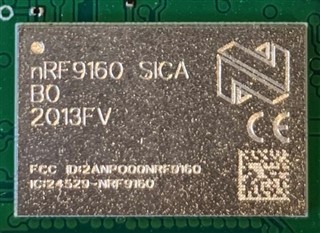
  • Can you please provide an image of the device markings? Also, can you please run at client and issue the command AT+CFUN?.

    Jagruti said:
    For the next batch, we have used nRF9160 revision 2 Build code B1. Modem firmware will be 1.3.1. Do I need to update ncs version v1.9.1?

    Yes, please use latest version of nRF Connect SDK with nRF9160 Rev 2.

    Jagruti said:
    Do you think the certificates are deleted because of the older versions of modem firmware and ncs?

    No, I don't think so, however, we know that earlier versions pre modem 1.0.0 had issues with file system.

    Jagruti said:
    Is there any guide to know which libraries were modified for certain ncs version, so that it might help to change the program.

    There is no guide unfortunately, other than the release notes. I would strongly encourage you update your application to a newer version of NCS.

  • Hello,

    One of the nRF9160 chip's image (I guess this what you meant for device's markings)

    Actually I can not use at_client on my custom board as there is no provision of UART.

    To check the existence of the certificates at the sec_tag, I sent %CMNG AT command in my application program and received the respone by SMS. The reponse for AT+CFUN? will be very long and will not fit in one sms. I will check if I can do something.

    Yes I will switch to the latest version of ncs for the new batch of custom boards.

    Also, I found this post on the devzone: https://devzone.nordicsemi.com/f/nordic-q-a/70134/sec_tag-wiped-from-the-modem-if-low-battery-power/290582#290582

    I see that the same problem is encountered. The certificates and keys for mqtt are deleted from the modem at the provided sec_tag. The writer describes that it was because of the low battery power. Do you think this is the reason for the deletion of the certificates? Are there any tests carried out at Nordic related to this problem and observed the same problem?

    Edit: 

    The reply received for AT+CFUN? is

    +CFUN: (0,1,4,20,21,30,31,40,41,44)

Related