This discussion has been locked.
You can no longer post new replies to this discussion. If you have a question you can start a new discussion

VS Code - Strange Popup after updating SDK

Hi,

i upgraded the nRF Connect SDK from 1.8.0 to 1.9.1.
During the install i have chosen a different install path - to have the same current path in different locations.

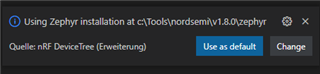
Now, each time i start VS Code i see a popup with the old location and have to select the new one ("Change" opens a dropdown).

Does anybody know where the information about the old location is stored?

    Thanks

   fremboli
Parents
  • Hello, 

    In VS Code open the Command Palette (CTRL+SHIFT+P) then type in settings and open workspace settings.

    From here you can search for nrf-connect in the search field. Note that there is both a user and a workspace setting.

    Kind regards,
    Øyvind

Reply
  • Hello, 

    In VS Code open the Command Palette (CTRL+SHIFT+P) then type in settings and open workspace settings.

    From here you can search for nrf-connect in the search field. Note that there is both a user and a workspace setting.

    Kind regards,
    Øyvind

Children
No Data
Related
