Secure BLE connections in nrf52833

Hi All,

Hope everyone is fine.

I'm using Vs code with nrf Connect sdk v1.9.1 to develope firmware for nrf52833.

Here our device has no display or Keyboard to give input. I want to achieve pairing with external mobile application ex. nrf connect app.

How can we do it?

I have tried with example under the path "v1.9.1\zephyr\samples\bluetooth\peripheral_sc_only", where I found one it uses SECURITYLEVEL_4.

I've copied the example as it, and got following response into my terminal.

Security failed: 65:86:DA:1C:0E:65 (random) level 1 err 8
Pairing Failed (8). Disconnecting.
{Disconnected (reason: 22)}

Please guide me with necessary steps here. Thank you in advance.

Parents
  • Hi Viswa, 

    As you already find out, the example only allow SC pairing at security level 4. This mean your device should have at least display or keyboard capability. 

    However, error 8 means  "BT_SECURITY_ERR_KEY_REJECTED" this mean your device may have paired with the phone earlier but one of the device has erased this bond information. Please try to erase the device's flash (erase all, chip erase) and remove any bond on the phone. 


    Note that you don't need secure connection to pair and encrypt the link. You can do normal legacy pairing, or doing Secure Connection with justwork. Of course when doing that you will not at security level 4. Please try remove 

    CONFIG_BT_SMP_SC_ONLY=y
    from prj.conf. 
  • Hi Hung Bui

    You can do normal legacy pairing, or doing Secure Connection with justwork

    May I know config/security levels to acheive that?

    Regards

    Visweswara Sarma.

  • Hi Sarma, 

    Most of our sample support pairing. For example \zephyr\samples\bluetooth\peripheral_hr  sample or \nrf\samples\bluetooth\peripheral_hids_mouse sample. 
    They don't require the peer device to bond but they can support if the peer device (the phone) request to bond/pair. 

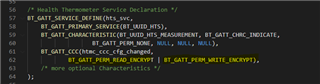
    If you want to request the peer device to bond you would need to configure the characteristic so that it require encryption. You can do that by configuring the permission of the characteristic, for example change from BT_GATT_PERM_READ to BT_GATT_PERM_READ_AUTHEN. 
    You can read about that here.

    In addition to support storing bond information, in addition to CONFIG_BT_SMP=y the following configuration needed: 

    CONFIG_BT_SETTINGS=y
    CONFIG_FLASH=y
    CONFIG_FLASH_PAGE_LAYOUT=y
    CONFIG_FLASH_MAP=y
    CONFIG_NVS=y
    CONFIG_SETTINGS=y

  • This mean your device should have at least display or keyboard capability.

    Our device has no dedicated Keyboard / Display. 

    I have commented "CONFIG_BT_SMP_SC_ONLY=y"

    /* Callback I've selected for secure connections */ 
    
    static struct bt_conn_auth_cb auth_cb_display = {
    	.passkey_display = auth_passkey_display,
    	.passkey_entry = NULL,
    	.cancel = auth_cancel,
    	.pairing_complete = pairing_complete,
    	.pairing_failed = pairing_failed,
    }; 
    
    /* Inside Connection callback */
    if (bt_conn_set_security(conn, BT_SECURITY_L2)) {
    		printf("Failed to set security\n");
    	}

    for above code I got below response, what shall I add in configuration to get legacy pairing.

    W: opcode 0x200a status 0x09
    
    Connected: 00:00:00:00:00:00 (public)
    E: SMP Timeout
    
    Security failed: 63:67:23:18:43:74 (random) level 1 err 9
    Pairing Failed (9). Disconnecting.
    {Disconnected (reason: 22)}

Reply
  • This mean your device should have at least display or keyboard capability.

    Our device has no dedicated Keyboard / Display. 

    I have commented "CONFIG_BT_SMP_SC_ONLY=y"

    /* Callback I've selected for secure connections */ 
    
    static struct bt_conn_auth_cb auth_cb_display = {
    	.passkey_display = auth_passkey_display,
    	.passkey_entry = NULL,
    	.cancel = auth_cancel,
    	.pairing_complete = pairing_complete,
    	.pairing_failed = pairing_failed,
    }; 
    
    /* Inside Connection callback */
    if (bt_conn_set_security(conn, BT_SECURITY_L2)) {
    		printf("Failed to set security\n");
    	}

    for above code I got below response, what shall I add in configuration to get legacy pairing.

    W: opcode 0x200a status 0x09
    
    Connected: 00:00:00:00:00:00 (public)
    E: SMP Timeout
    
    Security failed: 63:67:23:18:43:74 (random) level 1 err 9
    Pairing Failed (9). Disconnecting.
    {Disconnected (reason: 22)}

Children
Related