This discussion has been locked.
You can no longer post new replies to this discussion. If you have a question you can start a new discussion

Script Error when Open nRF Connect SDK Project

Hello Group,

I got an error when I tried to “Open nRF Connect SDK Project” from the Segger Embedded Studio.

Do have any idea how to fix it? (the attached here my process)

Thanks a lot for your time,

Jack
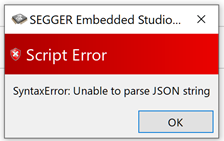
  1. Open Segger Embeed Studio from the Toolchain Manager
  2. In the Segger Embedded Studio for ARM (Nordic Edition)

    Click File, Open nRF Connect SDK Project

  3. Then it pop-up the error with empty textboxes

Parents
  • Hi

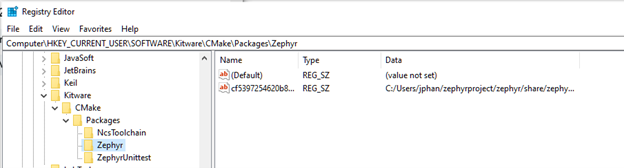
    Users with the same issue has fixed this by removing the following records to the registry:

    HKEY_CURRENT_USER\Software\Kitware\CMake\Packages\Zephyr

    HKEY_CURRENT_USER\Software\Kitware\CMake\Packages\ZephyrUnittest

    Just delete these records and Open NRF project will work again. Apparently it's caused by a Zephyr export command. This is discussed further in this case.

    Best regards,

    Simon

  • Hello Group,

    The error goes away when I do:

    1. Delete all CMake registries
    2. Uninstall nRF Connect and Segger Embbeded
    3. Reinstall nRF Connect and Segger Embbeded


    Thanks a lot for your time,

    Jack

Reply Children
No Data
Related