Flash the nrf52811 VScode

Hello! 

Sorry for asking, im fairly new to SoC on custom boards.

I have now created a custom PCB using the nRF52811 and i want to flash it with an example. ble peripheral example. Im using the nRF Connect together with Visual Studio Code. Im trying to understand the documentation, but i cant find the preprosessor settings, neither the things i need to change according to the documentation. How can i flash my card with this example? is it even possible? I Would be very happy if someone could help me with it. The SoC is connected to the PC so i got that part right. I think what im looking for is in some sort of config file.

im using the nRF 52840 DK for flashing the custom SoC.

Fredrik 

  • Hi Fredrik

    What sample project are you trying to flash onto your nRF52811 board? Have you checked out our nRF Connect for VS Code video tutorial series on YouTube? They should give you a good idea on how to get started and how to build and flash projects onto your boards. 

    When you create a project and build configuration in nRF Connect for VS code, you should get to choose the board you want to build the project for, here you will need an nRF52811 board file to make sure the pin configurations etc. are correct.

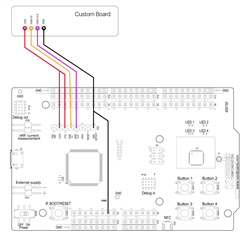
    In order to flash a custom board, you will need a debugger (like the nRF52840 DK) and connect it either with the 10 pin debugger header or with the SWDIO pins as explained in the picture below.

    Best regards,

    Simon

  • Hi

    Yes i have watched the videoseries. Im trying to flash the peripheral_LBS example to the board. But where do i find the nRF52811 board file? And how do i implement that? I read something about precossesor settings and setting the  right RAM and ROM settings, but i cant find out where i set these parameters?

    Fredrik

  • Hi again

    You can either

    1. Add the custom board files to your application root. See chapter "Add a custom board" of this webinar.
    2. Use nRF Connect for VS Code to add custom boards. In general, this is the recommended tool for development and debugging, so using its custom board functionality might come along as a natural choice.

    Best regards,

    Simon

  • Hi Simon!

    Thats okay, i hace created the custom board and i think thats okay, but the problem is that the example is for the nrf52840 i think. In your documentation you can emulate the 52811 on the 52840 DK then upload it following these steps:

    1. Open the example project for your IDE.
    2. In the project settings, change to device "NordicSemiconductor->nRF52811_xxaa".
    3. In the C/C++ preprocessor settings, remove the defines "NRF52" and "NRF52840_XXAA".
    4. Add the preprocessor define "NRF52811_XXAA".
    5. In the linker script settings, adjust the linker script to match the maximum RAM and flash size of nRF52811.
      • ROM END: 0x2FFFF
      • RAM END: 0x20005FFF
    6. Remove the following files from the project: <compiler>_startup_nrf52.s and system_nrf52.c.
    7. Add the following files to the project: <compiler>_startup_nrf52811.s and system_nrf52811.c.
    8. Add the DEVELOP_IN_NRF52840 define to the compile flags. Adding this define will add extra code in SystemInit needed for nRF52840.
    9. Add the NRFX_COREDEP_DELAY_US_LOOP_CYCLES=3 define to ensure correct timing when using nrf_delay_us function.

    But i cant figure out where i find these settings in VS code? thanks

    Fredrik

  • So i will get an error saying im overflowing the SRAM by 873 bytes.. It would not build.

Related