Building BLE Mesh using Zephyr

Hi 

I have been able to work with the 'Lighting' demo BLE mesh application using the nRF Connect SDK with Visual Studio Code. I have even been able to add my custom board to the project and successfully been able to work with it.

I am now trying to use the sample and build my own application, however I want to use my Zephyr installation and not the nRF Connect SDK. I have been able to create a project from scratch and include the source files from the sample app. 

The problem I am facing is that Nordic build system includes another layer of code (nrf/include/bluetooth/mesh) which Zephyr does not recognize and throws errors of header files not found.

Even if I use the same build command that nRF Connect SDK uses, I get the same error message.

I guess, when you create a build configuration in visual studio, the Nordic modules are included in the build. I want to know how can I include the nordic abstraction layer in my application I am building from scratch.

Thanks

Parents
  • Hi.

    I must admit that I haven't tried this. I would recommend you using the nRF Connect SDK. Is there any reason that you don't want to use the nRF Connect SDK?

    However, I can ask internally if anyone has a solution to this.

    Br,
    Joakim

  • Hi Joakim

    Thanks for the response.

    I don't mind using the nRF Connect SDK, I think its great. The only thing I am not able to do with it, is start a new project from scratch. 

    I always have to start with a sample application, which are great to understand api calls and techniques, but need the option to start a new project (from VSCode) from scratch.

    There seems to be a middle layer (for the BLE mesh) which abstracts calls to Zephyr BLE Mesh structs and api, and I want to use it. However, building a project from scratch, the CMake dependency does not pickup on the apis from the middleware.

    I get the same errors whilst building using NCS or Zephyr. I am sure that when a new build folder is generated in VSCode + NCS, the dependency is added. That is exactly what I want to know/learn.

    Cheers

  • Thanks!

    I'll check with our developers and see if I can get some tips to get you started on a new project.

    Br,
    JOakim

Reply Children
  • Hi,

    Looks like this case has fallen in between two chairs, which unfortunately happens sometimes. Joakim does however not work here any more, so I will be handling the case from now. If long wait time occurs in the future, I would recommend that you give a reply to the case sooner to notify the case handler. If the latest reply is from the case handler, then the flag will be set to waiting (i.e the action is on the case creator), while if you if the latest reply is from the case creator it will be set to open and if no action has been made it will be placed back into the queue.

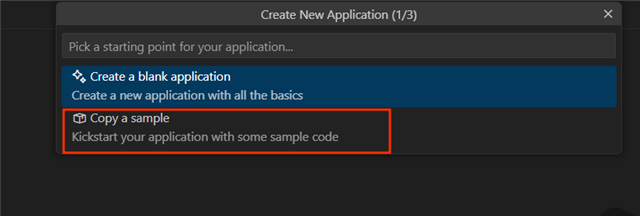
    So as to your issue. I'm not sure where you're having trouble. You can always create a new application from scratch, and include what parts you want to include. There are two ways to do this, but to use NCS you will have to set up the CMake either manually or by copying the contents of an existing sample.

    Since your last reply there has also been published quite a few getting started courses on our academy pages, where the NCS fundamentals course contains steps for setting up an application in exercise 2. Here you can see how to create a clean, basic application. I strongly recommend that you go through with both the fundamentals and intermediate course on the academy page to familiarize yourself with NCS.

    In general I would recommend that you simply just use either the Hello_world sample as your basic starting point (few things to remove and everything should be set up for you to add your own implemetations to it), or the blank application which has everything set up for you as well. 

    If you wish to set up a completely clean sample where you create the CMakeLists.txt and other required files yourself, use the "Create a blank application" option, then inspect the files that are generated and placed in your project file and you will see what you will need to populate your CMakeLists with, then simply just repeat the steps manually.

    For now the items below aren't relevant, but a few tips for future cases you create:

    1. Include which version of the SDK you're working with, as well as which boards
    2. Include any error logs you're getting using insert -> code function and mention what you've done to get any errors
    3. If relevant, include any prj.conf and overlays using insert -> code

    Let me know if the first few lessons in the Academy course is enough to get you started! 

    Kind regards,
    Andreas

Related