This discussion has been locked.
You can no longer post new replies to this discussion. If you have a question you can start a new discussion

Unable to set up nRF Connect for VS Code

Hello,

I'm trying to set up nRF Connect for VS Code. I followed this video for installation steps: https://youtu.be/2cv_jjqk5hg, the only difference being that my nRF Connect SDK installation directory was set to "C:\Users\<username>\ncs". However, when I launch VS Code and click on nRF Connect icon, I just get "Loading..." in WELCOME and APPLICATIONS sections. When I try to run one of the nRF Connect commands, for example "nRF Connect: Welcome", I get the following error:
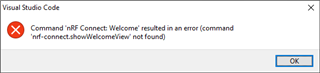
What could be the issue?

Parents Reply
  • I did install nRF Command Line Tools, however, I'm getting this error when I run nrfjprog -v:


    ERROR: JLinkARM DLL is invalid. Please reinstall latest JLinkARM DLL.
    NOTE: For additional output, try running again with logging enabled (--log).
    NOTE: Any generated log error messages will be displayed.


Children
Related