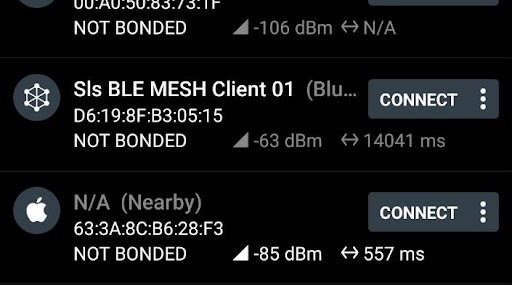
Advertising interval value keep fluctuating


I am using nRF52833 DK and I am running Light switch server in one DK and Client in another DK
Advertising interval was way too high(around 9Second)
so decided to change it.

Defined a interval of 50ms and under mesh_adv.c file, have defined this MACRO and changed duration and interval parameters.

#define CUSTOM_ADV_INTERVAL MSEC_TO_UNITS(50, UNIT_0_625_MS)

.
.
.
.
.

m_adv_params.duration = 0;
m_adv_params.interval = CUSTOM_ADV_INTERVAL;

Now the Advertising interval have been reduced, but it keeps on fluctuating

.
I am using nRF connect App to check the ADV interval timer, for some time it scans at 20ms and for some time scans at 100ms

I expect that to be around 50ms(+ or - 50ms) constantly.

Is this behavior expected ?

Is this fluctuating is normal ?

Any feedback would be helpful

Thanks in Advance.

Sarjoon.

Parents
  • Hi,

    Since you refer to the file mesh_adv.c, I assume you are working with the nRF5 SDK for Mesh, and I assume the latest release which is v5.0.0.

    Advertisements are used for several purposes. One of them is for sending Bluetooth mesh packets, which will happen as needed and within a restriction of maximum 100 messages sent within a sliding 10 second window. Therefore, if you push throughput (sending) from a node, you could experience a burst of packets, then a pause since you have sent 100 messages and you must wait until there has been 10 seconds since the first packet and then you will can get a burst again. Could the issue you describe (9 second interval) be related to that? I.e. how many messages are you sending from your node, and with what interval?

    Our Bluetooth stack (the SoftDevice) schedules all activity, including advertisements, scanning, connections, etc. according to certain rules, see SoftDevice timing-activities and priorities. If too much activity is scheduled, then some of the desired timings for those activities will collide. When collisions occur, one activity is schedule while any other activities are not. By decreasing the advertising interval for one advertising activity, the chances are it collides with other activity. The Bluetooth mesh stack and the Bluetooth mesh examples are tuned to get good overall performance, and changing interval values may end up giving more collisions, which could make performance worse.

    Further, the particular advertising setting that you change may be related to a different advertising system than the one you are looking at.

    What kind of advertising are you looking at, is it the ADV bearer mesh packets, is it advertising as GATT proxy node, or is it concurrent BLE activity?

    How do you measure the long interval, do you have a sniffer trace?

    Regards,
    Terje

  • How do you measure the long interval, do you have a sniffer trace?

    >> Didn't measure any interval. Just once after started the light switch applications on DK board, I expect the Node to get scanned quickly. But its taking so much for its to appear in nRF connect App. Almost more than 30 seconds. I need to keep scanning it.

    Attaching the timer Image for reference. 

    See the image. 

    Sls BLE MESH is our custom Client which runs Light switch client application. 

    Tat shows almost 14Sec interval(14041ms)

    This is what I meant like its taking lot of time to scan it.

    Thanks and Regards

    Sarjoon.

  • Hi,

    Both 30 seconds and 14 seconds sounds way too high. It is hard to tell, however, why it takes so long in this particular situation.

    For instance, do you have other connections running on the smartphone, and/or is the smartphone connected to a WiFi network at the same time? This can reduce the time used for scanning on the smartphone. It is also possible to be unlucky with advertising and scan timings.

    To figure out what happens in this case, a sniffer trace would be very useful, as it would reveal the actual advertisement timings from the mesh device.

    Regards,
    Terje

Reply
  • Hi,

    Both 30 seconds and 14 seconds sounds way too high. It is hard to tell, however, why it takes so long in this particular situation.

    For instance, do you have other connections running on the smartphone, and/or is the smartphone connected to a WiFi network at the same time? This can reduce the time used for scanning on the smartphone. It is also possible to be unlucky with advertising and scan timings.

    To figure out what happens in this case, a sniffer trace would be very useful, as it would reveal the actual advertisement timings from the mesh device.

    Regards,
    Terje

Children
No Data
Related