Use external flash with MCUBOOT

This is my first time developing for Nordic processors. I am using Zephyr 3.0.99 with the nrf52810 on a ublox BMD-330 eval board. I connected a W25X20CL 2M-bit chip via the SPI bus. I have used the “littlefs” file system to create and read/write files on the external flash. The application will be BLE enabled and I am planning on using a custom service to transfer a new bootable image to the external flash. When I enable the MCUMGR with bluetooth the image is too large for the flash. But our app builds and still has some headroom left. So if I can do OTA updates to the external flash we should be good. I have enabled MCUBOOT and it goes through the 2 phase build. However when I flash the image onto the board I get the following
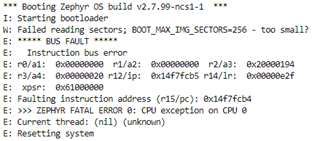
I am just using a simple hello world app to try and get this working. The partitions.yml looks like it has placed the mcuboot_secondary on the external flash. But I don't know what the above error means. The default was 128 and I managed to figure out how to change to 256. 512 will make the image too large. I have read dev zone articles and searched the web for 2 days. But all suggestions usually don't work because they are out of date and the configuration options have changed with the latest Zephyr. I would really appreciate if you could point me to a working example that uses your latest SDK or up to date info. on how to solve this problem.

Thanks

/*
 * Copyright (c) 2012-2014 Wind River Systems, Inc.
 *
 * SPDX-License-Identifier: Apache-2.0
 */

#include <zephyr.h>
#include <sys/printk.h>

#define IMAGE_VERSION		CONFIG_MCUBOOT_IMAGE_VERSION

void main(void)
{
	printk("Hello World! board: %s image: %s\n", CONFIG_BOARD, IMAGE_VERSION);
}
nrf52dk_nrf52810.overlay8764.prj.conf7776.mcuboot.conf1423.zephyr.dts

Parents
  • Hi,

    I would really appreciate if you could point me to a working example that uses your latest SDK or up to date info. on how to solve this problem

    My colleague Simon have an example here:

    https://devzone.nordicsemi.com/f/nordic-q-a/82430/ncs-external-flash-ota-change-qspi-to-spi/345238#345238

    What nRF Connect SDK version are you using?

  • I am using version 1.9.1

    I began debugging MCUboot and finally figured out the settings and their dependencies. Now I have things building and seem to work. I can mount a file system on the storage partition and read/write files. So I am convinced the external flash is working.

    My question is does MCUMGR support image partitions on the external flash? When I use it to list the partitions only see the ones on the internal flash. I would like to use it to upload and test booting from external flash.

    > mcumgr -c nrf52 image list

    Images:
    image=0 slot=0
    version: 0.0.0
    bootable: true
    flags: active confirmed
    hash: 3cc864cc51508c03e70aa83fd49d47e0aaf943736eb7b1ac1472c69511eeb718
    Split status: N/A (0)

    The board.dts file looks like the partitions are defined and the partition manager seems to confirm it.

    west build -t partition_manager_report
    -- west build: running target partition_manager_report
    [1/1] cmd.exe /C "cd /D D:\Projects\Nordic\OTA\littlefs_ub... D:/Projects/Nordic/OTA/littlefs_ubx/build/partitions.yml"
    external_flash (0x40000 - 256kB):
    +-------------------------------------------+
    | 0x0: mcuboot_secondary (0x24000 - 144kB) |
    | 0x24000: external_flash (0x1c000 - 112kB) |
    +-------------------------------------------+

    flash_primary (0x30000 - 192kB):
    +-------------------------------------------------+
    | 0x0: mcuboot (0xc000 - 48kB) |
    +---0xc000: mcuboot_primary (0x24000 - 144kB)-----+
    | 0xc000: mcuboot_pad (0x200 - 512B) |
    +---0xc200: mcuboot_primary_app (0x23e00 - 143kB)-+
    | 0xc200: app (0x23e00 - 143kB) |
    +-------------------------------------------------+

    sram_primary (0x6000 - 24kB):
    +------------------------------------------+
    | 0x20000000: sram_primary (0x6000 - 24kB) |
    +------------------------------------------+

    From ubx_bmd330eval_nrf52810.dts

    &flash0 {

        partitions {
            compatible = "fixed-partitions";
            #address-cells = <1>;
            #size-cells = <1>;

            boot_partition: partition@0 {
                label = "mcuboot";
                reg = <0x00000000 0xc000>;
            };
            slot0_partition: partition@c000 {
                label = "image-0";
                reg = <0x0000C000 0xd000>;
            };
            slot1_partition: partition@19000 {
                label = "image-1";
                reg = <0x00019000 0xd000>;
            };
            scratch_partition: partition@26000 {
                label = "image-scratch";
                reg = <0x00026000 0x3000>;
            };
            storage_partition: partition@29000 {
                label = "storage";
                reg = <0x00029000 0x00007000>;
            };
        };
    };
Reply
  • I am using version 1.9.1

    I began debugging MCUboot and finally figured out the settings and their dependencies. Now I have things building and seem to work. I can mount a file system on the storage partition and read/write files. So I am convinced the external flash is working.

    My question is does MCUMGR support image partitions on the external flash? When I use it to list the partitions only see the ones on the internal flash. I would like to use it to upload and test booting from external flash.

    > mcumgr -c nrf52 image list

    Images:
    image=0 slot=0
    version: 0.0.0
    bootable: true
    flags: active confirmed
    hash: 3cc864cc51508c03e70aa83fd49d47e0aaf943736eb7b1ac1472c69511eeb718
    Split status: N/A (0)

    The board.dts file looks like the partitions are defined and the partition manager seems to confirm it.

    west build -t partition_manager_report
    -- west build: running target partition_manager_report
    [1/1] cmd.exe /C "cd /D D:\Projects\Nordic\OTA\littlefs_ub... D:/Projects/Nordic/OTA/littlefs_ubx/build/partitions.yml"
    external_flash (0x40000 - 256kB):
    +-------------------------------------------+
    | 0x0: mcuboot_secondary (0x24000 - 144kB) |
    | 0x24000: external_flash (0x1c000 - 112kB) |
    +-------------------------------------------+

    flash_primary (0x30000 - 192kB):
    +-------------------------------------------------+
    | 0x0: mcuboot (0xc000 - 48kB) |
    +---0xc000: mcuboot_primary (0x24000 - 144kB)-----+
    | 0xc000: mcuboot_pad (0x200 - 512B) |
    +---0xc200: mcuboot_primary_app (0x23e00 - 143kB)-+
    | 0xc200: app (0x23e00 - 143kB) |
    +-------------------------------------------------+

    sram_primary (0x6000 - 24kB):
    +------------------------------------------+
    | 0x20000000: sram_primary (0x6000 - 24kB) |
    +------------------------------------------+

    From ubx_bmd330eval_nrf52810.dts

    &flash0 {

        partitions {
            compatible = "fixed-partitions";
            #address-cells = <1>;
            #size-cells = <1>;

            boot_partition: partition@0 {
                label = "mcuboot";
                reg = <0x00000000 0xc000>;
            };
            slot0_partition: partition@c000 {
                label = "image-0";
                reg = <0x0000C000 0xd000>;
            };
            slot1_partition: partition@19000 {
                label = "image-1";
                reg = <0x00019000 0xd000>;
            };
            scratch_partition: partition@26000 {
                label = "image-scratch";
                reg = <0x00026000 0x3000>;
            };
            storage_partition: partition@29000 {
                label = "storage";
                reg = <0x00029000 0x00007000>;
            };
        };
    };
Children
No Data
Related