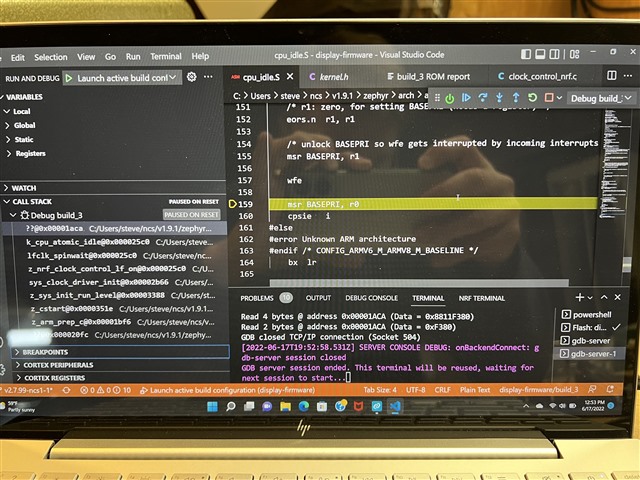
New PCB with BT840 is stuck in k_cpu_atomic_idle(). Suggestions?

Hi Folks,

I am bringing up a new printed circuit board with a Fanstel BT840 (nRF52840). When I install any firmware, even Blinky, it simply gets stuck in k_cpu_atomic_idle. It never reaches a breakpoint set at main().

Both Blinky and my application run fine on a nRF52840 DK, and on the nRF52840 Dongle.

I have confirmed that my JTAG probe is able to install the firmware on the BT840 successfully. I've built two different boards to help assure it isn't a soldering issue. I've included the external crystal.

My questions:
- Any eureka comments that would explain why this is happening?
- Would this more likely be a hardware issue or a Zephyr configuration issue?
- If you were debugging this issue, what would be the next steps you would take?

Thanks for your help,

Steve
Parents
  • Hi Steve,

    I am facing similar issue on Fanstel BT 840 using nRF SDK - nRF5_SDK_for_Thread_and_Zigbee_v4.1.0_32ce5f8. The issue seems to be with clock setting but I am not sure about it.
    In your case, you can try setting appropriate clock settings. For that you need to recompile the application, instead of using prebuilt hex.
    Clock setting required for Thread stack:
    CLOCK_CONFIG_LF_SRC 0
    CLOCK_CONFIG_LF_CAL_ENABLED 1
    Clock setting required for Bluetooth stack:
    #define NRF_SDH_CLOCK_LF_SRC 0
    #define NRF_SDH_CLOCK_LF_RC_CTIV 16
    #define NRF_SDH_CLOCK_LF_RC_TEMP_CTIV 2
    #define NRF_SDH_CLOCK_LF_ACCURACY 1
    These pointers might help you.

    Regards,
    Rajendra

  • Thanks for the tips, Rajendra. Much appreciated. I'm using Zephyr, but I think your advice that it has to do with the clock is right.  My next steps are to get an EV BT840 and make sure it all runs on their board before diagnosing my board. 

    Best,

    Steve

Reply Children
No Data
Related