Getting "Error when running fw program" when trying to write .hex file

Hi, getting this not very descriptive error when trying to upload hex file. I've made the .hex file in platformio. Sounds like i'm missing some software?

Any clues?

Device NRF52840 dongle (nRF6829, 2.1.0, 2021.51)

2022-06-21T12:41:41.945Z INFO Hash is generated by SHA256
2022-06-21T12:41:50.969Z INFO Performing DFU. This may take a few seconds
2022-06-21T12:41:50.984Z INFO Opening serial port for SDFU programming: 0%
2022-06-21T12:41:51.394Z INFO Opening serial port for SDFU programming: 100%
2022-06-21T12:41:51.445Z INFO Uploading image through SDFU: 0%
2022-06-21T12:41:51.492Z ERROR async task failure for id: 924035418510 msg: (Origin: "Error when running fw program.")
Michael

  • Hi,

    Is the hex file from platformio built for running on the nRF52840 Dongle? The dongle comes programmed with a bootloader + MBR, which can't be overwritten by the application if you want to program it through the USB port.

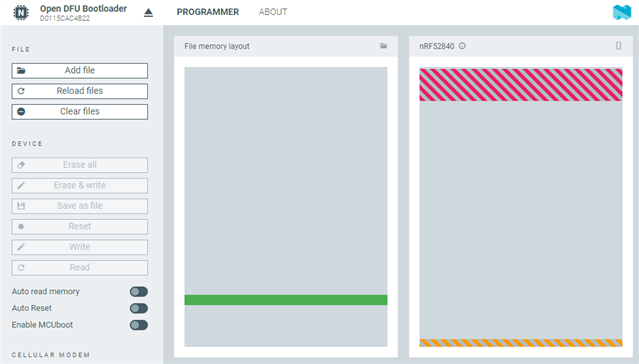
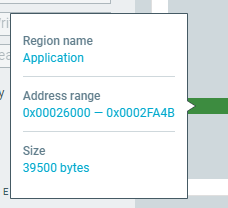
    If your hex-file is the green box in nRF Connect Programmer app, this looks a bit high in flash. Can you hover over it to see the start and end address of the application?

    Best regards,
    Jørgen

  • Hi, I believe i set things up right in platformio, i used this: https://raw.githubusercontent.com/maxgerhardt/pio-community-nrf52-example/main/boards/pca10059.json

    You probably know much more about it than I, but from the visual representation of the memory layouts it seemed like they were not overlapping.

    Attached screenshot of hover:

    The programming seems to never start. What exactly is "fw program" from the error message?

    I guess either the board definition profile i got from github is for a different dongle, or something is incorrectly set up on my computer.

    Best regards,

    Michael

  • Hi, I was trying to flash nrf connect ble application onto my nrf52 dongle:

    github.com/.../hex

    But run into the same error after donwloaded the hex file file.

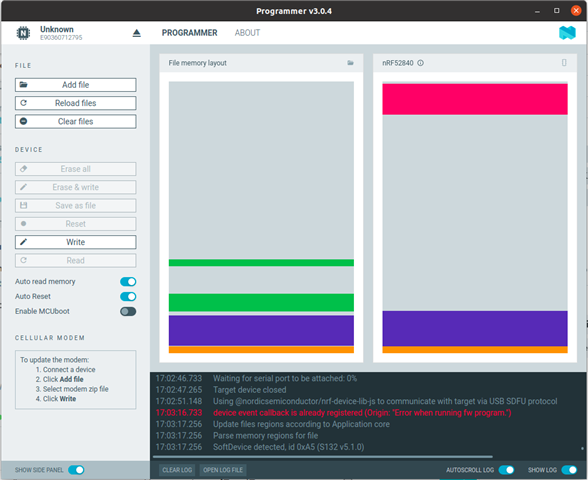
    I am using nRF Connect v 3.12.0 running on Ubuntu

    nRF Connect Programmer v 3.0.4

    Jlink v6.62d 

    17:02:41.176
    Does not need to be reloaded: /home/yihuiwang/Documents/bl653/connectivity_1.0.0_usb_with_s132_5.1.0.hex
    17:02:41.178
    SdReq for SoftDevice is set as 0x00.
    17:02:41.179
    Hash is generated by SHA256
    17:02:41.181
    Hash is generated by SHA256
    17:02:41.185
    Performing DFU. This may take a few seconds
    17:02:41.206
    Opening serial port for SDFU programming: 0%
    17:02:41.606
    Opening serial port for SDFU programming: 100%
    17:02:41.608
    Uploading image through SDFU: 0%
    17:02:41.782
    Uploading image through SDFU: 1%
    17:02:41.783
    Uploading image through SDFU: 2%
    17:02:41.783
    Uploading image through SDFU: 3%
    17:02:41.944
    Uploading image through SDFU: 4%
    17:02:41.944
    Uploading image through SDFU: 5%
    17:02:41.945
    Uploading image through SDFU: 6%
    17:02:42.106
    Uploading image through SDFU: 7%
    17:02:42.106
    Uploading image through SDFU: 8%
    17:02:42.106
    Uploading image through SDFU: 9%
    17:02:42.106
    Uploading image through SDFU: 10%
    17:02:42.267
    Uploading image through SDFU: 11%
    17:02:42.267
    Uploading image through SDFU: 12%
    17:02:42.268
    Uploading image through SDFU: 13%
    17:02:42.429
    Uploading image through SDFU: 14%
    17:02:42.429
    Uploading image through SDFU: 15%
    17:02:42.430
    Uploading image through SDFU: 16%
    17:02:42.590
    Uploading image through SDFU: 17%
    17:02:42.591
    Uploading image through SDFU: 18%
    17:02:42.591
    Uploading image through SDFU: 19%
    17:02:42.591
    Uploading image through SDFU: 20%
    17:02:42.752
    Uploading image through SDFU: 21%
    17:02:42.752
    Uploading image through SDFU: 22%
    17:02:42.752
    Uploading image through SDFU: 23%
    17:02:42.913
    Uploading image through SDFU: 24%
    17:02:42.913
    Uploading image through SDFU: 25%
    17:02:42.913
    Uploading image through SDFU: 26%
    17:02:43.075
    Uploading image through SDFU: 27%
    17:02:43.075
    Uploading image through SDFU: 28%
    17:02:43.075
    Uploading image through SDFU: 29%
    17:02:43.076
    Uploading image through SDFU: 30%
    17:02:43.236
    Uploading image through SDFU: 31%
    17:02:43.237
    Uploading image through SDFU: 32%
    17:02:43.237
    Uploading image through SDFU: 33%
    17:02:43.397
    Uploading image through SDFU: 34%
    17:02:43.398
    Uploading image through SDFU: 35%
    17:02:43.398
    Uploading image through SDFU: 36%
    17:02:43.559
    Uploading image through SDFU: 37%
    17:02:43.560
    Uploading image through SDFU: 38%
    17:02:43.560
    Uploading image through SDFU: 39%
    17:02:43.721
    Uploading image through SDFU: 40%
    17:02:43.721
    Uploading image through SDFU: 41%
    17:02:43.721
    Uploading image through SDFU: 42%
    17:02:43.721
    Uploading image through SDFU: 43%
    17:02:43.882
    Uploading image through SDFU: 44%
    17:02:43.882
    Uploading image through SDFU: 45%
    17:02:43.882
    Uploading image through SDFU: 46%
    17:02:44.044
    Uploading image through SDFU: 47%
    17:02:44.044
    Uploading image through SDFU: 48%
    17:02:44.044
    Uploading image through SDFU: 49%
    17:02:44.205
    Uploading image through SDFU: 50%
    17:02:44.206
    Uploading image through SDFU: 51%
    17:02:44.206
    Uploading image through SDFU: 52%
    17:02:44.206
    Uploading image through SDFU: 53%
    17:02:44.367
    Uploading image through SDFU: 54%
    17:02:44.367
    Uploading image through SDFU: 55%
    17:02:44.368
    Uploading image through SDFU: 56%
    17:02:44.529
    Uploading image through SDFU: 57%
    17:02:44.529
    Uploading image through SDFU: 58%
    17:02:44.529
    Uploading image through SDFU: 59%
    17:02:44.690
    Uploading image through SDFU: 60%
    17:02:44.691
    Uploading image through SDFU: 61%
    17:02:44.691
    Uploading image through SDFU: 62%
    17:02:44.691
    Uploading image through SDFU: 63%
    17:02:44.853
    Uploading image through SDFU: 64%
    17:02:44.853
    Uploading image through SDFU: 65%
    17:02:44.853
    Uploading image through SDFU: 66%
    17:02:45.014
    Uploading image through SDFU: 67%
    17:02:45.014
    Uploading image through SDFU: 68%
    17:02:45.015
    Uploading image through SDFU: 69%
    17:02:45.176
    Uploading image through SDFU: 70%
    17:02:45.176
    Uploading image through SDFU: 71%
    17:02:45.176
    Uploading image through SDFU: 72%
    17:02:45.177
    Uploading image through SDFU: 73%
    17:02:45.338
    Uploading image through SDFU: 74%
    17:02:45.338
    Uploading image through SDFU: 75%
    17:02:45.338
    Uploading image through SDFU: 76%
    17:02:45.499
    Uploading image through SDFU: 77%
    17:02:45.499
    Uploading image through SDFU: 78%
    17:02:45.499
    Uploading image through SDFU: 79%
    17:02:45.661
    Uploading image through SDFU: 80%
    17:02:45.661
    Uploading image through SDFU: 81%
    17:02:45.661
    Uploading image through SDFU: 82%
    17:02:45.662
    Uploading image through SDFU: 83%
    17:02:45.823
    Uploading image through SDFU: 84%
    17:02:45.823
    Uploading image through SDFU: 85%
    17:02:45.823
    Uploading image through SDFU: 86%
    17:02:45.984
    Uploading image through SDFU: 87%
    17:02:45.985
    Uploading image through SDFU: 88%
    17:02:45.985
    Uploading image through SDFU: 89%
    17:02:46.146
    Uploading image through SDFU: 90%
    17:02:46.146
    Uploading image through SDFU: 91%
    17:02:46.146
    Uploading image through SDFU: 92%
    17:02:46.147
    Uploading image through SDFU: 93%
    17:02:46.308
    Uploading image through SDFU: 94%
    17:02:46.308
    Uploading image through SDFU: 95%
    17:02:46.309
    Uploading image through SDFU: 96%
    17:02:46.470
    Uploading image through SDFU: 97%
    17:02:46.470
    Uploading image through SDFU: 98%
    17:02:46.471
    Uploading image through SDFU: 99%
    17:02:46.631
    Uploading image through SDFU: 100%
    17:02:46.733
    Waiting for serial port to be attached: 0%
    17:02:47.265
    Target device closed
    17:02:51.148
    Using @nordicsemiconductor/nrf-device-lib-js to communicate with target via USB SDFU protocol
    17:03:16.733
    device event callback is already registered (Origin: "Error when running fw program.")
    17:03:17.256
    Update files regions according to Application core
    17:03:17.256
    Parse memory regions for file
    17:03:17.256
    SoftDevice detected, id 0xA5 (S132 v5.1.0)

    I have spent hours on this, but it still stays in bootloader with red led flashing. please advise.

Related