Beware that this post is related to an SDK in maintenance mode
More Info: Consider nRF Connect SDK for new designs

Bootloader Update with new size over BLE DFU service

Hi

Is there a possibility to update the bootloader himself over the BLE DFU?

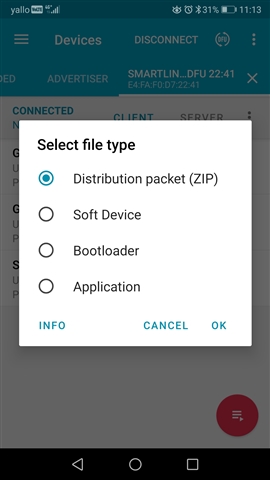
I have a new bootloader with a bigger size (MemoryMap changed) and I am wondering if I can upload old boards with the small bootloader over BLE DFU with the Nordic nrf Connect App, because there is under SelectFileType (Bootloader). Is this possible only if the size and memory map is equal or even if the size is bigger?

I checked if I can download te new Ditribution Packet (ZIP) on the old device with the old small bootloader, and yes, its possible. The application is new but the bootloader is still the old one. Even after Powereset the application is running wit the old bootloader, this makes me a little bit confusing, ow is this possible?

See: https://devzone.nordicsemi.com/f/nordic-q-a/89328/ota-dfu-bootloader-memory-map-increasing-size-in-pca10056_s140_ble

Regards, Dominik

Parents
  • Hi Dominik,

    Is there a possibility to update the bootloader himself over the BLE DFU?

    Yes.

    I have a new bootloader with a bigger size (MemoryMap changed) and I am wondering if I can upload old boards with the small bootloader over BLE DFU with the Nordic nrf Connect App, because there is under SelectFileType (Bootloader). Is this possible only if the size and memory map is equal or even if the size is bigger?

    The size of the bootloader cannot increase across the page boundary when doing DFU. Meaning: the start address must remain the same, and it cannot grow into the last two pages (MBR params and bootloader settings pages). The reason for this is that the bootloader start address is at the end of the MBR page, and that cannot be changed via DFU (it has to be done via an attached debugger as you would have to erase the MBR page and write it again).

  • Yes

    But in this case only over the SWD SWD upater with the nrfjprog?

    OTA is not possible if the start address is different, which is my case, right?

    The other question is, why the new build is possible to download with new start  adress, I gues because of the same keys in the building? (bootloader is still the old one after OTA (zip file), the application is new if I do a OTA on a old bootloader device with a higher start address)

    Thanks

  • The bootloader implements an inactivity timeout that applies in this and other cases. This is controlled by adjusting the NRF_BL_DFU_INACTIVITY_TIMEOUT_MS parameter in the bootloader's sdk_config.h. The default value in our examples are 120000 ms, so 2 minutes.

    This is working, but only after flashing the RF over SWD with the programmer.

    If I update the file with nrf connect app and send the zip packet, this changing was not active. Why? The bootloader will be updated with the zip packet aswell, but the SDK config settings not?

  • I did not get this. Can you elaborate?

    Dominik Eugster said:
    The bootloader will be updated with the zip packet aswell, but the SDK config settings not?

    The sdk_config.h file for the bootloader is used when building the bootloader. That is then part of the resulting binary file. So regardless of how you update the bootloader, as long as it is successfully updated, all and any changes will be included (as you get the exact same binary bootloader file programmed in the end regardless of method being used).

  • checked again, not working with the new time if I choose this:

  • I don't understand the use case precisely. Is the bootloader that is on the device built with a timeout enabled, and what is that timeout? Can you test with a debug bootloader with RTT logging and check the log?

    A last point: If your WH is using a LFRC instead of an LFXO and WDT, then you may be seeing a bug in the bootloader where the LFCLK is not beng properly started after a soft reset, which prevents the inactivity timer from working. The fix for this is to modify this part of timer_init() in components\libraries\bootloader\nrf_bootloader_dfu_timers.c:

            if (!nrf_clock_lf_is_running())
            {
                nrf_clock_task_trigger(NRF_CLOCK_TASK_LFCLKSTART);
            }

    and reduce it to this:

            nrf_clock_task_trigger(NRF_CLOCK_TASK_LFCLKSTART);

Reply
  • I don't understand the use case precisely. Is the bootloader that is on the device built with a timeout enabled, and what is that timeout? Can you test with a debug bootloader with RTT logging and check the log?

    A last point: If your WH is using a LFRC instead of an LFXO and WDT, then you may be seeing a bug in the bootloader where the LFCLK is not beng properly started after a soft reset, which prevents the inactivity timer from working. The fix for this is to modify this part of timer_init() in components\libraries\bootloader\nrf_bootloader_dfu_timers.c:

            if (!nrf_clock_lf_is_running())
            {
                nrf_clock_task_trigger(NRF_CLOCK_TASK_LFCLKSTART);
            }

    and reduce it to this:

            nrf_clock_task_trigger(NRF_CLOCK_TASK_LFCLKSTART);

Children
  • The time is ok. I had the default time of 120s on my old bootloader. This is working correctly. Then I flash with the nrf connect app the new zip file with the new bootloader merged with 30s.

    Now If I do a DFU OTA with a corrupted (wrong private key) zip file, the DFU is starting, dects the wrong key and disconnect BLE. all correct. Then the bootloder start the inactive delay and switch back to application after time x. But this time is still 120s instead of 30s. An Update to 30s is only happening if I flash the nRF over the cable with nrfjprog.

    Or do I have to do a power on Reset after OTA manually (which is happening with the nrfjprog of course)

  • Hm, that does not make sense to me. The timer is all handled in SW, so if the new bootloader with 30 s timeout is what is running, the timeout should be 30 s. Did you successfully update to the new bootloader with 30s timeout (via DFU) before you tested updating to an image with invalid key that should fail? Or is it still the old bootloader that is running on the device? If it is the old, this is as expected. As this seems really odd, I suggest you verify that the new bootloader is running when this happens. For instance by adding different log string in the two versions, or toggling different GPIO's, or some other method you can use to easily see which bootloader version is actually running on the device.

    Dominik Eugster said:
    Or do I have to do a power on Reset after OTA manually (which is happening with the nrfjprog of course)

    Power-on reset is not needed. (A bootloader-update involves a soft reset reset as the MBR is responsible for copying the bootloader and that runs first, but this is part of the update procedure, and as long as it is successful all is good).

  • I will test again, yes t really sounds strange but I will check this again. Thanks

Related