it is seem that APPROTECT permanently enabled

Hello,

Every time I restart the power(power on reset) and then use the command nrfjprog to download, the following error will appear

After I use the nrfjprog --recover command, I can download the firmware, but the power on reset, and then the readback protection prompted above appears again when i download the firmware again.

So it seems as long as power on reset, readback protection will be re-enabled.

So my question is how to permanently disable readback protection?

Parents
  • Hi there,

    Are you using nRF5SDK or NCS?

    Could you also provide what version of the nRF52833 that you're using?

    regards

    Jared

  • many thx for your support.

    i am using nRF5SDK.

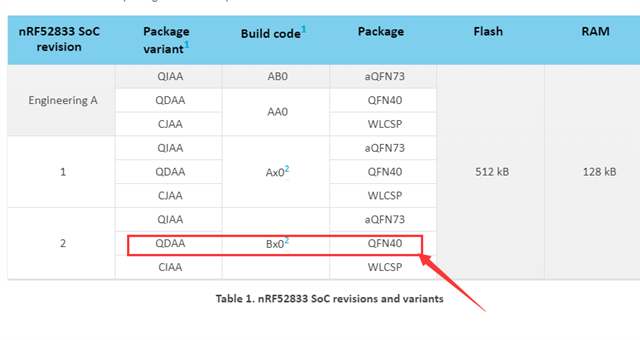
    Read the package variant and build code from the marking on the top of the nRF52 SoC is N52833  QDAAB0  2117AA

    The package is QFN40,so the version should be circled in red in the image below:


  • Hi,

    You're using the latest version which behaves a bit different then the older ones in regards to App protect. In the newest version app protect is enabled by default while it was the opposite in the older versions. nrfjprog --recover command will disable the app protect temporary until a reset occurs, which will effectively activate the readback protection again.

    Could you:

    1. Read out the UICR.APPROTECT register and NRF_APPROTECT.DISABLE register
    2. nrfjprog --recover
    3. Read out the UICR.APPROTECT register and NRF_APPROTECT.DISABLE register
    4. Flash your fw
    5. Read out the UICR.APPROTECT register and NRF_APPROTECT.DISABLE register
    6. Do a power-on-reset
    7. Read out the UICR.APPROTECT register and NRF_APPROTECT.DISABLE register

    You can read out the UICR.APPROTECT by:

    nrfjprog --memrd 0x10001208

    You can read out the NRF_APPROTECT.DISABLE register by:

    nrfjprog --memrd 0x40000558

    Also see this blogpost about APPROTECT and the documentation on it in the product specification here.

    regards

    Jared 

  • Hi,

    yes,i know how to read out these registers.but my question is how to keep readback protection disabled?

    I followed your above steps. do a power-on-reset, readback protection will still start again.

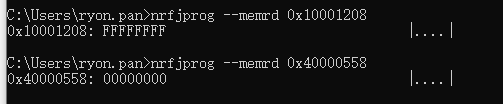
    The following figure is to read the value of two registers:

Reply Children
  • Hi,

    Ryon_pan said:
    yes,i know how to read out these registers.but my question is how to keep readback protection disabled?

    To disable readback protection you would have to:

    1. Start with a CTRL-AP ERASEALL operation (nrfjprog -e)
    2. Program code compiled with an MDK 8.44.1 or later, without ENABLE_APPROTECT defined.
    3. Write HwDisabled (0x5A) to UICR.APPROTECT
    4. Perform any reset to run the code. The programmed code from step 2 will open access port by writing to APPROTECT.DISABLE during start-up.

    regards

    Jared

Related