Serial LTE Modem Program for nRF9160 with hardware flow control: Undeclared RTS pin enumeration

Hello,

We need to enable hardware flow control in the serial LTE modem application (2.0.0 release) on the nRF9160 for use with an external MCU.

We have tried to do so with the following settings in the nrf9160dk_nrf9160_ns.conf file, trying both UART_0 (our preferred connection) and UART_2 (Nordic’s suggested connection):

CONFIG_SLM_CONNECT_UART_2=y
CONFIG_UART_0_NRF_HW_ASYNC_TIMER=2
CONFIG_UART_0_NRF_HW_ASYNC=y
CONFIG_SLM_WAKEUP_PIN=31
CONFIG_SLM_INDICATE_PIN=30
CONFIG_SLM_UART_HWFC_RUNTIME=y

The build fails with the following error:

[{ 

	"resource": "/c:/nordic/v2.0.0/nrf/applications/serial_lte_modem/build/zephyr/include/generated/devicetree_unfixed.h", 

	"owner": "cpptools", 

	"severity": 8, 

	"message": "'DT_N_S_soc_S_peripheral_40000000_S_uart_8000_P_rts_pin' undeclared (first use in this function); did you mean 'DT_N_S_soc_S_peripheral_40000000_S_uart_8000_P_status'?", 

	"source": "gcc", 

	"startLineNumber": 9186, 

	"startColumn": 38, 

	"endLineNumber": 9186, 

	"endColumn": 38 

}] 

Attempting to set hardware flow control during runtime with "AT#XSLMUART=115200, 1" also does not seem to work; it produces the following output from the LTE Link monitor:

2022-06-29T13:52:01.766Z DEBUG modem >> AT#XSLMUART? 
2022-06-29T13:52:01.775Z DEBUG modem << #XSLMUART: 115200,0 
2022-06-29T13:52:01.776Z DEBUG modem << OK 

2022-06-29T13:52:09.875Z DEBUG modem >> AT#XSLMUART=115200,1 
2022-06-29T13:52:09.883Z DEBUG modem << OK 

2022-06-29T13:52:14.949Z DEBUG modem >> AT#XSLMUART? 
2022-06-29T13:52:14.957Z DEBUG modem << #XSLMUART: 115200,0 
2022-06-29T13:52:14.959Z DEBUG modem << OK 

Could you please assist us in enabling hardware flow control?   

Thank you.

Parents Reply
  • Hi Charlie,

    The application now builds with "CONFIG_SLM_UART_HWFC_RUNTIME=y" in the  nrf9160dk_nrf9160_ns.conf file.

    Flashing /resetting does not seem to switch on hardware flow control if it was previously off, but the AT command now works, which is sufficient for our needs. Thank you. 

    2022-07-04T13:05:06.682Z INFO Modem port is opened
    2022-07-04T13:05:06.703Z DEBUG modem >> AT+CFUN?
    2022-07-04T13:05:06.736Z DEBUG modem << +CFUN: 0
    2022-07-04T13:05:06.741Z DEBUG modem << OK
    2022-07-04T13:05:15.436Z DEBUG modem >> AT#XSLMUART?
    2022-07-04T13:05:15.447Z DEBUG modem << #XSLMUART: 115200,0
    2022-07-04T13:05:15.453Z DEBUG modem << OK
    2022-07-04T13:05:23.623Z DEBUG modem >> AT#XSLMUART=115200,1
    2022-07-04T13:05:23.634Z DEBUG modem << OK
    2022-07-04T13:05:28.833Z DEBUG modem >> AT#XSLMUART?
    2022-07-04T13:05:28.845Z DEBUG modem << #XSLMUART: 115200,1
    2022-07-04T13:05:28.855Z DEBUG modem << OK

    Kind regards,

    Kimberly

Children
  • Hi Kimberly,

    Thanks for the feedback.

    Kimberly said:
    Flashing /resetting does not seem to switch on hardware flow control if it was previously off

    The default configuration is #XSLUMUART:115200,1 after you do erase and flash, I suspect this is what you did.

    If you only do flash without erasing or simply do power reset, the configuration in persisting memory will keep the same.

    Best regards,

    Charlie

  • Hi Charlie,

     Thank you for the info. 

    The default configuration is #XSLUMUART:115200,1 after you do erase and flash, I suspect this is what you did.

    Yes, HWFC is still zero with an erase and flash, though it can be changed with the AT command.

    Below is the terminal output (with the serial redacted) from the nRF Connect extension in VS Code for the erase and flash: 

    > Executing task: nRF Connect: Flash: serial_lte_modem/build (active) <
    
    Flashing build to undefined
    west flash -d c:\nordic\v2.0.0\nrf\applications\serial_lte_modem\build --skip-rebuild -r nrfjprog --dev-id  --erase
    
    -- west flash: using runner nrfjprog
    -- runners.nrfjprog: mass erase requested
    -- runners.nrfjprog: Flashing file: C:\nordic\v2.0.0\nrf\applications\serial_lte_modem\build\zephyr\merged.hex
    Parsing image file.
    Verifying programming.
    Verified OK.
    Applying pin reset.
    -- runners.nrfjprog: Board with serial number  flashed successfully.
    
    Terminal will be reused by tasks, press any key to close it.

    And the modem output in LTE Link monitor afterward:

    2022-07-05T14:07:29.567Z DEBUG modem << Ready
    2022-07-05T14:07:38.614Z DEBUG modem >> AT#XSLMUART?
    2022-07-05T14:07:38.622Z DEBUG modem << #XSLMUART: 115200,0
    2022-07-05T14:07:38.626Z DEBUG modem << OK

    Kind regards,

    Kimberly 

  • Hi Kimberly,

    I tested on an nRF9160DK V1.1.0 with the following firmware yesterday.

    Can you try ncs200_serial_lte_modem_uart2hwfl_merged.hex built from my project ncs200_serial_lte_modem_uart2hwfl.zip?

    Please update modem firmware to v1.3.2 and report which nRF9160DK version you are using if this problem still exists.

    Best regards,

    Charlie

  • Hi Charlie, 

    Thank you for sending through the files. I will update when I've managed to test them. 

    Kind regards,

    Kimberly 

  • Hi Charlie, 

    UART2 does not transmit to our external MCU with the hex file, a build from the provided zip or a build from the original program edited as above. Building produces the following warnings concerning  missing dependencies, which may be relevant:

    Serial LTE Modem: 

    	"resource": "/c:/nordic/v2.0.0/nrf/applications/serial_lte_modem/boards/nrf9160dk_nrf9160_ns.conf", 
    
    	"owner": "kconfig2", 
    
    	"severity": 4, 
    
    	"message": "CONFIG_UART_2_NRF_HW_ASYNC_TIMER couldn't be set. Missing dependencies:\nUART_2_NRF_HW_ASYNC && UART_2_NRF_UARTE", 
    
    	"startLineNumber": 25, 
    
    	"startColumn": 1, 
    
    	"endLineNumber": 25, 
    
    	"endColumn": 33 
    
    },{ 
    
    	"resource": "/c:/nordic/v2.0.0/nrf/applications/serial_lte_modem/boards/nrf9160dk_nrf9160_ns.conf", 
    
    	"owner": "kconfig2", 
    
    	"severity": 4, 
    
    	"message": "CONFIG_UART_2_NRF_HW_ASYNC was assigned the value y, but got the value n. Missing dependencies:\nUART_2_ASYNC && UART_2_NRF_UARTE", 
    
    	"startLineNumber": 26, 
    
    	"startColumn": 1, 
    
    	"endLineNumber": 26, 
    
    	"endColumn": 27 
    
    }] 
     

    Provided zip: 

    	"resource": "/c:/nordic/v2.0.0/nrf/applications/ncs200_serial_lte_modem_uart2hwfl/prj.conf", 
    
    	"owner": "kconfig2", 
    
    	"severity": 4, 
    
    	"message": "CONFIG_LOG_BACKEND_UART was assigned the value n, but got the value n. Missing dependencies:\nUART_CONSOLE", 
    
    	"startLineNumber": 19, 
    
    	"startColumn": 1, 
    
    	"endLineNumber": 19, 
    
    	"endColumn": 24 
    
    },{ 
    
    	"resource": "/c:/nordic/v2.0.0/nrf/applications/ncs200_serial_lte_modem_uart2hwfl/prj.conf", 
    
    	"owner": "kconfig2", 
    
    	"severity": 4, 
    
    	"message": "CONFIG_SLM_NRF52_DFU_LEGACY was assigned the value n, but got the value n. Missing dependencies:\nSLM_NRF52_DFU", 
    
    	"startLineNumber": 104, 
    
    	"startColumn": 1, 
    
    	"endLineNumber": 104, 
    
    	"endColumn": 28 
    
    }] 

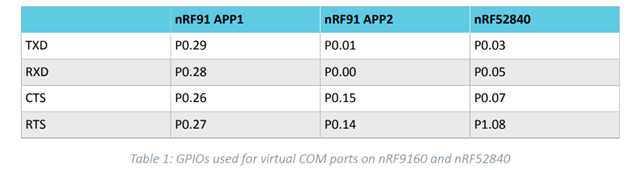
    We are using a NRF9160_xxAA_REV2 connected to a NRF5340_xxAA_ENGD, with the 01 to 14 pin connections: 

    The same issue is not seen with UART0. 

    Kind regards,

    Kimberly

Related