nRF Connect v3.11.1 gets stuck at blank Grey/blue screen on startup

Hi, I am currently getting started with the Thingy: 91 and am having trouble getting the SDK setup. 

I download the file from: https://www.nordicsemi.com/-/media/Software-and-other-downloads/Desktop-software/nRF-Connect-for-Desktop/3-11-1/nrfconnect-3.11.1-x86_64.AppImage and give it executable permissions and then run it from the command line: ./nrfconnect* The splash screen comes up and closes and then opens to the program screen that sits at a blueish background. I have switched to the 3.11.0 version and have been able to get the program to run successfully, however since the Tool Chain Manager is only compatible with the recent build, its a nonstarter.

I am running an Ubuntu 18.04 OS, and have installed all of the prerequisites at least at the minimum supported version. 

I was hoping you could help me troubleshoot this. 

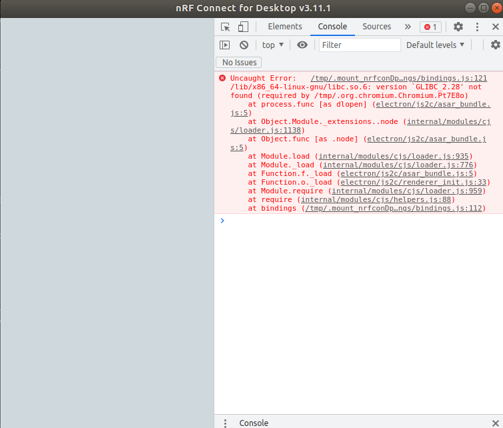
Here is what the window looks like as well as the console it shows, I am unable to install GLIBC 2.28 without corrupting my system so I assume that isn't the issue
Parents
  • Hello Christian, 

    I am running an Ubuntu 18.04 OS, and have installed all of the prerequisites at least at the minimum supported version. 

    Forwarding the statement from our developers:  

    “We have concluded that we don't support Ubuntu 18.04 LTS anymore.  

    We did try looking into the issue a bit due to the error specifying a missing library version. It would seem that installing it manually is either difficult and/or potentially disrupting to the OS.”  

    You need to upgrade your distribution to make v3.11.1 work or fall back to version 3.11.0.

    My very apologies for the inconvenience! 

    //Markus 

Reply
  • Hello Christian, 

    I am running an Ubuntu 18.04 OS, and have installed all of the prerequisites at least at the minimum supported version. 

    Forwarding the statement from our developers:  

    “We have concluded that we don't support Ubuntu 18.04 LTS anymore.  

    We did try looking into the issue a bit due to the error specifying a missing library version. It would seem that installing it manually is either difficult and/or potentially disrupting to the OS.”  

    You need to upgrade your distribution to make v3.11.1 work or fall back to version 3.11.0.

    My very apologies for the inconvenience! 

    //Markus 

Children
No Data
Related