

Hi,
I'm using SDK17.02 HID example on nRF52810.
What can I do so that my device is not automatically bound when it connects with other new devices.
Hi,
I'm using SDK17.02 HID example on nRF52810.
What can I do so that my device is not automatically bound when it connects with other new devices.
Hi Taylor,
By default when a phone connect to a HID device it will automatically request bonding. It's the default behavior because HID device is usually a keyboard or mouse so the link should be encrypted.
You can reject the pairing request from the phone if the device doesn't want to bond at the moment.
You can have a look at this post: Option to disable Peer Manager
Note that you can block connection from unwanted device by using whitelisting. This way you don't need to modify the peer manager.
Hi Hung Bui,
There is a new question.
I have enabled automatically request bonding. When I want to automatically disconnect with a phone, my device will automatically connecting again. For example the battery on low power.
I have tried using sd_ble_gap_disconnect and stopping advertising immediately, it doesn't work.
BTW, I could not delete bonding information because my device need to connect automatically when I start advertising again.
Hi Taylor,
If you disconnect and stop advertising it shouldn't be reconnected.
There are 2 things you need to check:
- Check if you actually disconnect after you call sd_ble_gap_disconnect (). You can check if you receive BLE_GAP_EVT_DISCONNECTED event. You can also verify using a sniffer.
- Check if the code automatically start advertising after disconnected. In most of our code we will start advertising after we disconnect. Please make sure you remove such code. If you use ble_advertising module, you need to set ble_adv_on_disconnect_disabled=true using ble_advertising_modes_config_set() call.
Hi Taylor,
If you disconnect and stop advertising it shouldn't be reconnected.
There are 2 things you need to check:
- Check if you actually disconnect after you call sd_ble_gap_disconnect (). You can check if you receive BLE_GAP_EVT_DISCONNECTED event. You can also verify using a sniffer.
- Check if the code automatically start advertising after disconnected. In most of our code we will start advertising after we disconnect. Please make sure you remove such code. If you use ble_advertising module, you need to set ble_adv_on_disconnect_disabled=true using ble_advertising_modes_config_set() call.
Hung Bui, thanks for your reply.
If you disconnect and stop advertising it shouldn't be reconnected.
I used wrong handle in sd_ble_gap_adv_stop(uint8_t adv_handle), I have solved it now.
I have public a problem about NRF_ERROR_FORBIDDEN when using HID, and Nordic replied to me
"You have to ensure that you go through pairing before you try to send anything over the link, since the HID service requires encryption to be enabled. "
Actually, I solved it with a wrong way, and I closed this ticket -_-.So what should I do to make sure HID service paring and requiring encryption have done?
Hi Taylor,
By default the HID service requires encryption. So you don't need to do anything.
For example you can find in the HIDs example in the SDK: Just work pairing is required: 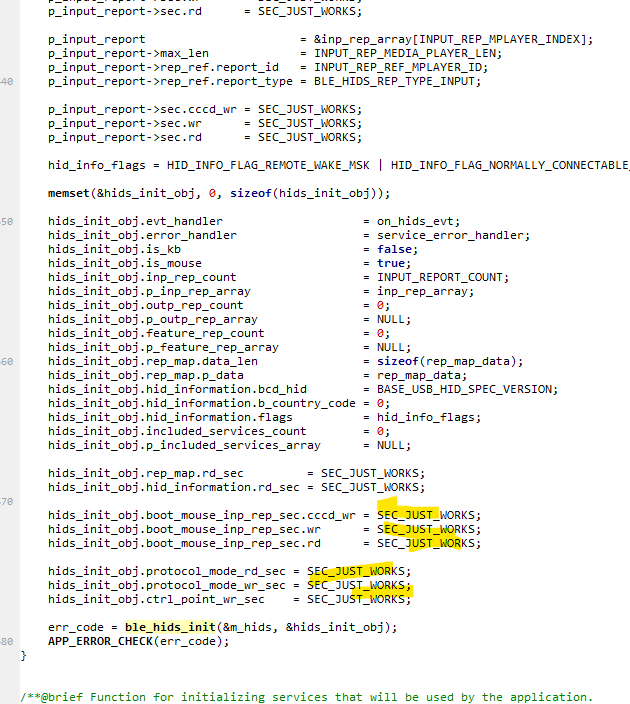
Sorry for my description.
I mean how could I get the status of finishing pairing? After that I need to send HID data.
Hi again,
If you have a look at the ble_hids_mouse example you can find PM_EVT_CONN_SEC_SUCCEEDED event in pm_evt_handler().
It's when the link is encrypted.
But note that by default if the link is not encrypted the CCCD will not be enabled and you won't be able to send any notification.

