Setting Up OTA DFU for BMD-350-EVAL Board Windows 10

Hello,

I've been struggling to follow along with this tutorial:  Getting started with Nordic's Secure DFU bootloader, a step by step guide 

Is this the most up to date instructions for how to update the device over bluetooth?

I'm using SEGGER 5.68 and nRF 17.1.0

Thanks,
Caleb

Parents Reply Children
  • I've installed the GOW package using GOW.exe
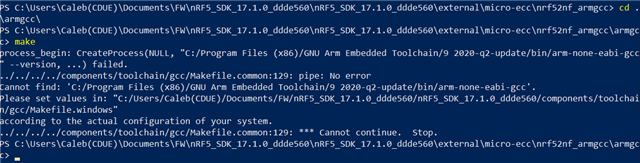
    However I am getting a different error.

    C:\Users\Caleb(CDUE)\Documents\FW\OTA Work\nRF5SDK153059ac345\nRF5_SDK_15.3.0_59ac345\external\micro-ecc\nrf52nf_armgcc\armgcc>make
    mkdir _build
    'C:\Users\CALEB' is not recognized as an internal or external command,
    operable program or batch file.
    make: *** [../../../../components/toolchain/gcc/Makefile.common:254: _build] Error 1

    The contents of nRF5_SDK_15.3.0_59ac345\components\toolchain\gcc\makefile.windows

    I've modified this to point to where GNU is installed on my PC so I am now getting a new error.

    GNU_INSTALL_ROOT ?= C:/Program Files (x86)/GNU Tools ARM Embedded/5.4 2016q3/bin/
    GNU_VERSION := 5.4.1
    GNU_PREFIX := arm-none-eabi

    I'm confused as to why this needs to be referenced as one of the features of GOW is that it adds all binaries to the windows path.

  • Hi,

    Did you get to the bottom of this?

    Regarding the first issue, I think there may be issues with parenthesis in the path, so that may be the issue there.

    Regarding GNU_INSTALL_ROOT etc in the makefile.windows, that must be set to be correct for your specific environment. The reason for this not using whatever is in your path is that in some cases you may have different SDKs etc installed, each which you for some reason want to use with different specific versions of ARM GCC (typically you want to use the version that was used in release testing, and which is specified in the release notes).

  • Though I had installed ARM GCC and specified the path the issue was I was using windows command prompt.
    I had a call with support and they informed me that I should download Cygwin64 and install make through there. After that I was able to build micro ECC

Related