Entering eDRX and PSM mode on the nRF9160

I was wondering how one might get the nRF9160 to enter the low power modes when making my own firmware? If possible could someone point me in the direction of an implementation of this in the examples perhaps?


Presumably, the Asset_tracker_v2 sample application would have such functionality in there somewhere?

Thanks in advance!

Parents
  • I've found by default the nRF9160 should enter a low power mode.

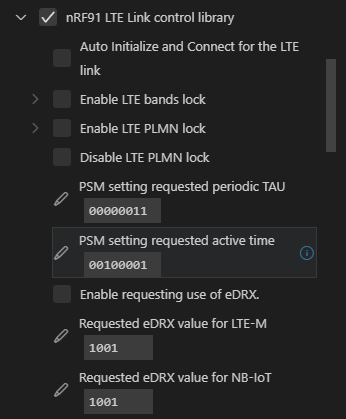
    It can be set up in KConfig -> Modules -> nrf -> Nordic nRF Connect -> Libraries -> nRF91 LTE Link control library

    Below is a snapshot of a default project:

    The settings for Requested Periodic TAU and Requested Active Time can be found at infocenter.nordicsemi.com/index.jsp

    The other area you may need to concentrate on is the UART (console). It can consume a bit of current, if enabled.

  • Thank you very much for this, though I've got a follow up question in that with the asset_tracker_v2 application, the setting for PSM seems to be set to the maximum unit time (110 for bits 8-6) but that doesn't seem to be a very efficient way for the nRF9160 to sleep since by default, it seems to publish data to nRF Cloud every 2 minutes or so.

    Is there any way to confirm that the nRF9160 is indeed going into PSM mode?

    Additionally, is there a function to set the nRF9160 to go into PSM mode, or is that handled differently?

Reply
  • Thank you very much for this, though I've got a follow up question in that with the asset_tracker_v2 application, the setting for PSM seems to be set to the maximum unit time (110 for bits 8-6) but that doesn't seem to be a very efficient way for the nRF9160 to sleep since by default, it seems to publish data to nRF Cloud every 2 minutes or so.

    Is there any way to confirm that the nRF9160 is indeed going into PSM mode?

    Additionally, is there a function to set the nRF9160 to go into PSM mode, or is that handled differently?

Children
No Data
Related