

My nRF Connect SDK extension in VS Code did an auto update this morning, and now my whole IDE is non-functional.
This is the error I get when I go to the Quick Setup
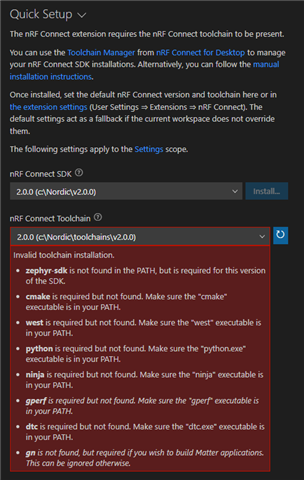
It seems unable to find any of the toolchain stuff.
I've literally uinstalled and reinstalled everything associated with nRF (Command Line Tools, Toolchain Manager, the SDK, Visual Studio Code) numerous times, as well as deleting the:
.vscode
.nrfutil
.nrfconnect-apps
directories, but its still coming up with this error.
It also seems to be "remembering" some of my old directories and workspaces, which for the life of me I can't understand because I thought I'd hosed all of that old info out with all of the above.
I'm basically unable to do any development, because my IDE is unable to do a build.
Has anyone seen this issue before and able to provide me with a fix?
Cheers,
Mike

