MCUBoot Application not starting Program on Custom nrf5340 PCB

Hello, 

I followed the following guide for creating a modified Blinky example app that boots from the mcuboot. I attempted to flash both the merged.hex and zephyr.elf to a custom board with the nrf5340 processor. 

The sample should just toggle the following pins high (P0.20, P0.23, P0.24) every second to test an LED and some test points on the custom board. 

The program compiles and appears to flash to my board when using the following methods: 

Using 3rd Party J-Link Programmer: 

Programmer: J-Link EDU Mini

Software:  J-Flash Lite
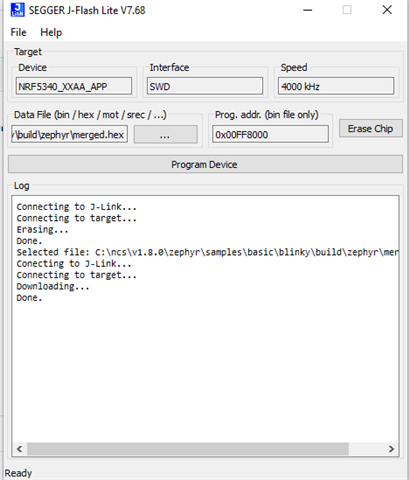
 

Output using West Flash : 

-- west flash: rebuilding
[0/4] Performing build step for 'mcuboot_subimage'
ninja: no work to do.
-- west flash: using runner nrfjprog
Using board 1050041106
-- runners.nrfjprog: Flashing file: C:\ncs\v1.8.0\zephyr\samples\basic\blinky\build\zephyr\merged.hex
Parsing image file.
Applying system reset.
Verified OK.
Applying pin reset.
-- runners.nrfjprog: Board with serial number 1050041106 flashed successfully.

nrf5340DK board Modified for Debug out (soldering SB47 Pad) Flashed Using SES Debug Console: 

Program builds and I am able to flash the device through debug but again nothing is appearing when probing the oscillator with my logic analyzer. 

- The debugger does not enter the main program, it hangs in cpu idle unable to detect the clock. 

None of the pins are being driven high when attempting to measure them with a logic analyzer, and when I attempt to prob the oscillator, I dont see a clock  pulse. This to me indicates that the bootloader is being flashed onto the board but there is perhaps an issue in software. Maybe I am missing something that was not in the guide? 

Attached is a copy of the mcuboot + blinky program I developed. 

Any help would be appreciated. 

Thanks, 

Matt 
Parents
  • Hello again,

    First, I should mention that this is a slightly older tutorial, and it is based on NCS 1.4. I see that you are using NCS 1.8 which might be an issue. I'm not sure if this is a problem yet, but just know that there are newer tutorials available.

    I am not sure if you are able to debug/program the SoC on the DK with the onboard debugger if you have shorted SB47. Are you able to flash a simple Blinky sample to your DK? Are you using an additional external debugger?

    Regards,

    Elfving

Reply
  • Hello again,

    First, I should mention that this is a slightly older tutorial, and it is based on NCS 1.4. I see that you are using NCS 1.8 which might be an issue. I'm not sure if this is a problem yet, but just know that there are newer tutorials available.

    I am not sure if you are able to debug/program the SoC on the DK with the onboard debugger if you have shorted SB47. Are you able to flash a simple Blinky sample to your DK? Are you using an additional external debugger?

    Regards,

    Elfving

Children
  • Thanks for the updated tutorial. I'll give that a try. 

    Yes, when I flash it to a DK board the blinky example works. Im assuming this is because the DK board already has a bootloader. 

    I was told that shorting SB47 would allow me to use a DK board as a programmer/debugger according to these instructions for modifying for debug out

    And the only debugger I've used is the modified for debug output nrf5340-DK board. 

    Thanks for your help, 

    Matt 

  • I have followed the instructions you provided and still no clock signal. 

    I tried using the modified nrf to perform a DFU over serial using mcumgr and here is the following output: 

    c:\ncs\v1.8.0\nrfApps\serial_dfu_hello_world\build\zephyr>mcumgr --conntype serial --connstring "COM4,baud=115200" image upload -e app_update.bin
    39.71 KiB / 39.71 KiB [=======================================================================] 100.00% 2.30 KiB/s 17s
    Done

    c:\ncs\v1.8.0\nrfApps\serial_dfu_hello_world\build\zephyr>mcumgr --conntype serial --connstring "/dev/ttyACM0,baud=115200" image list
    Error: The system cannot find the path specified.

    c:\ncs\v1.8.0\nrfApps\serial_dfu_hello_world\build\zephyr>mcumgr --conntype serial --connstring "COM4,baud=115200" image list
    Images:
    image=0 slot=0
    version: 0.0.0
    bootable: true
    flags: active confirmed
    hash: c32d83a704ccc2ccd03ed91269f4fb0d25697c901f48d5e91c2d262b56bdb715
    image=0 slot=1
    version: 0.0.0
    bootable: true
    flags:
    hash: 2081b9546a86a83f164c58f48979bf929a975bb233abcbc852d11f5289a4ef65
    Split status: N/A (0)

    So it appears to be flashing the device. 

    Any other ideas? 

    Thanks, 

    Matt 

  • No problem.

    mattmacleod said:
    I was told that shorting SB47 would allow me to use a DK board as a programmer/debugger according to these instructions for modifying for debug out

    Where are you seeing this exactly? You can use the DK as an external programmer by simply using the debug out connector (J19), but you would have to program the external board yourself. If you want the DK to power it however you can solder SB47. Like it says there on infocenter:

    " While SB47 is shorted, it is not possible to program the onboard nRF5340 SoC even if the external board is unplugged."

    So I am a bit confused as to how you are successfully flashing a Blinky sample to it. Are you using the nRF USB or the main USB to power the DK? When attempting to flash the SoC on the DK, have you disconnected the 10-pin debug cable?

    Regards,

    Elfving

Related