Error with the faster period of 50ms in I2C/twi reading

 Hello Groups,

I'm trying to send I2C/twi data from nRF52832 using the Nordic development board with nRF Connect SDK 1.9.1.

Based on the sample project ble_app_uart, I read and added the I2C data of the accelerometer KX132 and sending out through the BLE mechanism.

It worked very well with reading and sending I2C data fast to the period, down to 60ms. But when I tried to send faster by setting the period down to 50ms then, I got the error at the function:

   __WEAK void app_error_fault_handler(uint32_t id, uint32_t pc, uint32_t info)

At

     NRF_BREAKPOINT_COND;

Any idea on this problem?

Thanks a lot for your time,

Jack

///////// code

// Note: In my application, I need to read the I2C fast to clear the FIFO buffer of the sensor.

#define SENSOR_RATE_MEAS_INTERVAL       APP_TIMER_TICKS(50)

static void application_timers_start(void)                     

{

    ret_code_t err_code;


    // Start application timers.

    err_code = app_timer_start(m_sensor_rate_timer_id, SENSOR_RATE_MEAS_INTERVAL, NULL);

    APP_ERROR_CHECK(err_code);


}

void twi_init(void)

{

       ret_code_t err_code;


       const nrf_drv_twi_config_t twi_sensor_config = {

          .scl = ARDUINO_SCL_PIN,

          .sda = ARDUINO_SDA_PIN,

          .frequency = NRF_DRV_TWI_FREQ_400K,

          .interrupt_priority = APP_IRQ_PRIORITY_HIGH,

          .clear_bus_init = false

       };


       err_code = nrf_drv_twi_init(&m_twi, &twi_sensor_config, twi_handler, NULL);

       APP_ERROR_CHECK(err_code);


       nrf_drv_twi_enable(&m_twi);

}


static void sensor_meas_timeout_handler(void* p_context)  

{

    // prepare data

    uint16_t length = PACKAGE_BLE_MAX_SIZE;

    ret_code_t      err_code;


    UNUSED_PARAMETER(p_context);

    kx132ReadFifo();


    err_code = ble_nus_data_send(&m_nus, BlePackageData, &length, m_conn_handle);

    if ((err_code != NRF_ERROR_INVALID_STATE) &&

        (err_code != NRF_ERROR_RESOURCES) &&

        (err_code != NRF_ERROR_NOT_FOUND))

    {

        APP_ERROR_CHECK(err_code);

    }


}

Parents
  • Hello,

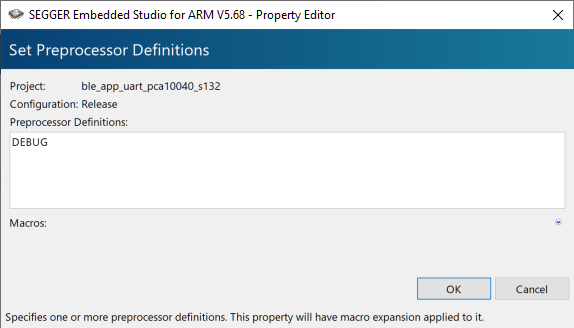
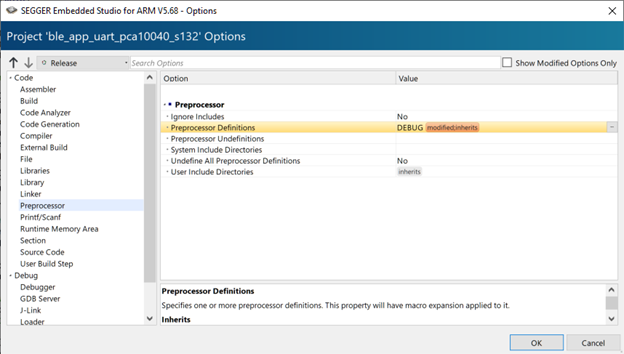
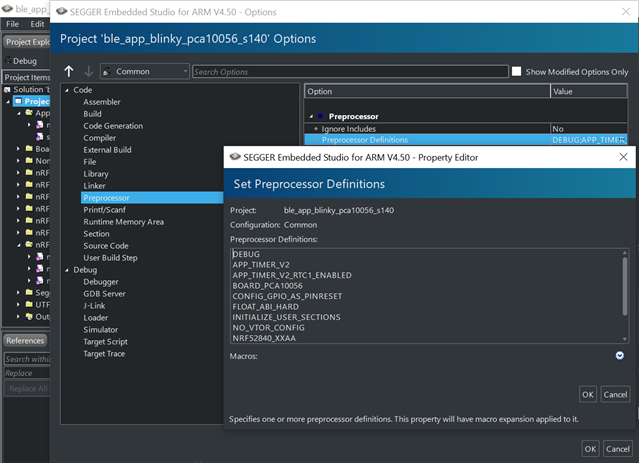
    Could you make sure to add DEBUG to your preprocessor defines, like shown in the included image?

    This will make your logger output a detailed error message whenever a non-NRF_SUCCESS error code is passed to an APP_ERROR_CHECK. Please do this, and let me know what the logger outputs when this happens.


    Best regards,
    Karl

  • Hi Karl,

    Thanks for your quick response.

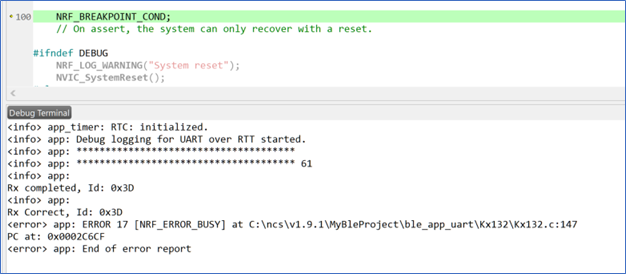
    I’ve add DEBUG and run again. There are error message that shows in the image.

    Best,

    Jack

    ErrorMessage

    // ===

    Setting Debug 01

  • Hello Jack,

    Jack Phan said:
    Thanks a lot for your information and explanation.

    No problem at all, I am happy to help! :) 

    Jack Phan said:
    • I cannot read faster than 50ms because the nrf_drv_twi_tx(..) function will return the error NRF_ERROR_BUSY when we read faster than 50ms?
    • Or, the nrf_drv_twi_tx(..) function can read faster than 50ms, but my sensor Kx132 cannot be read faster than 50ms?
    • I want to read faster than 50ms on my sensor Kx132. Can you please advise a method that can help me?

    There is no limitation in the nrfx driver that limits the speed, so we will need to look into what else might be causing this.
    The first thing I would do is to check the datasheet for your sensor, to see if it has any particular requirements for the speed and read/write requests.

    If there is no limitation in the datasheet either we will need to look at why the reads/writes are taking so long - for this we will need to use a logic analyzer to see what is actually happening on the lines.
    From the logic analyzer trace we would be able to see if any of the devices are holding up the transfers from their end, causing the delays.

    Do you have access to a logic analyzer to get these traces?

    Best regards,
    Karl

  • Hi Karl,

    I’ll check the document of the sensor Kx132 and will try to get a signal from my logic analyzer, Saleae, and then will update you.

    I saw an example of Nordic TWI/I2C on the temperature sensor LM75B (examples\peripheral\twi_sensor). Did you have a chance to read this sensor up to 50ms?

    Thanks,

    Jack

  • Hello Jack,

    Jack Phan said:
    I saw an example of Nordic TWI/I2C on the temperature sensor LM75B (examples\peripheral\twi_sensor). Did you have a chance to read this sensor up to 50ms?

    I do not have an LM75B sensor on hand right now to test this, so I have not performed any tested this myself.
    How big is each of your TWI messages, by the way? Just so we can get some reference of the speed you are achieving.

    Jack Phan said:
    I’ll check the document of the sensor Kx132 and will try to get a signal from my logic analyzer, Saleae, and then will update you.

    I look forward to hearing any update! :) 

    Best regards,
    Karl

  • Hi Karl,

    I found the problem.

    The error is busy because it period reads data during the initial sensor setting in the main loop. So I put a flag to wait until the setting is completed.

    Thanks a lot for your time,

    Jack


    // ===============

        IsSensorInitReady = true;

        // Enter main loop.

        for (;;)

        {

            idle_state_handle();

        }


    // ==============

    static void sensor_meas_timeout_handler(void* p_context)

    {

        if (IsSensorInitReady == false) { return; }

        // prepare data

        uint16_t length = PACKAGE_BLE_MAX_SIZE;

        ret_code_t      err_code;


        UNUSED_PARAMETER(p_context);

        kx132ReadFifo();


        err_code = ble_nus_data_send(&m_nus, BlePackageData, &length, m_conn_handle);

        if ((err_code != NRF_ERROR_INVALID_STATE) &&

            (err_code != NRF_ERROR_RESOURCES) &&

            (err_code != NRF_ERROR_NOT_FOUND))

        {

            APP_ERROR_CHECK(err_code);

        }


    }
  • Hello again, Jack

    I am glad to hear that you were able to resolve the root of this issue - thank you for sharing the solution as well.

    Jack Phan said:
    Thanks a lot for your time,

    It is no problem at all - we are happy to help you!

    Please do not hesitate to open a new ticket if you should encounter any other issues or questions in the future.

    Good luck with your development!

    Best regards,
    Karl

Reply Children
No Data
Related