ncs cmd line abnormal

hi support team,

NCS SDK is now available, customer need to use cmd line tool to build demo and flash;

but find out that we have to open cmd through "nrf connect--->toolchain manager --> open command prompt", and building project is working,
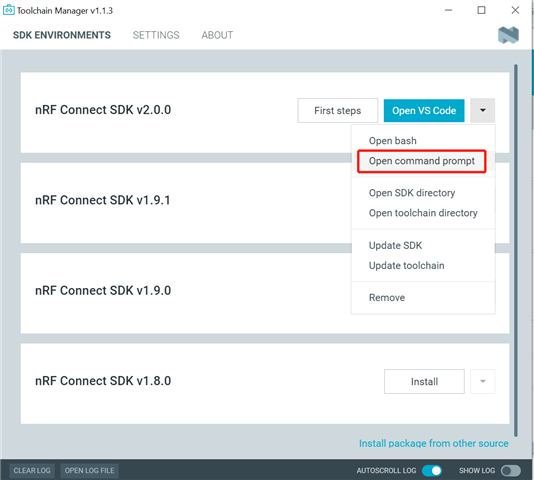
if we open through "ncs2.0.0-->toolchains-->v2.0.0-->git-cmd.exe", and building project is not working; however all the versions previously is normally through this method.

how can we fix this?

Thanks,

Regards.

Parents
  • Hello,

    The reason for this is likely that the Toolchain Manager 'open command prompt' option sources its environment variables from different files, such as v2.0.0/zephyr/zephyr-env.cmd.

    if we open through "ncs2.0.0-->toolchains-->v2.0.0-->git-cmd.exe", and building project is not working

    The toolchain for NCS v2.0.0 and onwards have been moved to be located next to the v2.0.0 SDK folder, so it would be PATH/v2.0.0 and PATH/toolchains/v2.0.0. As mentioned, the issue here is likely that the git-cmd.exe does not source its environment variables from all the correct locations, such as in the Toolchain Manager->Open command prompt case.

    however all the versions previously is normally through this method.

    Could you clarify what you mean by this last sentence?

    Best regards,
    Karl

  • Hi Karl,

    i mean before ncs2.0.0, we can open cmd with "ncs1.9.1-->toolchains-->git-cmd.exe" all the versions before 2.0.0 are working normally, how can i fix this for ncs 2.0.0?

    Regards,

    William.

  • Hello William,

    I reached out to the Toolchain Manager team about this, and asked them how you could source the environment variables for a command prompt akin to what the Toolchain Manager 'Open Command prompt' is doing, and here is their reply:
    ---------------------------------------------------------------------------------

    There is no reliable and supported answer to that question. Eventually we will release a command line version of the toolchain manager and that will support getting that script.
    An unsupported way to get almost (see below) the script, is to use the env subcommand of the version of nrfutil-toolchain-manager that is bundled with the graphical Toolchain Manager. The script will depend on the way you invoke it. E.g. if I call
    %USERPROFILE%\.nrfconnect-apps\node_modules\pc-nrfconnect-toolchain-manager\resources\nrfutil-toolchain-manager\win32\nrfutil-toolchain-manager.exe env --as-script --install-dir C:\ncs --ncs-version v2.0.0
    in a command prompt, I get a different script when I call
    $USERPROFILE/.nrfconnect-apps/node_modules/pc-nrfconnect-toolchain-manager/resources/nrfutil-toolchain-manager/win32/nrfutil-toolchain-manager.exe env --as-script --install-dir C:/ncs --ncs-version v2.0.0
    in a bash. That might already help the customer.
    Both invocations above depend on the SDKs and toolchains being installed at C:\ncs, which is the default it the users did not already install toolchains with older versions of the Toolchain Manager, otherwise the user needs to change the arguments accordingly.
    The little “almost” comment above: The commands above do not include setting the environment variable ZEPHYR_BASE. So, e.g. in my example above ZEPHYR_BASE needs additionally be set to C:\ncs\v2.0.0\zephyr.
    ---------------------------------------------------------------------------------

    Could you give this suggestion a try, and see if you then are able to source the terminal as you would have wanted?

    Best regards,
    Karl
  • Thanks Karl,

    i didn't try it out.

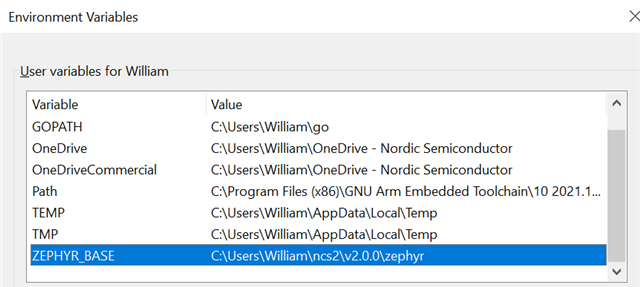
    so where do I set the ZEPHYR_BASE, is it correct as below?

    and i tried command prompt as below.

    am i missing something? or I was wrong anywhere?

    Regards,

    William.

  • hi Karl,

    i did as zephyr getting started. url: https://docs.zephyrproject.org/latest/develop/getting_started/index.html,

    and now i am able to build and flash ncs demo to dk.

    Thanks.

    Regards,

    William.

Reply Children
Related