

hi,
i am using sdk_17.0.2 and nrf52840.
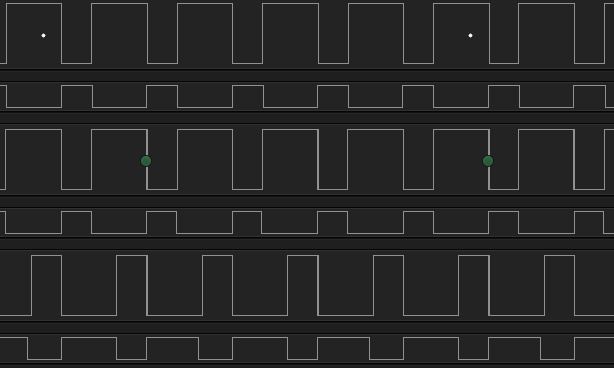
- I want to get 6 pwm outputs like in the picture.
- They all have to start at the same time.
- 20 khz signals should be.
- i am using mesh protocol.
/**
 */

#include <stdio.h>
#include <string.h>
#include "nrf_drv_pwm.h"
#include "app_util_platform.h"
#include "app_error.h"
#include "boards.h"
#include "bsp.h"
#include "app_timer.h"
#include "nrf_drv_clock.h"
#include "nrf_delay.h"

#include "nrf_log.h"
#include "nrf_log_ctrl.h"
#include "nrf_log_default_backends.h"


#define m_top     100

#define  led_red    13
#define  led_green  14
#define  led_blue   15


// Create an instance of pwm0
static nrfx_pwm_t m_pwm0 = NRFX_PWM_INSTANCE(0);
static nrfx_pwm_t m_pwm1 = NRFX_PWM_INSTANCE(1);
//static nrfx_pwm_t m_pwm2 = NRFX_PWM_INSTANCE(2);


// initialize the sequence values to 0; we will update them later in the code
nrf_pwm_values_individual_t seq_values[] = {0, 0, 0, 0};
nrf_pwm_values_individual_t seq_values1[] = {0, 0, 0, 0};

// Create a sequence struct which points to sequence values along with the other properties
nrf_pwm_sequence_t const seq0 =
{
  .values.p_individual = seq_values, // use individual here remaining code is similar to previous examples
  .length              = NRF_PWM_VALUES_LENGTH(seq_values),
  .repeats             = 0,
  .end_delay           = 0

};

nrf_pwm_sequence_t const seq1 =
{
  .values.p_individual = seq_values1, // use individual here remaining code is similar to previous examples
  .length              = NRF_PWM_VALUES_LENGTH(seq_values1),
  .repeats             = 0,
  .end_delay           = 0

};


// We will create a simple function which will change the sequence values;
// what ever values we assign it will continue to play those values unles we call this function to change the values
// in this example we will just simply use single values for all the channels and use the loop flag to play the same
// values making a constant duty cycle, which can be increased or decreased by updating these values
// we use these duty cycle values to change the brightness of the led and by setting different brightness levels
// we can make any color using RGB led
static void pwm_update_duty_cycle(uint16_t duty_red, uint16_t duty_green, uint16_t duty_blue)
{

  //if(duty_red >= 100) // check if duty passed is greater then 100 set it to 100
  //{
  //  //seq_values->channel_0 = 100; // Set the value for channel 0
  //seq_values->channel_0 = duty_red | (1 << 15);
  //}

  //else
  //{
    //seq_values->channel_0 = duty_red; // Set the value for channel 0


  seq_values->channel_0 =duty_red;
    seq_values->channel_1 =duty_red;
      seq_values->channel_2 =duty_red;

 seq_values1->channel_0 =duty_red;
    seq_values1->channel_1 =duty_red;
      seq_values1->channel_2 =duty_red;
    //uint16_t pwm_duty= duty_red | (1 << 15);
    //  seq_values->channel_0 =pwm_duty;
    //    seq_values1->channel_0 = pwm_duty;

      //      uint16_t pwm_duty1= duty_red | (1 << 15);
      //seq_values->channel_1 =pwm_duty;
      //  seq_values1->channel_1 = pwm_duty;

      //      uint16_t pwm_duty2= duty_red | (1 << 15);
      //seq_values->channel_2 =pwm_duty2;
      //  seq_values1->channel_2 = pwm_duty;


  //}


  //if(duty_green >= 100)// check if duty passed is greater then 100 set it to 100
  //{
  //  seq_values->channel_1 = 100; // Set the value for channel 1

  //}

  //else
  //{
    //seq_values->channel_1 = duty_green; // Set the value for channel 1
    // seq_values1->channel_1 = duty_green;
  //}


  //if(duty_blue >= 100)// check if duty passed is greater then 100 set it to 100
  //{
  //  seq_values->channel_2 = 100; // Set the value for channel 2

  //}

  //else
  //{
  //seq_values->channel_2 = duty_blue; // Set the value for channel 2
  //    seq_values1->channel_2 = duty_green;
  //}


  //this funtion play's the sequence values, we pass it the seuqence but we have updated the values
  // for the specific channels so the updated values will be played
  (void)nrfx_pwm_simple_playback(&m_pwm0, &seq0, 1, NRFX_PWM_FLAG_LOOP);

   (void)nrfx_pwm_simple_playback(&m_pwm1, &seq1, 1, NRFX_PWM_FLAG_LOOP);
   //nrfx_pwm_complex_playback(&m_pwm0, &seq0,&seq1,1, NRFX_PWM_FLAG_LOOP);


}


// initilzation is similar to previous codes


static void pwm_init(void)
{


    nrfx_pwm_config_t const config0 =
    {
      .output_pins =
      {
          13,
          14,
          15,
          NRFX_PWM_PIN_NOT_USED
      },
      .irq_priority = APP_IRQ_PRIORITY_LOWEST,
      .base_clock   = NRF_PWM_CLK_16MHz,
      .count_mode   = NRF_PWM_MODE_UP,
      .top_value    = 800,
      .load_mode    = NRF_PWM_LOAD_INDIVIDUAL, // selected INDIVIDUAL
      .step_mode    = NRF_PWM_STEP_AUTO


    };
// initialize the pwm0


        nrfx_pwm_config_t const config1 =
    {
      .output_pins =
      {
          16,
          17,
          18,
          NRFX_PWM_PIN_NOT_USED
      },
      .irq_priority = APP_IRQ_PRIORITY_LOWEST,
      .base_clock   = NRF_PWM_CLK_16MHz,
      .count_mode   = NRF_PWM_MODE_UP,
      .top_value    = 800,
      .load_mode    = NRF_PWM_LOAD_INDIVIDUAL, // selected INDIVIDUAL
      .step_mode    = NRF_PWM_STEP_AUTO

    };
// initialize the pwm0

    APP_ERROR_CHECK(nrfx_pwm_init(&m_pwm1, &config1, NULL));
      APP_ERROR_CHECK(nrfx_pwm_init(&m_pwm0, &config0, NULL));
}


// initialize the log

static void log_init(void)
{
  ret_code_t err_code = NRF_LOG_INIT(NULL);
  APP_ERROR_CHECK(err_code);

  NRF_LOG_DEFAULT_BACKENDS_INIT();

  }


// Main Function


int main(void)
{

log_init();

bsp_board_init(BSP_INIT_LEDS);

pwm_init();


  NRF_LOG_INFO("PWM application started!!");
     pwm_update_duty_cycle(400, 400, 400);
     nrf_delay_ms(1000);
  while(true)
  {

// Here we call this update function
// we can send any value b/w 0 to 100
// this value will refelct the duty cycle
// Note: if you want to change the frequency of waves then change the m_top VALUE, BUT you will have to adjust the duty cycle values accordingly
// here we are simply changing duty cycles to increase or decrease the brightness of each colors
// using this we can make any color from RGB led
     //pwm_update_duty_cycle(400, 400, 0);
     //nrf_delay_ms(1000);

     //pwm_update_duty_cycle(100, 0, 0);
     //nrf_delay_ms(1000);

     //pwm_update_duty_cycle(0, 100, 0);
     //nrf_delay_ms(1000);

     //pwm_update_duty_cycle(0, 0, 100);
     //nrf_delay_ms(1000);

     //pwm_update_duty_cycle(50, 70, 0);
     //nrf_delay_ms(1000);

     //pwm_update_duty_cycle(0, 40, 60);
     //nrf_delay_ms(1000);

     //pwm_update_duty_cycle(70, 0, 60);
     //nrf_delay_ms(1000);


  }

}


/** @} */
i am using the above code.But I couldn't find a way to start at the same time because there are different timers.Is there a way to align the signals.
Note: I tried the ppi method.But did not succeed.
Can you help me please.
