nRF9160 LTE Link Monitor and Logging

From everything I've read, I should be able to see log output in the "LTE Link Monitor" when logging is enabled. Instead, it appears to freeze up the LTE Link Monitor and make it non-responsive. I've tried both the Segger RTT backend and the UART backend, which the LTE Link Monitor is using UART 0 for it's communication. I've been trying various changes in the kconfig to no avail. I'm currently on an nRF9160dk. What could I be missing?

Parents
  • Hi,


    LTE Link Monitor is a uart terminal with logic for AT commands. This means that you need to have the at_client sample (or have enabled the AT host in kconfig) to be able to fully utilize the LTE LinkMonitor.

    However, it should not crash or hang with generic logging output either.


    Does this happen regardless of which sample/application you're running? Can you share screenshots of the issue?


    Kind regards,

    Håkon

  • Spent more time working with a few examples today and my code base. I found that if the CONFIG_LTE_LINK_CONTROL=y as well as CONFIG_AT_HOST_LIBRARY=y and CONFIG_LOG=y then I get something that appears frozen on the LTE Link Monitor and on a serial monitor. 

    My guess is there is some issue with where things are being sent. The AT Host library is using UART0, but I had the logging using SEGGER RTT, so not sure exactly.

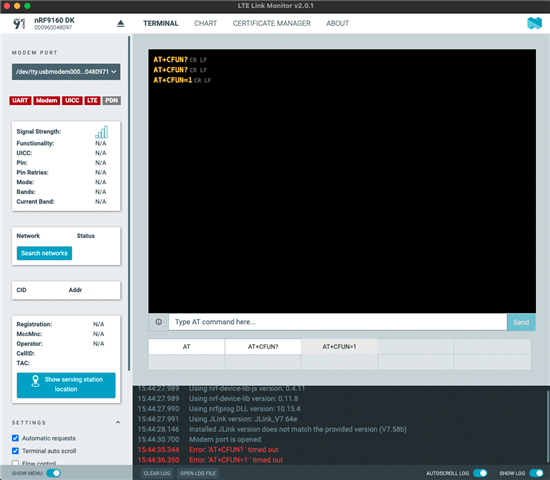
    This is what I see on the LTE Link Monitor when it's appears frozen:

Reply
  • Spent more time working with a few examples today and my code base. I found that if the CONFIG_LTE_LINK_CONTROL=y as well as CONFIG_AT_HOST_LIBRARY=y and CONFIG_LOG=y then I get something that appears frozen on the LTE Link Monitor and on a serial monitor. 

    My guess is there is some issue with where things are being sent. The AT Host library is using UART0, but I had the logging using SEGGER RTT, so not sure exactly.

    This is what I see on the LTE Link Monitor when it's appears frozen:

Children
  • Hi,


    The log lines in red indicate that the device did not answer the commands that were issued.

    There can be many reasons why, for instance that the firmware isn't running properly, or that you have the wrong com port selected for this specific application.


    Benjamin said:

    Spent more time working with a few examples today and my code base. I found that if the CONFIG_LTE_LINK_CONTROL=y as well as CONFIG_AT_HOST_LIBRARY=y and CONFIG_LOG=y then I get something that appears frozen on the LTE Link Monitor and on a serial monitor. 

    My guess is there is some issue with where things are being sent. The AT Host library is using UART0, but I had the logging using SEGGER RTT, so not sure exactly.

    Does your current application have any serial output at all?

    You should first verify that the AT client sample works as expected with the LTE Link Monitor application.

    Could you try to build and flash the ncs/nrf/samples/nrf9160/at_client sample?


    Kind regards,

    Håkon

  • Sorry I wasn't clear. I tried the at_client, which works fine, unless I also enable the same combination of: 

    CONFIG_LTE_LINK_CONTROL=y

    CONFIG_AT_HOST_LIBRARY=y

    CONFIG_LOG=y

    I'm pretty sure enabling the AT Host library has something to do with it. I can get serial output until I enable the AT_HOST_LIBRARY, then I start seeing the AT command timeouts in the LTE Link Monitor. This is using an nrf9160dk for the hardware.

  • Hi,


    Sorry for the long wait. I tried this in one of the samples, and yes, I see the same behavior.

    What is required is to place the UART in interrupt driven mode. Could you try adding this config to your project and see if the at_host library works now?

    CONFIG_UART_INTERRUPT_DRIVEN=y


    Kind regards,

    Håkon

Related