nrf5340 OTA DFU multi-image over BLE

Hi,

We have multiple controllers connected serially(using SPI/UART) to the NRF5340 controller in our product. We have a requirement to download multiple images(4-5) for all the controllers simultaneously over BLE(to start with and later over Matter/thread too) on the nrf5340 controller. Some of the images will be in MCUBoot image format and others won't be. We will be storing few of the images on the external flash connected with NRF5340 and the other images need to be transferred serially to other controllers on the fly when the download is in progress.

I saw that Nodic SDK has a library for supporting multi-image DFU( DFU multi-image ) which uses the CBOR format for adding multiple images in a firmware bundle. I couldn't find examples for using this library. How can I use this library with Simple Management Protocol and MCUmgr? I want to be able to write my own custom writer functions(open, read and write) for some images when the firmware bundle is being downloaded. 

Please help me with this. Detailed steps would be appreciated as I am new to Nordic controllers.

Regards,

Devanshu Agarwal

  • Also, Please let me know if there are any other ways in which I can achieve my desired goal of downloading multiple images in one firmware bundle on the nrf5340.

  • Hello,

    The DFU Multi-Image is intended to update several cores on the nRF5340. The entire ecosystem around MCUBOOT and mcumgr (used to transfer the DFU images to the target device) revolves around the MCUBOOT bootloader on a single device, such as the nRF5340. The smp_svr sample is a sample showing how to store the DFU image to the correct place(s) in flash, and telling the bootloader to reset and check out these new images. 

    For multi-image DFU on the nRF5340 (to upgrade both cores in one combined package) I suggest that you take a look at the FOTA over Bluetooth LE section in combination with the Simultaneous multi-image DFU section.

    To see examples that have implemented this, you can check out the machine learning example.

    If you have access to an nRF52840 (or any of the nRF52XXX) DKs, I suggest that you test DFU using that first. If you don't have it, I suggest you start by only updating the application core, just to familiarize yourself with the concept.

    As for the rest of the devices that you want to update, I don't think you should mix this into the MCUBOOT environment. You can look at the SMP_SVR sample to see how you can transfer files, but it can also be done easier, if you create a custom BLE service (or whatever transport layer you want to use). Then you transfer the binary files that you want to apply to the other devices. I don't know what devices you are talking about, but I suspect that if this is not a device running Zephyr, and in that case, they probably have their own protocols on how to receive DFU images. In that case, you need to implement the generating and transfer of these packets on your own. Both from the cloud to the nRF, and from the nRF via serial to the other devices.

    Best regards,

    Edvin

  • Thanks for the detailed information.

    I have few more queries:

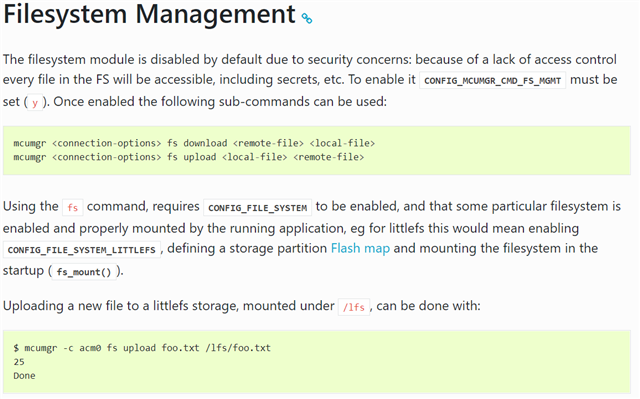
    1. For transferring files using the SMP_SVR, are you referring to the below from mcumgr?

    2. If I go with the approach of writing my own custom BLE service( for transport layer), can you point to examples where the  DFU multi-image library is used? I want to transfer my images in a single CBOR firmware bundle. I have checked the API documentation of the library but if you could point me to the source code where it is being utilized that would be helpful.

  • 1: Yes. Not necessarily the Filesystem Management. At least, I suggest you try without that first, using the guide from my previous reply. Also, be aware that if you intend to use Bluetooth LE as the transfer layer, then mcumgr on windows doesn't support that (at least at this point in time). It is supported on Linux, and possibly MacOS. 

    But you can test transferring the file over BLE using nRF Connect for Android/iOS. 

    2: I want to keep all other devices (all non-Nordic) devices out of the equation for now, because I don't know how they work, and in what format they expect to receive their image. This will be proprietary. What you need to figure out is a way to transfer the binary blob from your computer/phone to the nRF, and whether to store it in flash, or send it directly over serial (?) in the expected format that they want to receive the image.  By default, if you use the SMP_SVR sample, it will be stored in a particular place in flash where it will try to boot it up later. So if you want to use this service directly, you may want to look into a way to store it somewhere else, so that the MCUBOOT bootloader doesn't try to apply it to itself. This will probably also require you to modify whatever you are using to transfer the image, to be able to differentiate between images intended for the nRF and the other devices.

    The easiest is probably to take the SMP_SVR service as an starting point, but change the UUID and where in flash this is stored, or whether you want to send it (from RAM, without storing to flash) while receiving it. 

    Best regards,

    Edvin

  • Hello,

    I am working to achieve a similar goal of performing a DFU over BLE but to both cores of an nrf5340 simultaneously. When you say:

    The easiest is probably to take the SMP_SVR service as an starting point, but change the UUID and where in flash this is stored, or whether you want to send it (from RAM, without storing to flash) while receiving it. 

    I have a few questions.

    1. Why do you need to change the UUID? Isn't that the service UUID that will let NRF Connect and other mobile apps know that the device can DFU?
    2. When you say to change where in flash the update package is stored, is this why we need to create 2 partitions? May I ask, how can we define the size of these partitions?
Related