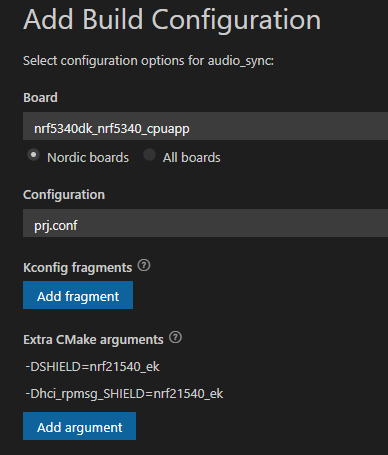
how to disable TX_EN of 21540 in NCS2.0.2

Hi,

nRF5340 + nRF21540, NCS2.0.2, VScode

i follow Working with RF front-end modules — nRF Connect SDK 2.0.99 documentation (nordicsemi.com)

how to disable TX_EN?  i only need recv.

as follow pic, i have set GPIO mode to three overlay file.

demo\boards\nrf5340dk_nrf5340_cpuapp.overlay

demo\child_image\hci_rpmsg.overlay

demo\child_image\hci_rpmsg\boards\nrf5340dk_nrf5340_cpunet.overlay
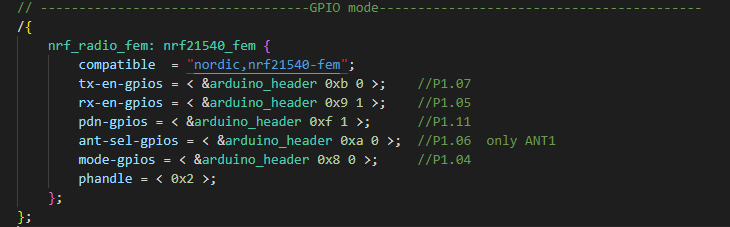
the pins same to EK,

in fact,  No matter what value I set as follow 5 line,  and re do add build,

it can receive and transmit.  even pdn-gpios = < &arduino_header 0xf 1 >; or pdn-gpios = < &arduino_header 0xf 0 >;

        tx-en-gpios
        rx-en-gpios
        pdn-gpios
        ant-sel-gpios
        mode-gpios
    
Best regards
  • Hi

    Can you provide some more details as to what exactly you're doing. I assume you're using an nRF5340 DK and an nRF21540 EK, correct? What does your application do here exactly, and what do you want it to do? By running an application that does only scanning the TXEN register shouldn't be enabled at all. If you in the end don't want to be able to transmit using the PA (nRF21540) I think it would be easiest not to connect the TXEN pin so that the nRF5340 uses the onboard radio to do transmissions.

    Best regards,

    Simon

  • Hi,

    thanks for reply,

    yes i'm using nRF5340 DK + nRF21540 EK,

    my project is period_adv + period_sync, one side only TX no RX,and another side only RX no TX.

    the data for Smart farm equipment.

    to reduce power consumption, TX side disable RX, and RX side disable TX.

    your mean is do't connect RXEN pin on TX side, and do't connect TXEN pin on RX side?


    Best regards

  • Hi

    It should not be necessary to disable TX and RX on these sides in a periodic advertising/sync application, as it shouldn't have much to say for the current consumption, since only one side will mainly be advertising and the other will be receiving.

    Best regards,

    Simon

Related