nRF9160 modem_shell example code crashes when connecting to CMW500

 SDK1.9.1 with example of modem_shell. 

modem fw is up to date, version 1.3.2

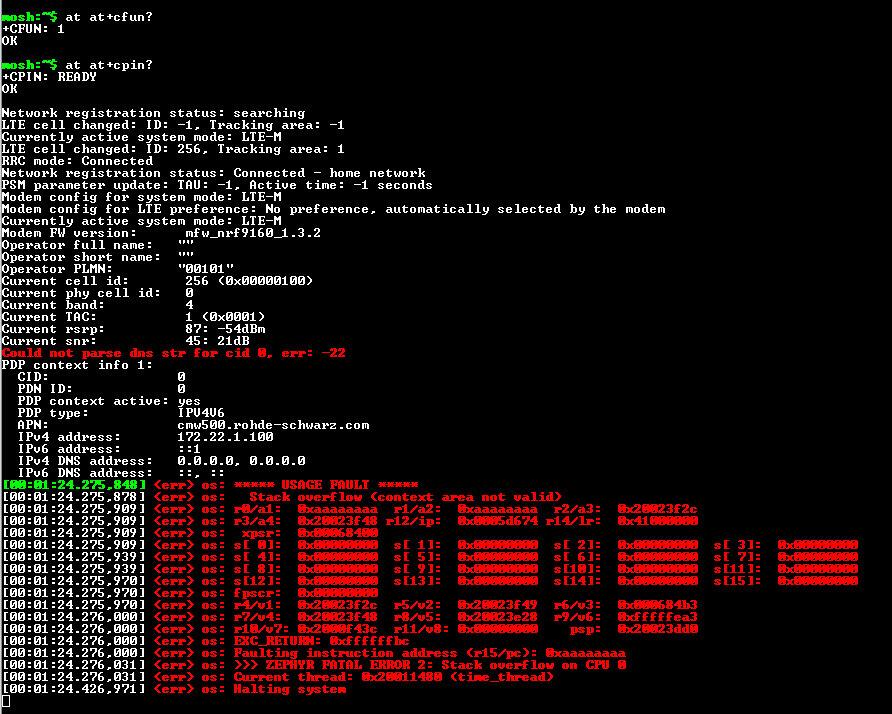
the fw crashes as soon as CMW500 trying to establish a connection.
  • Hi Bo,

    Just letting you know I have started working on this. I will update you as soon as I have any relevant information.

  • "Stack overflow" is a keyword here. Try using addr2line using LR in order to find out what caused the crash. It looks to be related to something in the time_thread in date_time_core.c.

    For 0x41000000/lr, type the following into the command line:

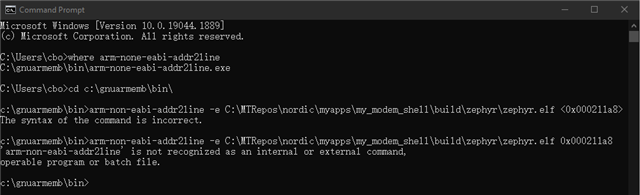
    arm-none-eabi-addr2line -e <path to build\zephyr\zephyr.elf> 0x41000000

    This will return a the line in the code related to the crash. Looking it up might give you some hints regarding the crash. This line would also be a good start for setting a break point.

  • what's the command line you are referring to? Do you mean the dev kit? No, I got the message from the UART port which is on our customized board build up with nRF9160 chipset. We don't have the resource to hook our customized board and debug it on the fly. I was hoping you, Nordic team, could replicate the error and updated the example code and I can test it from there. 

  • Hi Bo, sorry for the delay.

    bc_metco said:
    what's the command line you are referring to?

    I am reffering to Command Prompt in Windows. When sitting at a computer with development tools for Nordic installed then: Press the Windows button, type 'cmd' and press enter. Then you cmd.exe (Command Prompt) will open.

    Here are the steps for using arm-none-eabi-addr2line:

    Also for errors like this you can do some investigating with arm-none-eabi-addr2line:

    1. Check if you have arm-none-eabi-addr2line set up by running "where arm-none-eabi-addr2line" in a cmd window.
      1. This should return something like "C:\Program Files (x86)\GNU Tools ARM Embedded\4.9 2015q3\bin\arm-none-eabi-addr2line.exe"
      2. If it does not return this, then there might be some issues with the gnuarmemb path configuration
    2. Next step is to investigate what is in the R15/pc and R14/lr addresses
      1. arm-none-eabi-addr2line -e <path to _build\zephyr\zephyr.elf> <0x000211a8> for r15/pc
      2. arm-none-eabi-addr2line -e <path to _build\zephyr\zephyr.elf> <0x00018b3d> for r14/lr

    2. Should give you what function call that causes the kernel panic deep down in the stack. Remember to replace "<path to _build\zephyr\zephyr.elf>" with your actual path

  • When should I run those commands? Should I run the commands after the CMW500 triggered those error? Or I can ran it without CMW500 hooked up? It's a little bit confused to me what needs to be done at here. The screenshot I showed before is from the serial portal that connected to the DUT. but why the windows prompt is trying to prob the fw that built on my local PC? I don't understand that part.

Related