SDK1.9.1 with example of modem_shell.
modem fw is up to date, version 1.3.2
the fw crashes as soon as CMW500 trying to establish a connection.
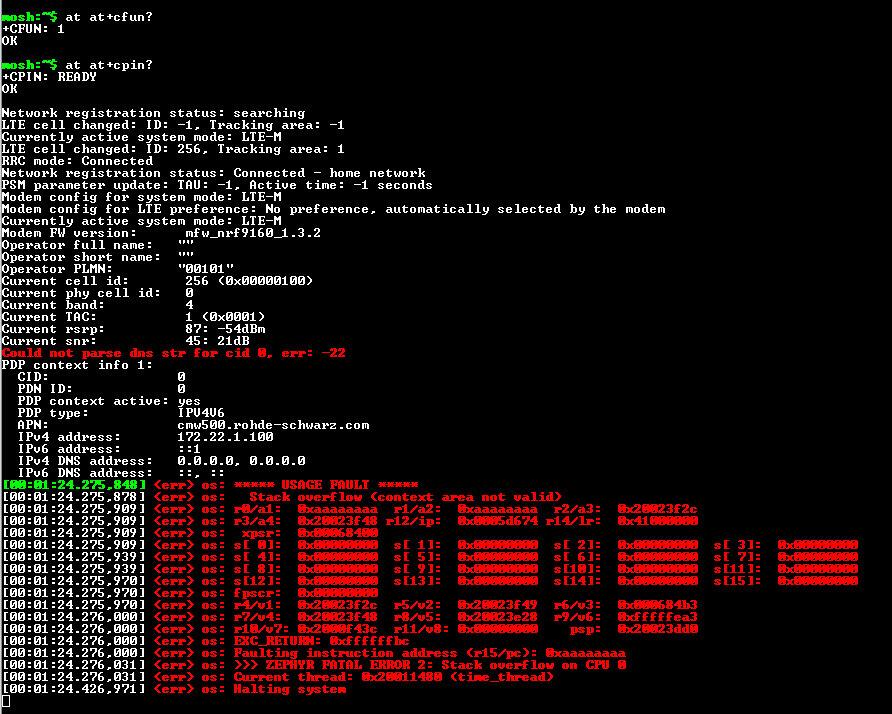
SDK1.9.1 with example of modem_shell.
modem fw is up to date, version 1.3.2
the fw crashes as soon as CMW500 trying to establish a connection.


It looks like you are almost there. You can run this command regardless of being connected to CMW500. However, you need to be running the command on a computer with access to the build folder for your application(it looks like you are doing so). The goal is to debug your application as arm-none-eabi-addr2line can be used to find out which part of your application's code was involved when Stack overflow occurred.
Thank you for posting the output from cmd. It is a good start that the computer is able to find arm-none-eabi-addr2line. Next thing, try removing '<' and '>' and insert the address in 'r14/lr' from the image in your initial post:
. It will also be interesting to see what is returned when inputting what is in r15/pc: 

Please try these two commands and post what is returned:
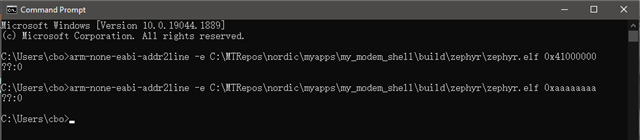
arm-none-eabi-addr2line -e C:\MTRepos\nordic\myapps\my_modem_shell\build\zephyr\zephyr.elf 0x41000000
arm-none-eabi-addr2line -e C:\MTRepos\nordic\myapps\my_modem_shell\build\zephyr\zephyr.elf 0xaaaaaaaa
output result:

Hi Bo, sorry for the delay.
Thank you for sharing the output from addr2line. Unfortunately, the output does not help as much as I was hoping for.
We would like to reproduce the issue:
Here is something else to try:
The stack overflow happens inside the time_tread. Could you try to increase the stack size for this thread and see if it helps? The stack size is defined by CONFIG_DATE_TIME_THREAD_STACK_SIZE and the default value is '1152'. Try adding this CONFIG to your prj.conf file and increase the stack size. Try for example to double the size to '2304' to begin with. Does the device still crash?
Documentation, for reference:
You could also try to add
CONFIG_DATE_TIME_THREAD_STACK_SIZE=2048
to your prj.conf file.