Porting the library from the nRF52DK to the nRF52820

Hello all,

I have started to port the code from the nRF52dk in Segger EM, indeed, everything so far works on the NRF52 dk , so I have opened the Blinky example for the nRF52820, namely the PCA10100e and compiles ok, it is downloaded to the module and it works ok, I want to continue adding the specific library (ported on the nrf52dk) now on the nRF52820, however, I got stuck with including the library, for example I have added the new folder where I have put all the files of the library, I have as well added the path to this library into the preprocessor, however, this is the error I am getting:
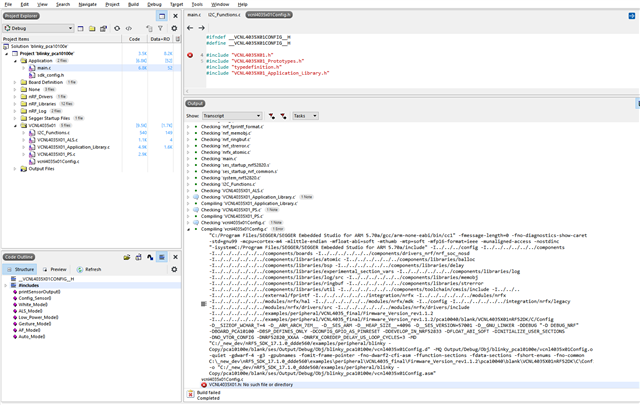
Any help is more than welcome!

Best.

  • Hi 

    Are you sure that the VCNL4035X01.h file is located in a folder that you have added to your preprocessor settings?

    Could you double check that the folder is correctly added to your project, and that there are no spaces at the end of the directory name?
    Segger Embedded Studio doesn't remove trailing spaces from the directory folders in the settings, so it won't work if you have any. 

    Best regards
    Torbjørn

  • Hello ovrebekk and thank you for your input, it helped!

    I have explicitly put the location into the preprocessor like this, not a problem, I was automatically thinking that segger would search into the all available folder in "an available subtree", apparently it does not...

    ../../../../../../examples/peripheral/VCNL4035_final/Firmware_Version_rev1.1.2

    ../../../../../../examples/peripheral/VCNL4035_final/Firmware_Version_rev1.1.2/pca10040/blank/VCNL4035X01nRF52DK/C

    ../../../../../../examples/peripheral/VCNL4035_final/Firmware_Version_rev1.1.2/pca10040/blank/VCNL4035X01nRF52DK/C/Config

    so now it compiles !

    Thank you again, looking forward to port more code !

    Best.

  • Hi 

    Glad to hear I was able to help, even if the issue wasn't exactly the one I described ;)

    The include folders in SES are not recursive, no, so you do need to include every sub folder that you are interested in. 

    As a side note it is not common practice to put source or header files inside the pca10040 folder (this is usually reserved for project files only), but in the end this is up to you. 

    Best regards
    Torbjørn

  • Moving forward with porting of the TWI ... so far I have added the #include, etc. and drivers to the project, none to the preprocessor, I am using only regular drivers, namely //TWI library
    #include "nrf_drv_twi.h" indeed, the nrf_drv_twi.c and nrfx_twim.c are added to the  nRF_drivers folder,

     I get the error when compiling (this is found in the nrfx_twim.c ) : 

    #error "No enabled TWIM instances. Check <nrfx_config.h>." 

    The twi instance is defined : #define TWI_INSTANCE_ID 0

    However, I am not sure why is there nrfx... and nrf... driver ?

    Is it possible that I am using other drivers, like timer or something else that is needed to run the twi, btw I am using this code from the project that works seamlessly on the nrf52dk, but there is plenty of other code too...

    Best.

  • Hi 

    The driver structure in the nRF5 SDK is a bit complicated, for historical reasons. Essentially the nrf_drv drivers is the older driver set, which was later replaced by the nrfx drivers. But in order to avoid breaking all the examples the legacy nrf_drv API and configurations was kept as a layer between the application and the nrfx drivers. 

    So to your application it looks like you are still using the nrf_drv drivers, while in the background you will end up using the newer nrfx drivers. 

    In order to use TWIM0 in your application you should ensure that TWI_ENABLED and TWI0_ENABLED is set to 1 in sdk_config.h. Also, it is recommended to set TWI0_USE_EASY_DMA to 1 to leverage the newer TWIM peripheral. 

    Best regards
    Torbjørn

Related