Read Uart based sensor data on nrf5340 using VsCode?

Hi,

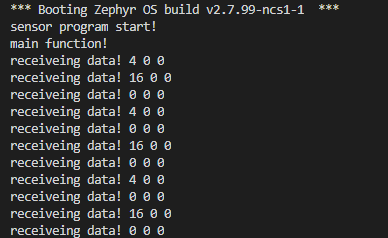
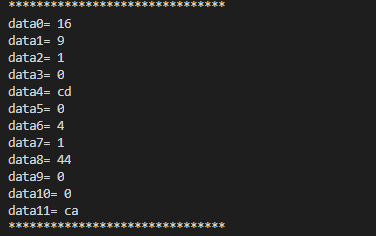
I'am using the  Ultrasonic Oxygen Senor with the nrf5340, the output is like this "photo" I want to calculate the concentration and the purity and with this values I had wrong results, so can you help to solve this problem?

 I am using this code

4857.gasboard.zip

 and here is my result.


this technical specification for my sensor.

 https://en.gassensor.com.cn/Product_files/Specifications/Gasboard%207500H%20series%20technical%20specification.pdf?fbclid=IwAR0R1P0FlwkPzhew7jBYVzL-rvtESB1ob2HGF0OE4bngaI5jP8ktZfFMoMo 

Could you please help me to solve this problem

Parents
  • Hello!

    Did you write the code you're using yourself?

    Can you please explain what you expect your code to do and how the results differ from your expectations?

    Best regards,

    Einar

  • Hello!
    Thank you for your response
    The code found in devzone for nrf9160
    The first step, I want to read the data through the UART connection.
    The second step, I have to read the flow rate and purity of oxygen.

    There is many illogical values, "many zeros" that gives wrong results
    Meilleures salutations,

  • I haven't seen the Arduino code so I can't say anything about that unless you share the code. Is the Arduino code also interrupt based?

    Looking at your code, it looks like you're disabling uart irq tx in your callback without enabling it again, any reason for this? Also you are using code in your main function that is supposed to be used in callbacks. I would recommend trying to use a UART API that is not interrupt based to test that you are able to communicate with the sensor.

    -Einar

  • Here is the Arduino code.

    #include <Wire.h>
    
    void setup() {
      Serial.begin(9600);
    }
    
    void loop() {
      typedef unsigned char u8;
      typedef unsigned int u16;
      int inByte;
      u8 temp;
      u8 i, j, o2[12];
      u16 o2c, o2f, o2t; //Define oxygen concentration, flow rate and temperature
    
      //When character arrive over the serial port ..
      if (Serial.available()) {
      // wait a bit for the entire message to arrive
      delay(100);
        // read all the available characters
        while (Serial.available() > 0) {
          inByte = Serial.read();
          //---Receiving part---
          if ((o2[0] == 0x16) && (o2[1] == 0x09) && (o2[2] == 0x01)) //Determine if the first two bytes are received correctly, I is the global variable
          {
            o2[i] = inByte;       
            i++;
          }
          else           //If one of the first three bytes received is incorrect, the first two bytes will be judged
          {
            if ((o2[0] == 0x16) && (o2[1] == 0x09))
            {
              if ( inByte == 0x01)   
              {
                o2[2] =  inByte;   
                i++;
              }
              else                                
              {
                i = 0;                
                for (j = 0; j < 12; j++)          
                {
                  o2[j] = 0;
                }
              }
            }
            else     
            {
              if (o2[0] == 0x16)
              {
                if ( inByte == 0x09)
                {
                  o2[1] =  inByte; 
                  i++;
                }
                else        
                {
                  i = 0;                
                  for (j = 0; j < 12; j++)          
                  {
                    o2[j] = 0;
                  }
                }
              }
              else     
              {
                if ( inByte == 0x16) 
                {
                  o2[0] =  inByte; 
                  i++;
                }
                else         
                {
                  i = 0;                 
                  for (j = 0; j < 12; j++)         
                  {
                    o2[j] = 0;
                  }
                }
              }
            }
          }
         //---Receiving part---


          if (i == 12)   //Data received complete, start calibration
          {
            temp = 0;
            for (j = 0; j < 12; j++)
            {
              temp += o2[j];
            }
            if (temp == 0)     //Check passed, calculate oxygen concentration, flow, temperature value
            {
              o2c = o2[3] * 256 + o2[4];     //Oxygen concentration
              o2f = o2[5] * 256 + o2[6];     //Oxygen flow value
              o2t = o2[7] * 256 + o2[8];     //Oxygen temperature
            }


            i = 0;                             
            for (j = 0; j < 12; j++)           //Initialize array
            {
              o2[j] = 0;
            }
          }
        }
      }
    
    //--O2
    Serial.print("O2 : ");
    Serial.print(o2c/100);
    Serial.print(o2c/10%10);
    Serial.print(".");
    Serial.print(o2c%10);
    Serial.println("%");
    
    //--Flow
    Serial.print("Flow : ");
    Serial.print(o2f/10%10);
    Serial.print(".");
    Serial.print(o2f%10);
    Serial.println("L/min");
    
    //--Temperature
    Serial.print("Temp : ");
    Serial.print(o2t/100);
    Serial.print(o2t/10%10);
    Serial.print(".");
    Serial.print(o2t%10);
    Serial.println("Celcius");
    delay(2000);
    }

  • Hi

    I noticed now that the data sheet says "The sensor will send data actively by default and the sending interval is 0.5 seconds", so you should be able to read data the same way the Arduino code does, without sending commands to it.

    So try to look at the Arduino code you have here and do the same in your program.

    Have you done anything more to look at the values you're reading other than the prints in your original post? Any reason you print those bytes as %x %i %i and not %x %x %x ?

    -Einar

  • Yes, I did the same but the program display this value"0", I think that i have a bug or problem in the code that i sent to you in the first discussion that i can't find it. So I need a help from you because i'm a beginner in the programing of nrf with zephyr. Thank you

    #include <zephyr.h>
    #include <device.h>
    #include <devicetree.h>
    #include <drivers/uart.h>
    #include <sys/printk.h>
    uint8_t uart_buf[1024];
    int count;
    void uart_cb(const struct device *x, void *user_data)
    {
    	uart_update(x);
    	int data_length = 0;
    
    	if (uart_rx_ready(x)) {
    		data_length = uart_fifo_read(x, uart_buf, sizeof(uart_buf));
    		uart_buf[data_length] = 0;
    	}
        uart_fifo_fill(x, uart_buf, data_length);
    }
    
    void main(void)
    {
    
        printk("sensor program start!\n"); //output on UART0, which is default for logging


    const struct device *uart = device_get_binding("UART_1");
    	uart_callback_set(uart, uart_cb,NULL);
    	uart_rx_enable(uart,uart_buf,sizeof(uart_buf),500000);
        struct uart_config cfg ;
        cfg.baudrate = 9600 ;
        cfg.parity = UART_CFG_PARITY_NONE ;
        cfg.stop_bits = UART_CFG_STOP_BITS_1 ;
        cfg.data_bits = UART_CFG_DATA_BITS_8 ;
        cfg.flow_ctrl = UART_CFG_FLOW_CTRL_NONE ;
     uart_configure(uart, &cfg);
    
    	printk("main function!\n"); //output on UART0, which is default for logging
    	while (1) {
            // uart_fifo_fill(uart, "UART loopback start!\r\n", 22);
            count=uart_fifo_read(uart,uart_buf,sizeof(uart_buf));
            printf("read  %i\n",count);
            printk("receiveing data! %x %i %i\n",uart_buf[0],uart_buf[1],uart_buf[2]); //output on UART0, which is default for logging
    	
            k_cpu_idle();
            k_sleep(K_MSEC(1000));
    	}
    }

  • As I asked in my last post, have you tried using %x instead of %i in your print? It could be that your program works but just doesn't display the data correctly.

Reply Children
  • Yes, I use %x instead of %i but always the result is "0".

    The file Proj. Conf:

    CONFIG_UART_INTERRUPT_DRIVEN=y

    Is there something missing?

  • Since you are getting the value 16 sometimes, which seems to be the expected beginning of a message according to the data sheet, I suspect that you are actually able to read the UART, and that the problem is related to how you process the data.

    For example, can you explain the purpose of these lines in your code:

    uart_buf[data_length] = 0;

    uart_fifo_fill(x, uart_buf, data_length);

    count=uart_fifo_read(uart,uart_buf,sizeof(uart_buf));

    I can't see anything similar in the Arduino code, and I'm not sure what these lines are supposed to do.

    Also, the Arduino code waits before reading, maybe you also have to do this for it to work:

    //When character arrive over the serial port ..
    if (Serial.available()) {
    // wait a bit for the entire message to arrive
    delay(100);
    // read all the available characters
    while (Serial.available() > 0) {
      inByte = Serial.read();

    -Einar

  • Hello,

    Now the code read correctly, 

    just now I need to translate this instraction to finish the code.

    inByte = Serial. read();

    So could you help me to translate it with zephyr language

  • Hi

    Would you mind sharing what solved your issue, in case others have similar problems?

    And I believe Serial.read() can be exchanged with uart_fifo_read()

  • Hi ,

    #include <zephyr.h>
    #include <device.h>
    #include <devicetree.h>
    #include <drivers/uart.h>
    #include <sys/printk.h>
    uint8_t uart_buf[12],i,j;
    uint16_t o2c,o2f,o2t;
    uint8_t temp;
    int count;
    	
     void uart_cb(const struct device *x, void *user_data)
     {
     	// uart_update(x);
         int data_length = 0;
    
     	if (uart_irq_rx_ready(x)) {
     		data_length = uart_fifo_read(x, uart_buf, sizeof(uart_buf));
     		// uart_buf[data_length] = 0;
     	}
         // uart_fifo_fill(x, uart_buf, data_length);
     }
    
    void main(void)
    {
        printk("sensor program start!\n"); //output on UART0, which is default for logging
    	  struct uart_config cfg ;
        cfg.baudrate = 9600 ;
        cfg.parity = UART_CFG_PARITY_NONE ;
        cfg.stop_bits = UART_CFG_STOP_BITS_1 ;
        cfg.data_bits = UART_CFG_DATA_BITS_8 ;
        cfg.flow_ctrl = UART_CFG_FLOW_CTRL_NONE ;
    
        const struct device *uart = device_get_binding("UART_1");	
      while(1){
          uart_configure(uart, &cfg);
        
          uart_rx_enable(uart,uart_buf,sizeof(uart_buf),500000);
           uart_callback_set(uart, uart_cb,NULL);
           printk("main function!\n");//output on UART0, which is default for logging
     	
         k_sleep(K_MSEC(1000));
    
    
            // for(int i=0;i<sizeof(uart_buf);i++){
            // printk("data%i= %x \n",i,uart_buf[i]);}
    
            printk("*******************************\n");
            k_sleep(K_MSEC(1000));
    
                o2c = uart_buf[3] * 256 + uart_buf[4];     //Oxygen concentration
                o2f = uart_buf[5] * 256 + uart_buf[6];     //Oxygen flow value
                o2t = uart_buf[7] * 256 + uart_buf[8];     //Oxygen temperature
                float o2c1;
                o2c1=(float)o2c/10;
                float o2f1;
                o2f1=(float)o2f/10;
                float o2t1;
                o2t1=(float)o2t/10;
                printf("O2 : %.2f %\n",o2c1);
                printf("flow : %.2f L/min\n",o2f1);
    
                printf("temp: %.2f °C\n",o2t1);
    
    }	}
    

    proj.conf

    CONFIG_UART_ASYNC_API=y
    CONFIG_UART_WIDE_DATA=y
    CONFIG_UART_USE_RUNTIME_CONFIGURE=y
    CONFIG_UART_LINE_CTRL=y
    CONFIG_UART_1_ASYNC=y
    CONFIG_NEWLIB_LIBC=y
    CONFIG_NEWLIB_LIBC_FLOAT_PRINTF=y
    CONFIG_NRFX_UARTE1=y

Related