Zephyr Ozone debugger not working with MCUboot

I have a simple blinky application. I was able to get the application running and using the Qzone debugger. When I change the application te be a MCUboot compatible application, (

CONFIG_BOOTLOADER_MCUBOOT=y) I can see the application is running,  (blinking led's) but if I connect the Ozone debugger, nothing happened and the application seems to be destroyed. (reset will not restart the application anymore).
I had 'Enable debug options' set in the build configuration, but no change.
  • Hello,

    Please try this one:

    To specify:

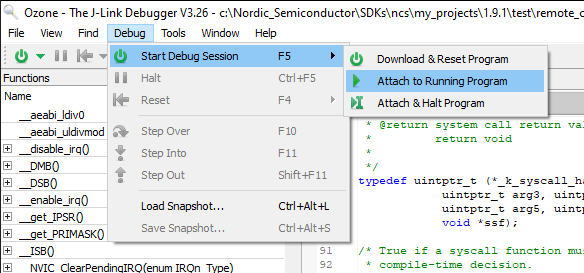
    When you "Download and Reset Program", the program that is downloaded is based on the .elf file, and may not be identical with the .hex that is programmed when you program using west flash, or the nRF Connect for VS Code. 

    Try programming your application normally, using either nRF Connect for VS Code or the command "west flash", and then try to attach the debugger. 

    It will then assume that the application is already flashed, so no need to do that again. The reason small changes in the application (typically padding bits) when you flash an .elf file instead of an .hex file is that the CRC that check that is ran when you run the start/check the application image from the bootloader, and hence the bootloader will reject the application, and never start it. 

    Attaching the debugger instead will not change anything in the flash, and it should work better.

    Best regards,

    Edvin

Related