

Hi,
I managed to do a DFU with an application on a nRF52820. Now I wanted to test if I can also update the softdevice. For this I read the following article:
infocenter.nordicsemi.com/index.jsp
Under the point "Single-bank updates" I saw that with a new softdevice the application area is deleted, and the softdevice is first copied into the application area and then copied into its destinated area. Since in my nRF52820 is not enough space for a softdevice in the application area, I wanted to ask whether a DFU of the softdevice is possible at all?
This is a screenshot of my memory usage:
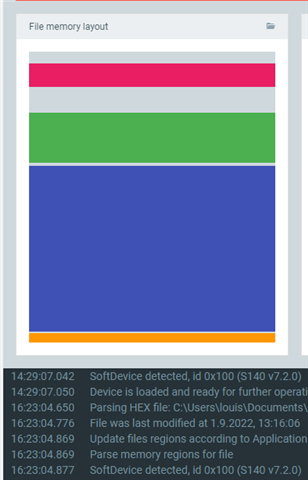
pink area: bootloader
green area: application
blue/orange area: softdevice and MBR
Edit from 2.9.2022:
If I set the macro NRF_DFU_SINGLE_BANK_APP_UPDATES to 1, it does not work, because there is not enough space according to the log (is attached to this post). I generated the softdevice DFU package with the following command:
nrfutil pkg generate --hw-version 52 --sd-req 0x100 --softdevice s140_nrf52_7.2.0_softdevice.hex --key-file private.pem app_dfu_package_sd_s140.zip
00> <info> app Inside main
00> <debug> app: In nrf_bootloader_init
00> <debug> nrf_dfu_settings: Calling nrf_dfu_settings_init()...
00> <debug> nrf_dfu_flash: Initializing nrf_fstorage_nvmc backend.
00> <debug> nrf_dfu_settings: Using settings page.
00> <debug> nrf_dfu_settings: Copying forbidden parts from backup page.
00> <debug> nrf_dfu_settings: Destination settings are identical to source, write not needed. Skipping.
00> <info> nrf_dfu_settings: Backing up settings page to address 0x3E000.
00> <debug> nrf_dfu_settings: Destination settings are identical to source, write not needed. Skipping.
00> <debug> app: Enter nrf_bootloader_fw_activate
00> <info> app: No firmware to activate.
00> <info> app: Boot validation failed. No valid app to boot.
00> <debug> app: DFU mode because app is not valid.
00> <info> nrf_bootloader_wdt: WDT is not enabled
00> <debug> app: in weak nrf_dfu_init_user
00> <debug> app: timer_stop (0x20002A58)
00> <debug> app: timer_activate (0x20002A58)
00> <info> app: Entering DFU mode.
00> <debug> app: dfu: NRF_DFU_EVT_DFU_INITIALIZED
00> <debug> app: Initializing transports (found: 1)
00> <debug> nrf_dfu_serial_uart: serial_dfu_transport_init()
00> <debug> nrf_dfu_serial_uart: serial_dfu_transport_init() completed
00> <debug> app: dfu: NRF_DFU_EVT_TRANSPORT_ACTIVATED
00> <debug> nrf_dfu_flash: Initializing nrf_fstorage_nvmc backend.
00> <debug> app: Enter main loop
00> <debug> nrf_dfu_serial: Received ping 1
00> <info> nrf_dfu_serial_uart: Allocated buffer 200041C0
00> <debug> nrf_dfu_req_handler: Handle NRF_DFU_OP_PING
00> <debug> nrf_dfu_req_handler: Request handling complete. Result: 0x1
00> <debug> nrf_dfu_serial: Sending Response: [0x9, 0x1]
00> <debug> nrf_dfu_serial: Set receipt notif target: 0
00> <info> nrf_dfu_serial_uart: Allocated buffer 200041C0
00> <debug> nrf_dfu_req_handler: Handle NRF_DFU_OP_RECEIPT_NOTIF_SET
00> <debug> nrf_dfu_req_handler: Request handling complete. Result: 0x1
00> <debug> nrf_dfu_serial: Sending Response: [0x2, 0x1]
00> <debug> nrf_dfu_serial: Received serial mtu
00> <info> nrf_dfu_serial_uart: Allocated buffer 200041C0
00> <debug> nrf_dfu_req_handler: Handle NRF_DFU_OP_MTU_GET
00> <debug> nrf_dfu_req_handler: Request handling complete. Result: 0x1
00> <debug> nrf_dfu_serial: Sending Response: [0x7, 0x1]
00> <info> nrf_dfu_serial_uart: Allocated buffer 200041C0
00> <debug> nrf_dfu_req_handler: Handle NRF_DFU_OP_OBJECT_SELECT (command)
00> <debug> nrf_dfu_req_handler: Request handling complete. Result: 0x1
00> <debug> nrf_dfu_serial: Sending Response: [0x6, 0x1]
00> <debug> app: Shutting down transports (found: 1)
00> <info> nrf_dfu_serial_uart: Allocated buffer 200041C0
00> <debug> nrf_dfu_req_handler: Handle NRF_DFU_OP_OBJECT_CREATE (command)
00> <debug> app: timer_stop (0x20002A58)
00> <debug> app: timer_activate (0x20002A58)
00> <debug> app: dfu: NRF_DFU_EVT_DFU_STARTED
00> <debug> nrf_dfu_req_handler: Request handling complete. Result: 0x1
00> <debug> nrf_dfu_serial: Sending Response: [0x1, 0x1]
00> <info> nrf_dfu_serial_uart: Allocated buffer 20004244
00> <debug> nrf_dfu_req_handler: Handle NRF_DFU_OP_OBJECT_WRITE (command)
00> <debug> nrf_dfu_req_handler: Request handling complete. Result: 0x1
00> <debug> nrf_dfu_serial: Sending Response: [0x3, 0x1]
00> <info> nrf_dfu_serial_uart: Allocated buffer 200041C0
00> <debug> nrf_dfu_req_handler: Handle NRF_DFU_OP_OBJECT_WRITE (command)
00> <debug> nrf_dfu_req_handler: Request handling complete. Result: 0x1
00> <debug> nrf_dfu_serial: Sending Response: [0x3, 0x1]
00> <info> nrf_dfu_serial_uart: Allocated buffer 20004244
00> <debug> nrf_dfu_req_handler: Handle NRF_DFU_OP_OBJECT_WRITE (command)
00> <debug> nrf_dfu_req_handler: Request handling complete. Result: 0x1
00> <debug> nrf_dfu_serial: Sending Response: [0x3, 0x1]
00> <info> nrf_dfu_serial_uart: Allocated buffer 20004244
00> <debug> nrf_dfu_req_handler: Handle NRF_DFU_OP_CRC_GET (command)
00> <debug> nrf_dfu_req_handler: Request handling complete. Result: 0x1
00> <debug> nrf_dfu_serial: Sending Response: [0x3, 0x1]
00> <info> nrf_dfu_serial_uart: Allocated buffer 20004244
00> <debug> nrf_dfu_req_handler: Handle NRF_DFU_OP_OBJECT_EXECUTE (command)
00> <debug> nrf_dfu_validation: PB: Init packet data len: 68
00> <info> nrf_dfu_validation: Signature required. Checking signature.
00> <info> nrf_dfu_validation: Calculating hash (len: 68)
00> <info> nrf_dfu_validation: Verify signature
00> <info> nrf_dfu_validation: Image verified
00> <debug> app: Enter nrf_dfu_cache_prepare()
00> <debug> app: required_size: 0x25634.
00> <debug> app: single_bank: true.
00> <debug> app: keep_app: false.
00> <debug> app: keep_softdevice: true.
00> <debug> app: SD_PRESENT: true.
00> <debug> app: Bank contents:
00> <debug> app: Bank 0 code: 0x00: Size: 0x0
00> <debug> app: Bank 1 code: 0x00: Size: 0x0
00> <debug> app: pass: 0.
00> <debug> app: cache_address: 0x27000.
00> <debug> app: cache_too_small: true.
00> <debug> app: keep_firmware: false.
00> <debug> app: delete_more: true.
00> <debug> app: pass: 1.
00> <debug> app: cache_address: 0x27000.
00> <debug> app: cache_too_small: true.
00> <debug> app: keep_firmware: true.
00> <debug> app: delete_more: true.
00> <warning> app: Aborting. Cannot fit new firmware on device
00> <error> nrf_dfu_validation: Can't find room for update
00> <debug> nrf_dfu_req_handler: Request handling complete. Result: 0x4
00> <warning> nrf_dfu_serial: DFU request completed with result: 0x4
00> <debug> nrf_dfu_serial: Sending Response: [0x4, 0x4]
00> <debug> app: dfu: NRF_DFU_EVT_DFU_FAILED
How can I perform the DFU so that the existing softdevice is deleted?
BR
Louis


