nrf-command-line-tools: connect to multiple j-link's devices in parallel

Hi dear, 

It is possible to establish parallels multi connection to different J-LINK's devices serial numbers via nrfjprog.dll, or any other automated way ?


We successfully establish connection (read and write) between one (1) J-LINK device and one (1) PCB device via NRFJPROG using "nRF Command Line Tools" version 10.16.0 on C# .NET application. 

While trying to have a concurrent connection to another J-LINK Device SN and PCB, we receive error type : INVALID_OPERATION = -2

Method used: NRFJPROG_connect_to_emu_with_snr

Please advice

BR,

Adrian

  • Hi, I just tried running two processes of JLinkExe in two different terminals, and that works just fine. So I believe you can try to call the dll from different threads in your program, and it should work.

    Best regards,
    Stian

  • Hi, we try to use the function "NRFJPROG_open_dll_inst" in the nrfjprog.dll.
    We get the result of INTERNAL_ERROR (-254).

    Do you have an example, how to use function "NRFJPROG_open_dll_inst " in C# (using DLL Import)?

    Best regards,
    Adrian

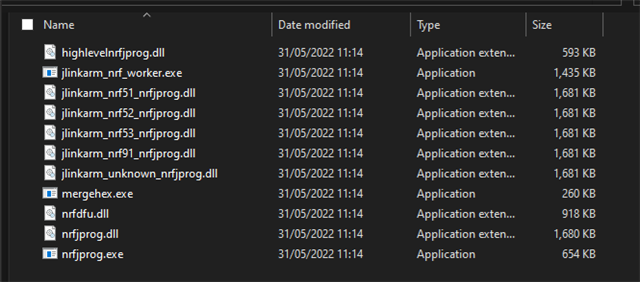
  • Hello, are you able to upload the log generated by passing a callback matching log_msg_callback_t to open_inst?

    We expect that the nrfjprog deployment is faulty and the dll isn't able to find jlinkarm_nrf_worker.exe.

    So two questions for you:

    1. Can you upload a screenshot of the folder containing nrfjprog.dll?
    2. Try adding a log callback to open_inst to get information about what's failing, and upload the results

    Best regards,
    Stian


  • 1. Yes i attached an image


    2. I added the log. The Output is:
    Client
    Client
    Client
    Client
    Client
    Client
    Client
    Client

    3. Our main misunderstanding is how to pass the first parameter (instance_ptr)
    what we tried is:
    c#:

    [DllImport(DllImportLocation, CallingConvention = CallingConvention.Cdecl)]
    internal static extern Nrfjprogdll_err_t NRFJPROG_open_dll_inst(ref nrfjprog_inst_t handle, string jlinkPath, IntPtr cb, Device_family_t family);

    public class nrfjprog_inst_t
    {
    public char _type_ = 'P';
    public int _b_base = 0;
    public int value = 1;
    }

    the call is:
    var openDllReturnValue =
    NativeMethods.NRFJPROG_open_dll_inst(
    ref inst,
    JLinkPath,
    Marshal.GetFunctionPointerForDelegate(new MsgCallback(OnMsgCallback)),
    Device_family_t.NRF52_FAMILY);

    4.
    The native funtion we try to call is :
    C :
    nrfjprogdll_err_t NRFJPROG_open_dll_inst(
    nrfjprog_inst_t * instance_ptr,
    const char * jlink_path,
    msg_callback_ex * log_cb,
    void * callback_param,
    device_family_t family);


    Please advice,
    BR

  • The deployment folder looks correct, so we'll need to look at the log for more details.

    Looks like you're missing the callback_param argument, and looks like you've implemented  msgcallback using msg_callback type since you're only printing the logger name rather than the full message.

    Msgcallback should follow

    typedef void msg_callback_ex(const char * logger,
                                 nrfjprogdll_log_level level,
                                 const char * msg_str,
                                 nrfjprog_inst_t instance);

    On the C side, nrfjprog_inst_t should just be the size of a void   *, typically possible to represent with an int, but I'm not familiar with using C dllls in C#, so I can't say whether or not your implementation is correct. I can say that nrfjprog_inst will be used to store a simple number, fitting inside an intptr_t.
Related