I'm having trouble with MCUBoot DFU with the Thingy:53

I'm running through the tutorial page to help me get stated.

The section I'm having trouble with is Updating through USB 

  • the Problem is on step 15
    • When I click on the write button I get the MCUBootDFU window, but there is an warning on the bottom as follows
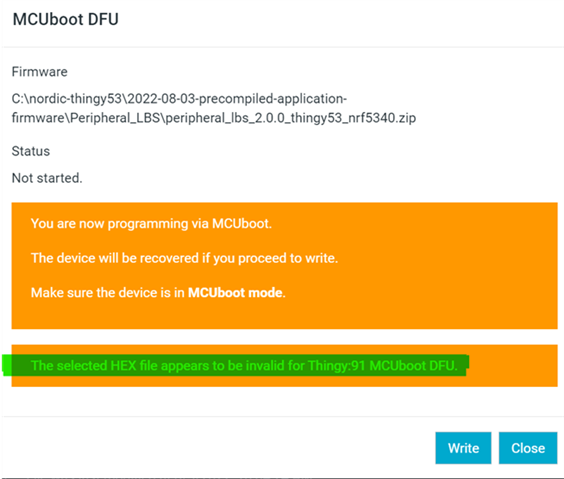
    • then click to Write button on the MCUBoot DFU window I get the following error
    • What does this mean?
    • Is it because I was developing using the nRF9160 DK
    •  
  • Hi,

    There are two things here.

    1.The warning about this not being valid for thingy:91 is a bug, but it is just a warning and can be ignored (I have informed the team about this invalid warning).

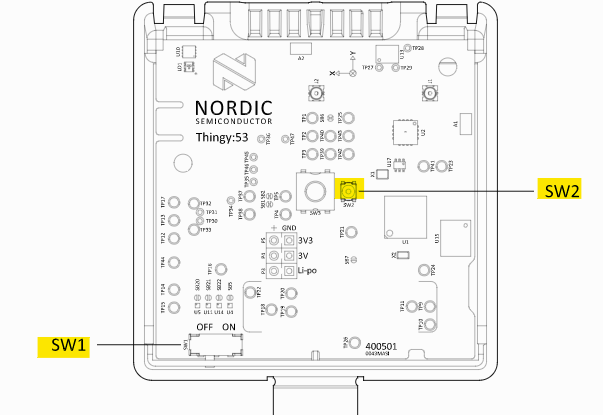
    2. The error you get after clicking "Write" seems to indicate that the Thingy:53 is not in DFU mode. You need to take of the cover, and power-cycle it while holding down SW2. Note that the SW2 button is a bit difficult to see, as it is a tiny button right next to the much larger SW3 button. When the device is in Bootloader mode you select it from the Programmer app, and you can easily see that it is in the correct mode a the name is Bootloader Thingy:53:

  • This is now working for me!!!

    I was pressing the wrong button SW3 instead of the tiny SW2 as indicated in the tutorial 

    It is a very small button and I'm sure it is intentional, so that it doesn't get pressed by accident. It Looks like this procedure need to be done every time you use the USB programmer.. I'm of to the races now thanks

    Steve K

Related