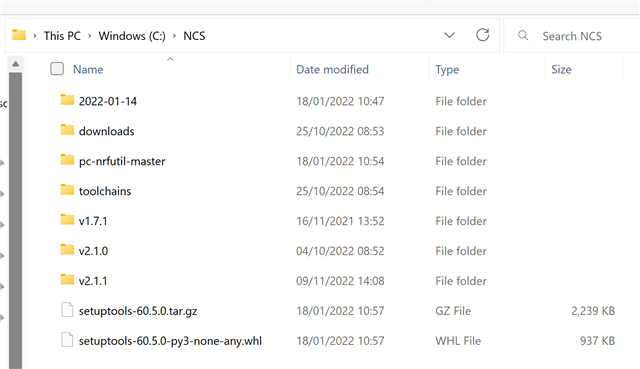
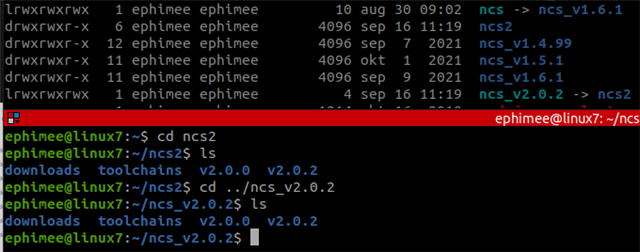
My system details:
- Ubuntu 20.04.04 LTS
- Visual Studio Code 1.70.2
- NCS 2.0.2
- nrfutil version 5.2.0
- Toolchain Manager v1.1.3
I'm trying to build my project, but it cannot find the toolchain:
Executing task: nRF Connect: Build: myproject/build_nordicDK (active)

Building myproject
west build --build-dir /home/ephimee/myproject/build_nordicDK /home/ephimee/myproject

-- west build: generating a build system
ZEPHYR_BASE:= /home/ephimee/ncs2/v2.0.2/zephyr
Loading Zephyr default modules (Zephyr base (cached)).
-- Application: /home/ephimee/myproject
-- Cache files will be written to: /home/ephimee/.cache/zephyr
-- Zephyr version: 3.0.99 (/home/ephimee/ncs2/v2.0.2/zephyr)
-- Found west (found suitable version "0.13.1", minimum required is "0.7.1")
-- Board: nrf52840dk_nrf52840
-- Found host-tools: zephyr 0.14.1 (/home/ephimee/ncs_v2.0.2/toolchains/v2.0.2/opt/zephyr-sdk)
-- Found dtc: /usr/bin/dtc (found suitable version "1.5.0", minimum required is "1.4.6")
-- Found toolchain: gnuarmemb (/home/ephimee/ncs2/v2.0.2/zephyr/cmake/toolchain/gnuarmemb)
CMake Error at /home/ephimee/ncs2/v2.0.2/zephyr/cmake/compiler/gcc/generic.cmake:9 (message):
  Zephyr was unable to find the toolchain.  Is the environment misconfigured?

  User-configuration:

  ZEPHYR_TOOLCHAIN_VARIANT: gnuarmemb

  Internal variables:

  CROSS_COMPILE:
  /home/ephimee/ncs2/v2.0.2/zephyr/cmake/toolchain/gnuarmemb/bin/arm-none-eabi-


  TOOLCHAIN_HOME: /home/ephimee/ncs2/v2.0.2/zephyr/cmake/toolchain/gnuarmemb

Call Stack (most recent call first):
  /home/ephimee/ncs2/v2.0.2/zephyr/cmake/modules/generic_toolchain.cmake:51 (include)
  /home/ephimee/ncs2/v2.0.2/zephyr/cmake/modules/zephyr_default.cmake:121 (include)
  /home/ephimee/ncs2/v2.0.2/zephyr/share/zephyr-package/cmake/ZephyrConfig.cmake:51 (include)
  /home/ephimee/ncs2/v2.0.2/zephyr/share/zephyr-package/cmake/ZephyrConfig.cmake:81 (include_boilerplate)
  /home/ephimee/myproject/build_nordicDK/CMakeLists.txt:15 (find_package)


-- Configuring incomplete, errors occurred!
FATAL ERROR: command exited with status 1: /usr/bin/cmake -DWEST_PYTHON=/usr/bin/python3 -B/home/ephimee/myproject/build_nordicDK -S/home/ephimee/myproject -GNinja

 *  The terminal process terminated with exit code: 1.
 *  Terminal will be reused by tasks, press any key to close it.
How can I make west build more verbose?
Why does the log say it found the toolchain and then it didn't find the toolchain?
Contents of /home/ephimee/.config/Code/User/settings.json:
{
    "nrf-connect.welcome.showOnStartup": true,
    "nrf-connect.topdir": "/home/ephimee/ncs2/v2.0.2",
    "nrf-connect.toolchain.path": "/home/ephimee/ncs2/toolchains/v2.0.2",
    "nrf-connect.enableTelemetry": true,
    "extensions.ignoreRecommendations": true,
    "cortex-debug.JLinkGDBServerPath": "/opt/SEGGER/JLink/JLinkGDBServerCLExe",
    "nrf-connect.applications": [
        "/home/ephimee/myproject"
    ],
    "cortex-debug.armToolchainPath.linux": ""
}