NRF52833 is locked every time after power reset

Hi, So I I'm working with nRF52833_xxAA on a custom board. I want to be able to debug without erasing all after power reset so I followed this tutorial. 

And I was following the instructions:

1. Start with a CTRL-AP ERASEALL operation. 2. Program code compiled with an MDK 8.45.0 or later, without ENABLE_APPROTECT defined. 3. Write HwDisabled (0x5A) to UICR.APPROTECT 4. Perform any reset to run the code. The programmed code from step 2 will open access port by writing to APPROTECT.DISABLE during start-up.

I am using Keil to flash the code, writing 0x10001208 register, doing a system reset and everything seems fine, device still unlocked. The moment after I did power reset the device is locked again:

> nrfjprog --recover
Recovering device. This operation might take 30s.
Erasing user code and UICR flash areas.
Writing image to disable ap protect.
> nrfjprog --eraseall
Erasing user available code and UICR flash areas.
Applying system reset.
***Here I am flashing a code using Keil without ENABLE_APPROTECT defined***
> nrfjprog --memwr 0x10001208 --val 0x5a
Parsing parameters.
WARNING: Writing to a non-empty address may result in unexpected behavior.
Would you like to continue with the operation? [Y]/N Y
Writing.
> nrfjprog --memrd 0x40000558
0x40000558: 0000005A                              |Z...|
> nrfjprog --reset
Applying system reset.
Run.
> nrfjprog --memrd 0x40000558
0x40000558: 0000005A                              |Z...|

***Here I am doing power reset for the board***

> nrfjprog --memrd 0x40000558
ERROR: The operation attempted is unavailable due to readback protection in
ERROR: your device. Please use --recover to unlock the device.
NOTE: For additional output, try running again with logging enabled (--log).
NOTE: Any generated log error messages will be displayed.

Questions:

1. What "2. Program code compiled with an MDK 8.45.0 or later" actually means? I had a hard time figuring this out. I assume MDK 8.45.0 is nRF MDK pack as found here. First of all there is no version for Keil 5 (my Keil is 5.36.0.0), so I tried downloading Keil 4 pack but it does nothing, code compiles with or without it and my code generation tab only provides these options:

So what is exactly nRF MDK and how to use it? Is it usable with Keil 5?

2. Am I doing something wrong so my device is locking after power reset? 

  • So what is exactly nRF MDK and how to use it? Is it usable with Keil 5?

    Yes, open Keil's Pack installer and install an updated nRF_DeviceFamilyPack. Or alternatively select the "Pack" version from the webpage.

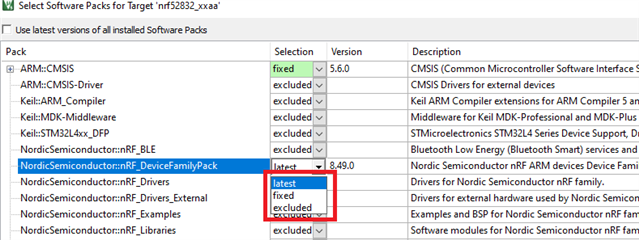
    Then use Keil's Select software packs tool to use the newly installed MDK.

  • Hi,

    Questions:

    1. What "2. Program code compiled with an MDK 8.45.0 or later" actually means? I had a hard time figuring this out. I assume MDK 8.45.0 is nRF MDK pack as found here. First of all there is no version for Keil 5 (my Keil is 5.36.0.0), so I tried downloading Keil 4 pack but it does nothing, code compiles with or without it and my code generation tab only provides these options:

    Yes, that's the MDK. The MDK contains the header files, startup files, workaround for errata's etc that is necessary for working with our microcontrollers. You're correct, Keil µvision doesn't have that MDK version in the downloads list under pack installer, but you can download and install it manually from our webpage. Just follow the instructions in this blogpost

    2. Am I doing something wrong so my device is locking after power reset? 

    You're doing it correct but you have to download the correct MDK so that the fw part of the app protect is also unlocked.

    Can you try to manually install the MDK and see if it fixes your issue?

    regards
    Jared 

  • Thanks for suggestions mrono and Jared. Solved it, the problem was tricky Keil interface:

    • I always though that "Use latest installed version" in Device Startup properties would use the latest installed mdk version. (It is actually showing which version it is using in blank grey I was not paying enough attention)

    Turns out it could be overwritten by "software packs" menu if "fixed" option is selected in it. So since I got 8.49.0 installed I always thought "use latest installed" would always give me 8.49.0, but it was actually using "8.44.1" as "fixed" because I was using a project from SDK example, ignoring latest installed 8.49.0. 

    Pretty much this blog post Jared shared is guiding through this process.

    Device is now unlocked after power reset too. Thanks!

Related