Initializing FOTA from app/general FOTA questions

Hi!

I'm trying to implement FOTA in our project. My application will sleep for days between each connection, so I'm turning off the modem and everything between.

I'm successfully connecting to nRF Cloud when I'm getting new A-GPS data or when doing cell measurements. These connections to the cloud lasts for less than a minute at a time, as I disconnect when I'm done sending my sensor data.

I'm trying to deploy a FOTA from nRFCloud. The job status is "queued", and isn't applied. Part of my configuration and the shadow is below. 

# MCUBOOT - Needed by FOTA
CONFIG_BOOTLOADER_MCUBOOT=y
CONFIG_IMG_MANAGER=y
CONFIG_MCUBOOT_IMG_MANAGER=y
CONFIG_STREAM_FLASH_ERASE=y

# Download Client - used by FOTA 
CONFIG_NRF_CLOUD_FOTA=y
CONFIG_DOWNLOAD_CLIENT=y
CONFIG_DOWNLOAD_CLIENT_HTTP_FRAG_SIZE_1024=y
CONFIG_DOWNLOAD_CLIENT_STACK_SIZE=4096
CONFIG_DOWNLOAD_CLIENT_BUF_SIZE=2300
CONFIG_DOWNLOAD_CLIENT_MAX_HOSTNAME_SIZE=128

# Flash - Used by FOTA 
CONFIG_FLASH=y
CONFIG_FLASH_PAGE_LAYOUT=y
CONFIG_FLASH_MAP=y
CONFIG_STREAM_FLASH=y
CONFIG_MPU_ALLOW_FLASH_WRITE=y

# Settings - used by nRF Cloud library
CONFIG_SETTINGS=y
CONFIG_SETTINGS_FCB=y
CONFIG_FCB=y

hadow":{3 items
"reported":{5 items
"connection":{...}4 items
"pairing":{...}2 items
"nrfcloud_mqtt_topic_prefix":"prod/XXX-XXX-XXX/"
"config":{...}7 items
"device":{2 items
"serviceInfo":{2 items
"ui":[]0 items
"fota_v2":[2 items
0:"MODEM"
1:"APP"

Before disconnecting the cloud, I always check if a FOTA is active by testing "if (nrf_cloud_fota_is_active()) " (defined in nrf_cloud_fota.c).
When connecting to the cloud, the library prints "nrf_cloud_fota: Saved job: , type: 3, validate: 0, bl: 0x0", called by "fota_settings_set()". I do not understand what this info means.

My questions are, can you see any reason or come with any tips as to why the FOTA isn't happening?  Is there any way of actively initiating/check for a FOTA from the application side?

Thank you all for all and any help!

Kind regards,

Torje

Parents
  • Hi,


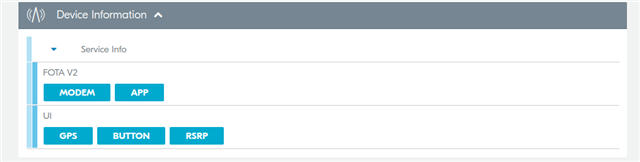
    If you log on to nrfcloud.com, go into devices and click on your specific device, does it have these properties under "device information"?


    Also, could you try adding the device specifically to a group and executing the FOTA operation, as described here?

    https://docs.nrfcloud.com/Guides/GettingStarted/FOTA/#performing-a-fota-update-in-the-nrf-cloud-portal 


    Kind regards,

    Håkon

  • Hello Håkon,

    And thank you for responding. I can confirm these properties under "device information". I am doing it as it says in the linked guide.

    When restarting the device I can get the FOTA, but not under normal operations. I believe I am connected to the cloud for a too short interval so it "doesn't have the time". First connection is somewhat longer. I don't want to extend my duration of connection due to power saving, as there won't be a FOTA 99/100 times. 

    Do you have any suggestions to how I can solve or work around this? Would you agree that a too short cloud connected period could be the reason the FOTA isn't executing?

    Thank you again!

  • Hello Justin,

    And thank you as well for replying. Today, I sat up two Thingys with the same code and issued separate FOTA jobs to them. One happened, the other one did not.
    I have enabled both the mentioned libraries. I also send my data to a third party broker, thus having connection both with nRFCloud, and with a third party. These connections seem to not interfere with each other. My current routine disconnects from nRFCloud before connecting to the other broker, but I have not experienced any issues being connected to both. Could this be cause of any trouble?

    My cloud connect routine is nrf_cloud_init() (with handler param) and nrf_cloud_connect(). My disconnect routine is nrf_cloud_disconnect() and nrf_cloud_uninit() (all from nrf_cloud.c). I am now also calling nrf_cloud_fota_update_check() in between. 

    I am trying to make my system work with both short- and long intervals. Disconnecting in longer intervals, staying connected for shorter. The interval may be changed during runtime. It gets GPS positioning at this interval, with aGPS-support and fallback to cell location if needed. It always gets aGPS or cell data when requested, establishing cloud connection if needed. 

    Thank you for the REST suggestion, I might consider this in a future version. 

  • My current routine disconnects from nRFCloud before connecting to the other broker, but I have not experienced any issues being connected to both. Could this be cause of any trouble?
    - No, that should be fine.

    You shouldn't need to un-init and re-init  the nrf_cloud library each time, unless you want to recover the memory.  Disconnecting and reconnecting should be sufficient.
    Also, you shouldn't need to call nrf_cloud_fota_update_check(), as the nrf_cloud library calls it automatically upon connection.

    For testing purposes, I would allow up to 30s after connection to the cloud to see if a scheduled FOTA job arrives.  Also for testing, try disabling power saving modes in the modem (PSM and eDRX).

  • Hello again,

    I ended up doing a quite extensive makeover of my system. This seems to have solved my issue, I am now getting the FOTA updates. I do not know what caused the fault, but I suspect it was the very short connection time.
    However, the system now disconnected from the cloud immediately after commencing the FOTA download. This caused the FOTA_DONE event not to happen, which in turned caused my system not to reboot. Job update wasn't sent to the cloud either, as shown in the log is pasted below:

    [01:24:27.830,841] [<dbg> voqdr: lte_event_handler: LTE_EVENT: RRC mode: Connected[
    [01:24:28.183,990] [<inf> download_client: Setting up TLS credentials, tag 16842753[
    [01:24:28.192,718] [<inf> download_client: Connecting to firmware.nrfcloud.com[
    [01:24:29.209,869] [<inf> download_client: Downloading: XXX-XXX-XXX/APP*XXX/app_update.bin [0][
    [01:24:29.222,717] [<inf> nrf_cloud_fota: Downloading update[
    [01:24:29.229,217] [<dbg> voqdr: cloud_event_handler: NRF_CLOUD_EVT_FOTA_START[
    [01:24:29.239,135] [<dbg> voqdr: cloud_event_handler: NRF_CLOUD_EVT_TRANSPORT_DISCONNECTED[
    [01:24:29.248,443] [<err> nrf_cloud_fota: Publish failed: -104[
    [01:24:29.255,523] [<err> nrf_cloud_transport: Error disconnecting from cloud: -128[
    [01:24:29.264,465] [<dbg> voqdr: cloud_event_handler: NRF_CLOUD_EVT_TRANSPORT_DISCONNECTED[
    [01:24:29.844,024] [<inf> download_client: Downloaded 1700/243900 bytes (0%)[
    [01:24:30.113,494] [<inf> download_client: Downloaded 3400/243900 bytes (1%)[
    [01:24:30.275,024] [<inf> download_client: Downloaded 5100/243900 bytes (2%)[
    [01:24:30.581,970] [<inf> download_client: Downloaded 6800/243900 bytes (2%)[
    [01:24:30.769,683] [<inf> download_client: Downloaded 8500/243900 bytes (3%)[
    [01:24:30.985,382] [<inf> download_client: Downloaded 10200/243900 bytes (4%)[
    [01:24:31.238,067] [<inf> download_client: Downloaded 11900/243900 bytes (4%)[
    [01:24:31.383,422] [<inf> download_client: Downloaded 13600/243900 bytes (5%)[
    [01:24:31.625,579] [<inf> download_client: Downloaded 15300/243900 bytes (6%)[
    [01:24:31.795,593] [<inf> download_client: Downloaded 17000/243900 bytes (6%)[
    [01:24:32.133,605] [<inf> download_client: Downloaded 18700/243900 bytes (7%)[
    [01:24:32.340,606] [<inf> download_client: Downloaded 20400/243900 bytes (8%)[
    [01:24:32.606,781] [<inf> download_client: Downloaded 22100/243900 bytes (9%)[
    [01:24:32.912,017] [<inf> download_client: Downloaded 23800/243900 bytes (9%)[
    [01:24:33.077,453] [<inf> download_client: Downloaded 25500/243900 bytes (10%)[
    [01:24:33.188,903] [<err> nrf_cloud_fota: Failed to send job update to cloud: -6[
    [01:24:33.402,648] [<inf> download_client: Downloaded 27200/243900 bytes (11%)[

    This particular device was connected to the cloud and in PSM-mode. The FOTA started at a keepalive ping. My app did not do anything to disconnect from the cloud when it did.

    If you would prefer for me to make a separate post for this issue that's fine, just let me know.

    Thank you again!

    Kind regards,

    Torje

  • yes please make this a new issue.
    it looks like nrf_cloud_fota does not handle the mqtt disconnect event, so that may need to be investigated.

    the disconnect shouldn't happen here though. 
    so in the new issue could you answer:
    what modem firmware version are you using?
    are you still connected to the other (non-nrf cloud) mqtt broker when this occurs?


  • FYI:
    Here is the PR to handle MQTT disconnect events during FOTA updates.
    https://github.com/nrfconnect/sdk-nrf/pull/9585

Reply Children
No Data
Related